Reference data
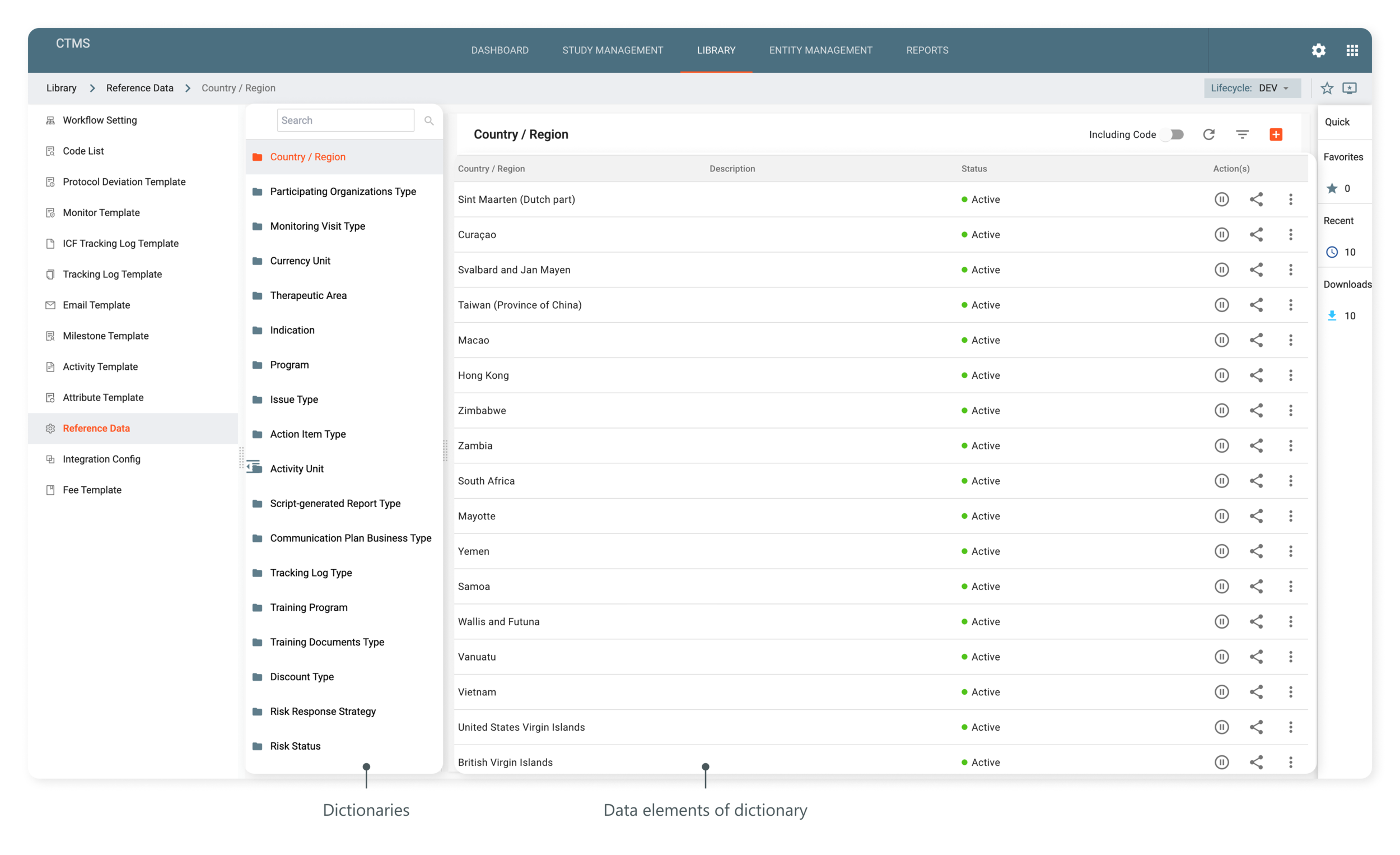
The Reference Data subtab of CTMS acts as a set of dictionaries containing various data elements required to create entities in CTMS, such as when adding new study details, the system would fetch the previously created data elements from reference data to define the study specifications, like its therapeutic area, countries and regions, and others.
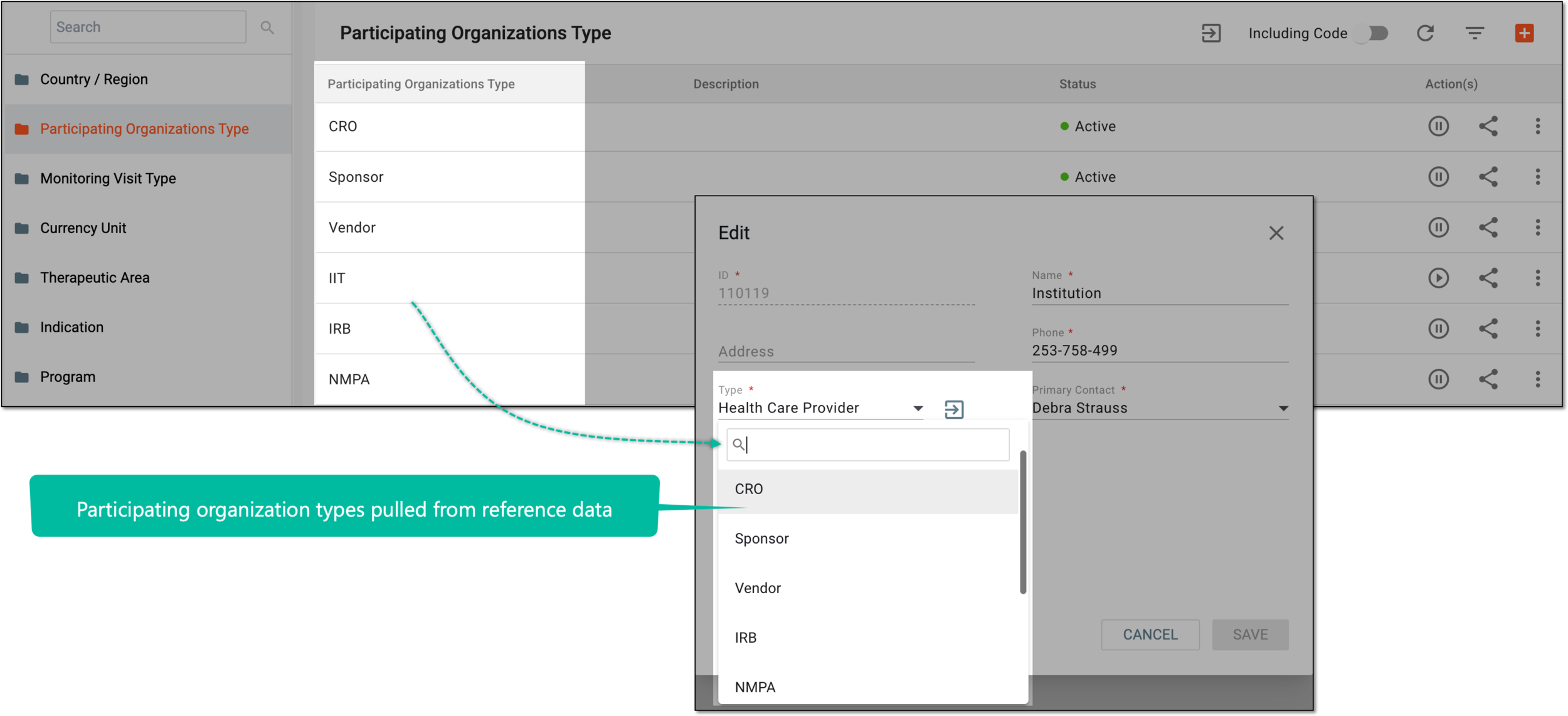
For example, while maintaining the participating organizations in CTMS, you need to define their types—CRO, healthcare provider, vendor, and so on. The list of participating organization types is defined and maintained in the Reference Data dictionaries and then pulled to the entity management module for you to define the organization type upon creating or editing entities.
Based on the study protocol requirements, the dictionaries and their data elements are added by the system administrators. If required, you can add new data elements to the existing dictionaries, however, you cannot add new dictionaries in the Reference Data subtab.
The dictionaries currently available in the system are explained in the following table.
|
Dictionary |
Details |
|---|---|
|
Country/Region |
Includes a list of countries or regions, such as China, Germany, the United States of America, the United Arab Emirates, Greece, and others. These data elements can be used when adding countries and regions of the study or indicating other locations in the basic information of a study under the STUDY MANAGEMENT tab of CTMS. |
|
Participating Organizations Type |
Includes a list of the types of participating organizations involved in your research, such as data and healthcare providers, CROs, committees, and so on. The data elements of this dictionary can be used while creating and managing participating organizations in the ENTITY MANAGEMENT tab of CTMS. |
|
Monitoring Visit Type |
Includes a list of monitoring visits, like Pre-Study Site Visit (PSSV), Site Initiation Visit (SIV), Interim Monitoring Visit (IMV), and so on. These data elements can be used while creating the monitor template in the Monitor Template subtab of the LIBRARY tab. |
|
Currency Unit |
Includes various units of currency that are required in your research, such as the United States Dollar (USD), Chinese Yuan (CNY), or others. The data elements of this dictionary can be used for financial management under the STUDY MANAGEMENT tab of CTMS. |
|
Therapeutic Area |
Includes a list of therapeutic areas like respiratory, ophthalmology, oncology, and others. These data elements can be selected while defining the basic information of a study in the STUDY MANAGEMENT tab of CTMS. |
|
Indication |
Includes various kinds of indications of a disease involved in your research, such as infection, neoplasm, immune system disease, metabolic diseases, and others. The data elements of this dictionary can be selected while defining the basic information of a study in the STUDY MANAGEMENT tab of CTMS. |
|
Program |
Includes a list of clinical trial programs involved in your research, such as prevention trials, screening trials, diagnostic trials, treatment trials, and others. The data elements of this dictionary can be selected while defining the basic information of a study in the STUDY MANAGEMENT tab of CTMS. |
|
Issue Type |
Includes a list of issue types to better categorize, manage, and reflect the purpose of the issues identified in a clinical trial. The issue types can be site file issue, investigational product, study supplies, and much more. The data elements of this dictionary can be used while adding the issues in the STUDY MANAGEMENT tab of CTMS. |
|
Action Item Type |
This list includes a list of action item types to better categorize, manage, and reflect the purpose of the action items associated with a study. The data elements of this dictionary can be used while adding the action items in the STUDY MANAGEMENT tab of CTMS. |
|
Activity Unit |
Includes various options to specify the measurement unit for the activity, such as study, panel, page, and others. The data elements of this dictionary can be used while creating the activities in the LIBRARY tab of CTMS. |
|
Script-generated Report Type |
Includes a list of the reports to extract data from eTMF files, such as clean patient tracker, key risk indicators (KRIs), and so on. The data elements of this dictionary can be used while configuring the script-generated reports in the STUDY MANAGEMENT tab of CTMS. |
|
Communication Plan Business Type |
Includes a list of options to specify the type of the meeting or events you want to schedule related to the clinical trial, such as site communications, team check-ins, and others. The data elements of this dictionary can be used while defining the communication plan in the STUDY MANAGEMENT tab of CTMS. |
|
Tracking Log Type |
Includes a list of categories of documents, such as regulatory documents, FDF, Form 1572, and more, that can be traced in CTMS with the tracking log functionality. The data elements of this dictionary can be used while adding the tracking log settings in the STUDY MANAGEMENT tab and creating tracking log templates in the LIBRARY tab of CTMS. |
|
Training Program |
Includes various options to link the study-related training document to a broader training program for contextual grouping and tracking category, such as safety report and adverse events (AE) management, data privacy and confidentiality, and others. The data elements of this dictionary can be used while creating the training document entry in the STUDY MANAGEMENT tab of CTMS. |
|
Training Documents Type |
Includes various options to categorize the study-related training document, safety reporting training, protocol training presentation, system training, and much more. The data elements of this dictionary can be used while creating the training document entry in the STUDY MANAGEMENT tab of CTMS. |
|
Risk Response Strategy |
Includes different strategies that can be executed in response to the discovered risks. The data elements of this dictionary can be selected when configuring risk assessments in CTMS. |
|
Risk Status |
Includes various statuses that can be assigned to the assessed risks. The data elements of this dictionary can be selected when configuring risk assessments in CTMS. |
|
Purpose of Communication |
Includes various purposes of communication activities, such as site management, safety reporting, investigational product or data management, and so on. The data elements of this dictionary can be selected when scheduling a meeting or event in CTMS. |
Using the functionality of the subtab, you can perform the following actions: