Library management
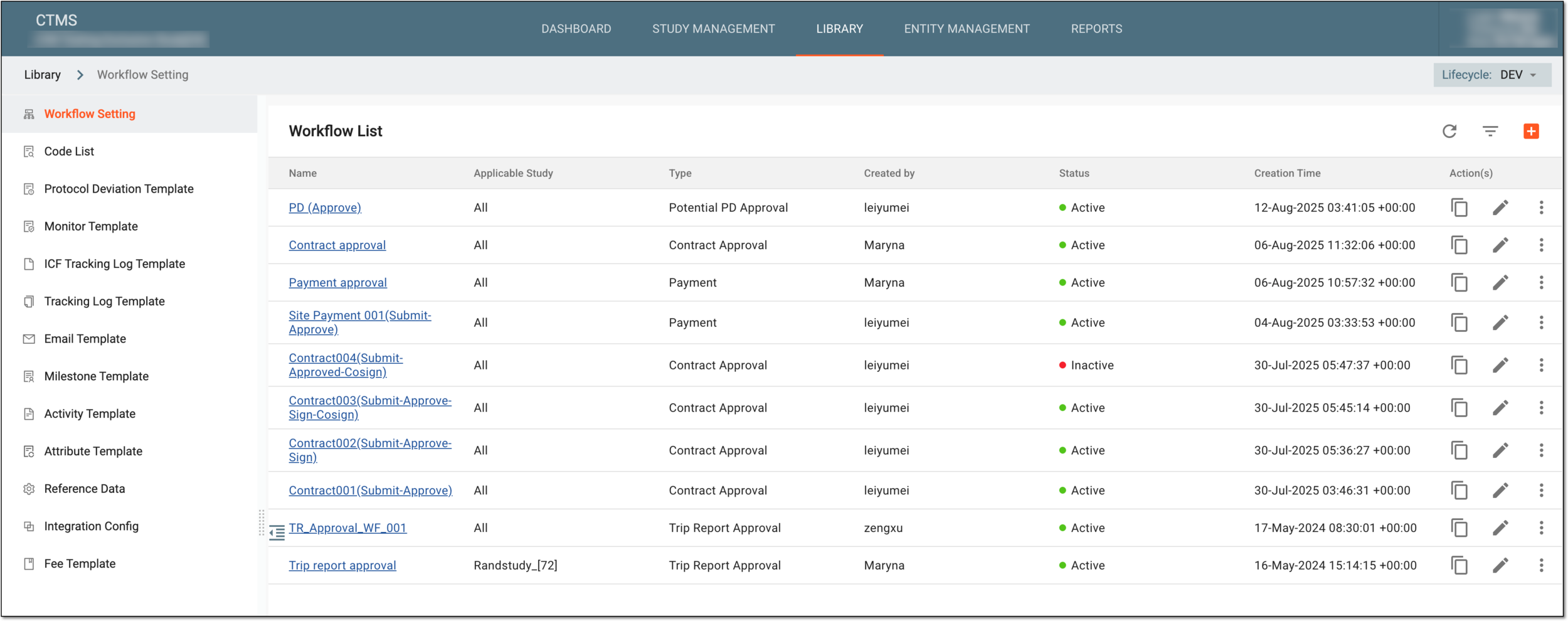
With the LIBRARY feature of CTMS, you can create custom libraries of entities—workflows, protocol deviation templates, and more. These entities are manageable to reflect the individual needs of every study and create a flexible system for your business.
-
Workflows: create and manage the documentation lifecycle templates that can be used internally in CTMS or pulled into eTMF for file maintenance.
-
Code lists: create a library of codelists to represent different categories of data and terminology, for instance, the Biological Sample Attribute Terminology codelist contains a terminology value set relevant to the attributes of the biological sample.
-
Protocol deviation templates: create and manage various scenarios of diverging from the approved study protocol, such as missing a visit window because the subject is temporarily unavailable or other unplanned instances of protocol noncompliance.
-
Monitor templates: create templates for monitoring tasks to be later used when auditing study visits and reports.
-
ICF tracking log templates: create templates for ICF tracking forms that can be used when configuring a tracking log for a study.
-
Tracking log templates: create templates for regulatory documents such as Financial Disclosure Forms (FDF), Form 1572, and others.
-
Email templates: create and manage the email templates to follow up or remind the designated personnel about a monitoring visit or related matters.
-
Milestone templates: define and manage important milestones representing key events in a clinical study’s lifecycle—such as subject enrollment, site openings, critical study visits, and much more.
-
Activity templates: define a realistic list of activities to be carried out before and during the trial.
-
Attribute templates: outline specific data attributes related to a task or an entity in a study, such as its priority, duration, start and end dates, responsible team members, status, and much more.
-
Reference data: create a database for the system to refer to when specific data has to be pulled. There can be various types of reference data categories, such as country and region, participating organization type, currency unit, or else.
-
Fee templates: create a list of items and categories entitled to payments, such as different services provided by study vendors.