Monitor template
The monitor templates are created for recording the details of a monitoring visit. When a subject visits a site to participate in an ongoing study, then there are numerous protocols and procedures that must be followed to ensure the validity of the clinical trial procedure and the safety of the subject. A reviewer is assigned the task to visit the site and ensure that the clinical trial is conducted, recorded, and reported in compliance with the applicable regulations, Good Clinical Practice (GCP) guidelines, study protocol, and Standard Operating Procedures (SOP). To help the reviewer with the task, different forms are prepared that list all the questions related to the site, study, and subject that are filled by the reviewer and submitted to the Data Managers, Study Statisticians, or others for review.
Using the functionality of the Monitor Template subtab, you can create the templates of the forms required to capture monitoring visit details in the trip report. For a particular monitoring visit, you can create a monitor template that includes various forms to acquire information about the subject's enrollment and retention, source data verification, protocol deviations discovered at the site, safety protocols, site qualification, and so on.
Since the monitoring visit data may vary, therefore, in a monitor template, you can create three types of forms: simple, log, and grid form. Once the monitor template is prepared, you can associate it with the trip report for the monitoring visit in the STUDY MANAGEMENT > Monitoring Visit functionality of CTMS.
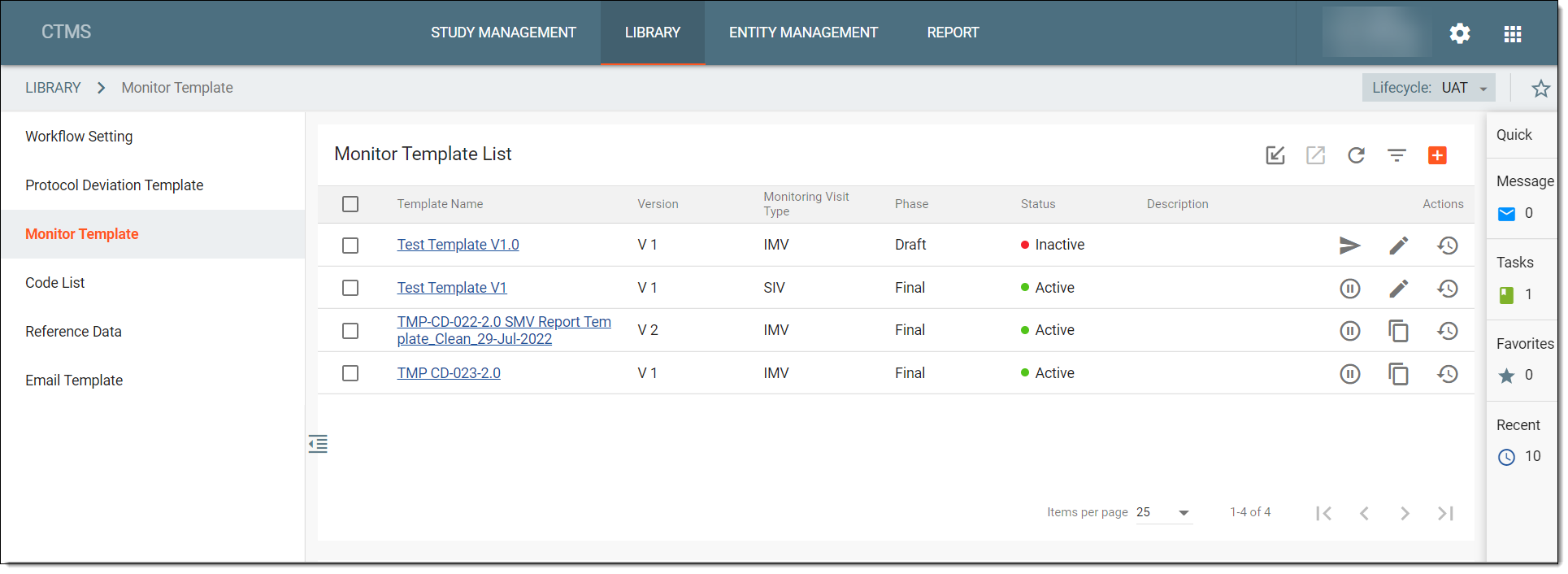
On the Monitor Template page, the Monitor Template List contains all the monitor templates created in the system and their details as explained in the following table.
|
Element |
Details |
|---|---|
|
Template Name |
Represents the name of the monitor template. |
|
Version |
Represents the latest version created of the monitor template. |
|
Monitoring Visit Type |
Represents the monitoring visit type, such as Site Monitoring Visit (SMV), Pre-Study Site Visit (PSSV), Site Initiation Visit (SIV), and others via the Reference data functionality. |
|
Phase |
Represents phases of the monitor template which can be any of the following:
|
|
Status |
Represents the status of the monitor template which can be active or inactive. Only an active template can be assigned to monitoring. |
|
Description |
Represents a brief description of a template informing readers about why the template is created. |
In the Monitor Template subtab, you can perform the following actions: