Workflow setting
A workflow represents a series of tasks performed to complete an action, such as to audit payment requests, contracts, trip reports, and potential protocol deviations in CTMS. The workflow tasks are repeatable business processes that are automated to involve minimal human interaction. In different studies, workflows may include various actions, such as submission, approval, or signature, depending on the business requirements of the sponsors or the study protocol.
In CTMS, from the Workflow Setting page, you can create custom workflows involving tasks of your choice.
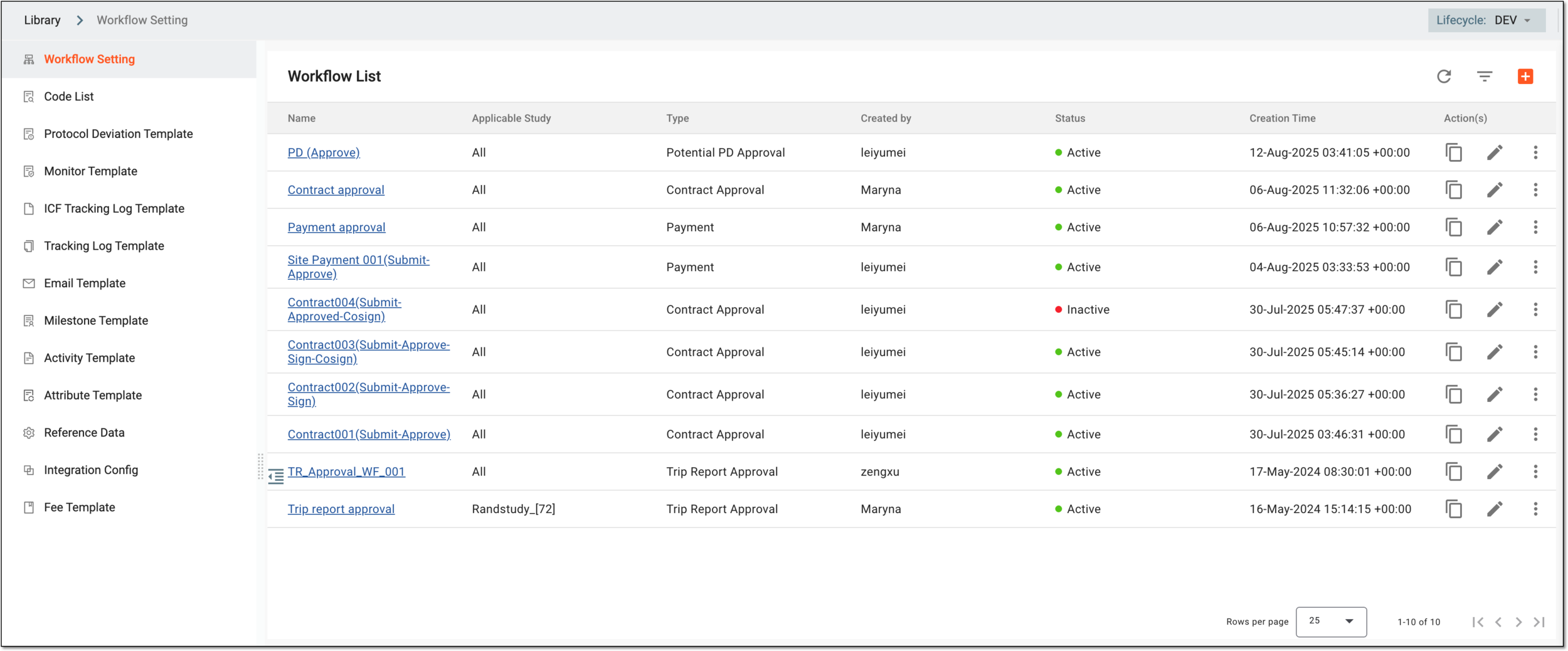
The elements of the Workflow List are explained in the following table.
|
Element |
Details |
|---|---|
|
Name |
Represents the name of the workflow. Upon selecting, you can edit the workflow. |
|
Applicable Study |
Represents the name of the study for which the workflow is designed and applicable or All if the workflow is applicable for all studies you manage in CTMS. |
|
Type |
Represents the purpose for which the workflow is created—trip report, potential PD, contract, or payment request approval. |
|
Created By |
Represents the username of the person who created the workflow. |
|
Status |
Represents if the study is activated. |
|
Create Time |
Represents the date, time, and time zone indicator when the workflow has been created. |
In the Workflow Setting subtab, you can perform the following actions: