Audit payment request
A payment request can be interpreted as an inquiry to perform financial compensation for a service. In a clinical trial, payment requests are created to maintain financial operations between the sponsor and vendors and other involved parties, such as sites, labs, and research facilities.
In CTMS, once you have created a new payment request, it remains in the draft state until submitted. The submitted payment request is finalized and ready to be audited—reviewed and approved according to the associated workflow. Auditing provides the controlling mechanism for the expenditures, ensuring at least one or more tiers of scrutiny when checking the financial operations of your study.
-
Access the study management page in one of the following ways:
-
In the CTMS application header, select the DASHBOARD tab and then select the study dashboard of your interest.
 Figure 1. Accessing study management from dashboard
-
In the CTMS application header, select the STUDY MANAGEMENT tab. Then from the Study Data List table, select the study name of your interest.
 Figure 2. Accessing study management from study data list
-
-
On the page that opens, from the left pane, expand Financial Management > Payment Request.
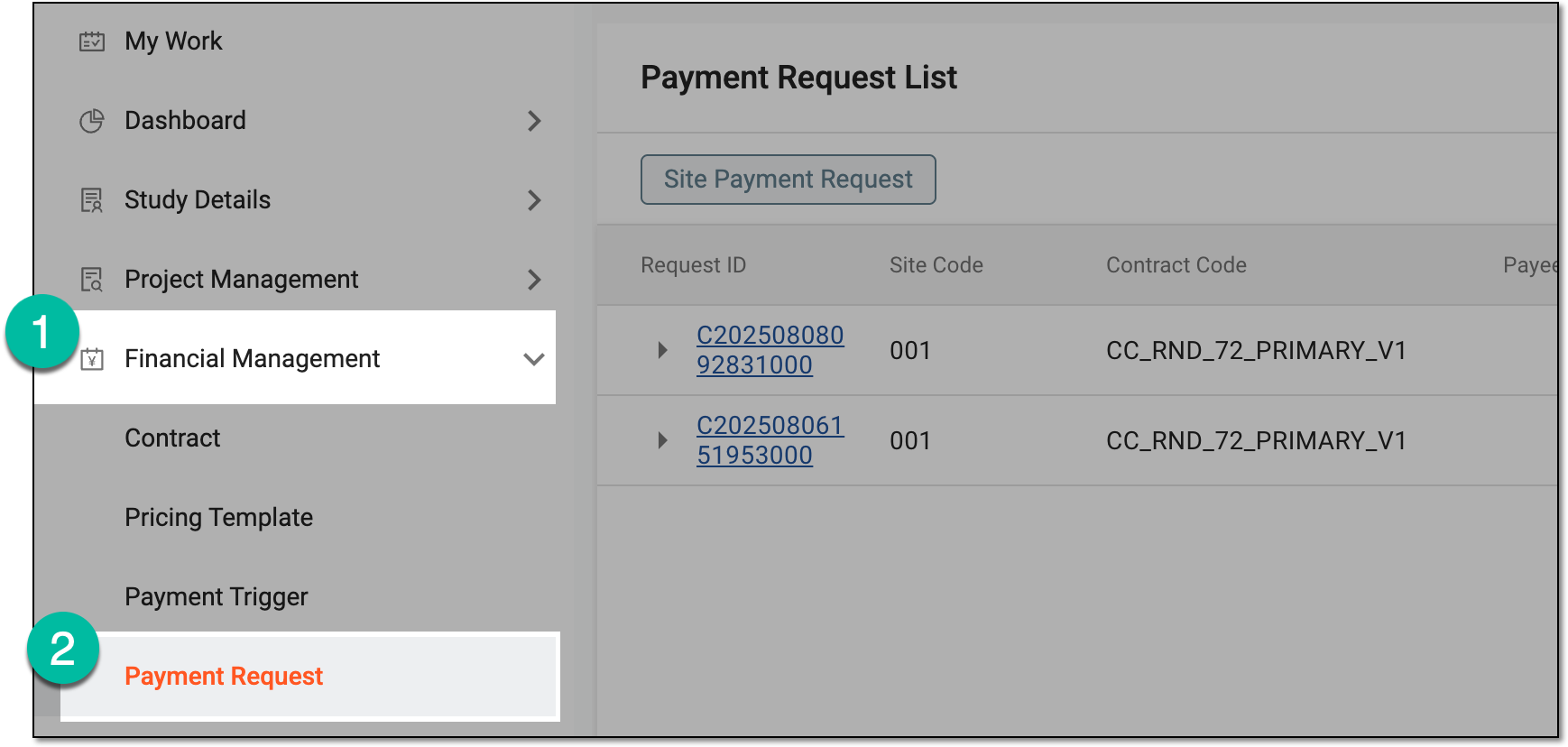 Figure 3. Accessing payment request list
-
In Payment Request List that opens, locate the payment request in the Auditing status that is ready for review. Then select the request ID to access its details.
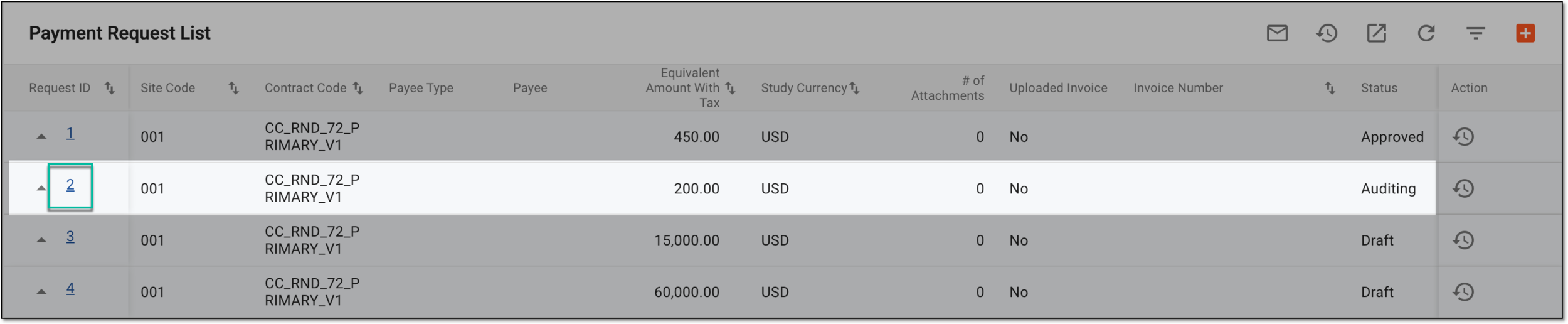 Figure 4. Accessing payment request details for audit
-
On the request details page that opens, analyze the payment information and payable item list. Once ready, from the workspace toolbar, select
 .
.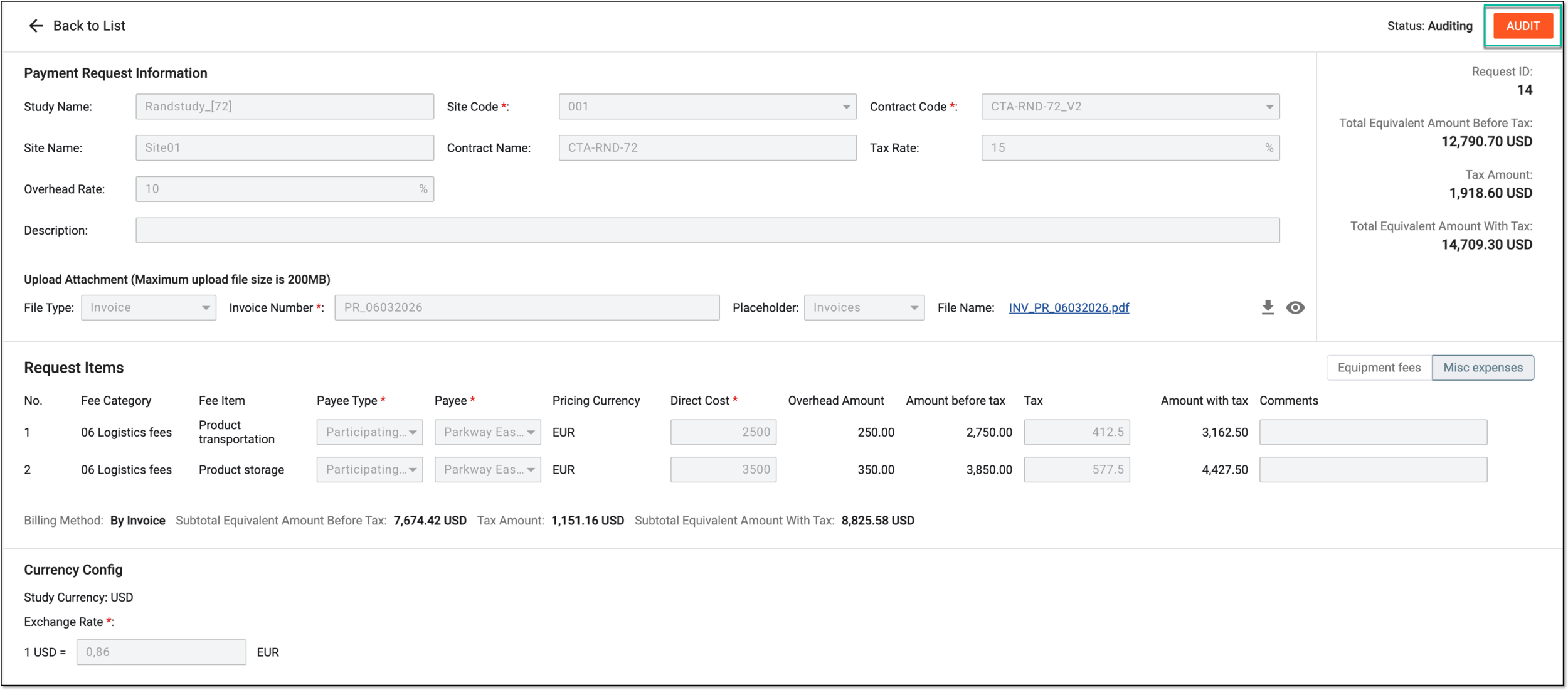 Figure 5. Accessing payment request audit
-
In the dialog that opens, perform one of the following options.
Verify the payment request by providing your credentials as explained in the following table.
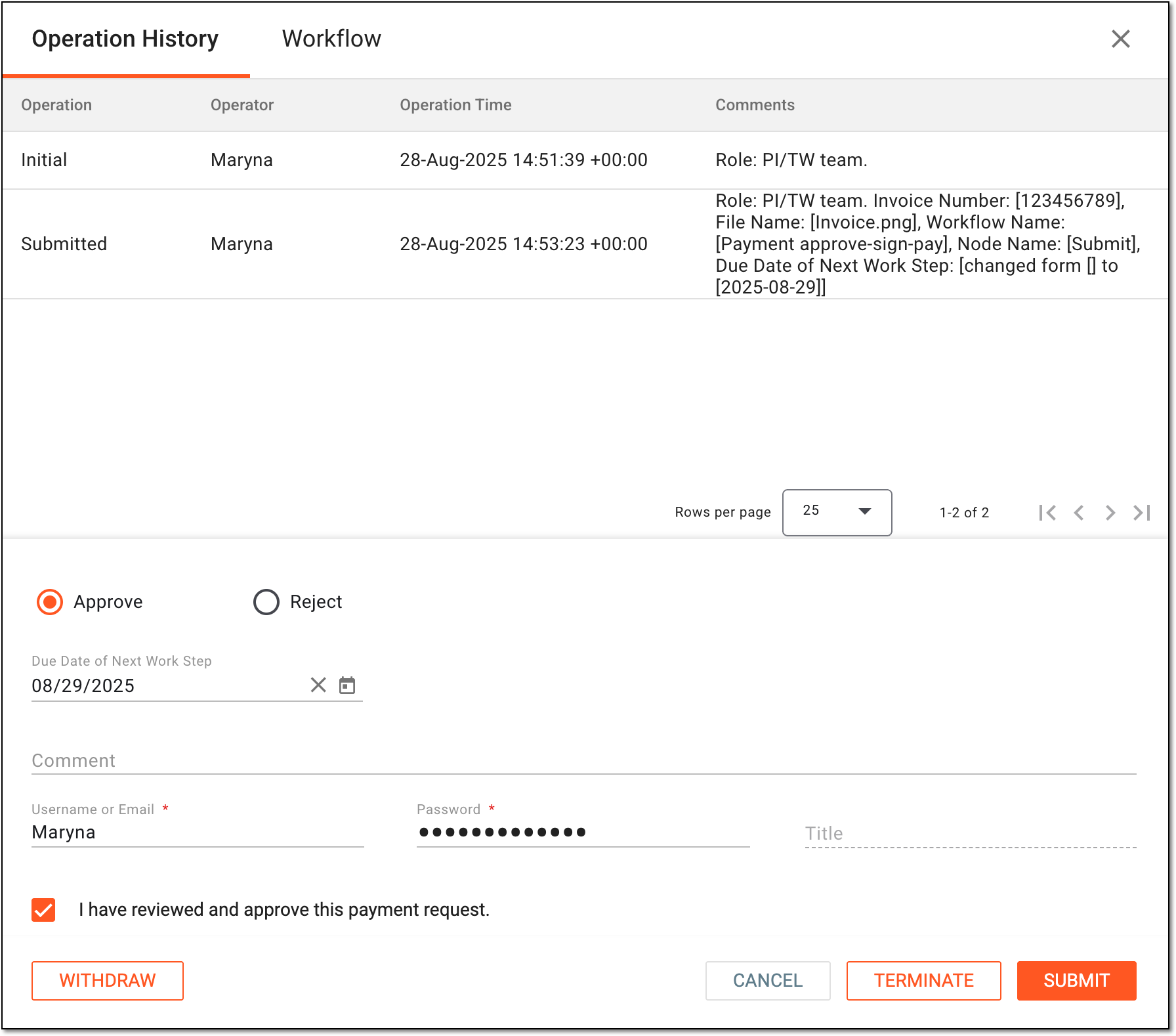 Figure 6. Approving payment request
Tip
In the following table, mandatory elements are marked with an asterisk (*).
Element
Details
Operation History
The tab that opens by default represents the complete log of operations performed to the payment request from its creation and up to date.
Workflow
Switch to this tab to see the workflow according to which the payment request audit is performed.
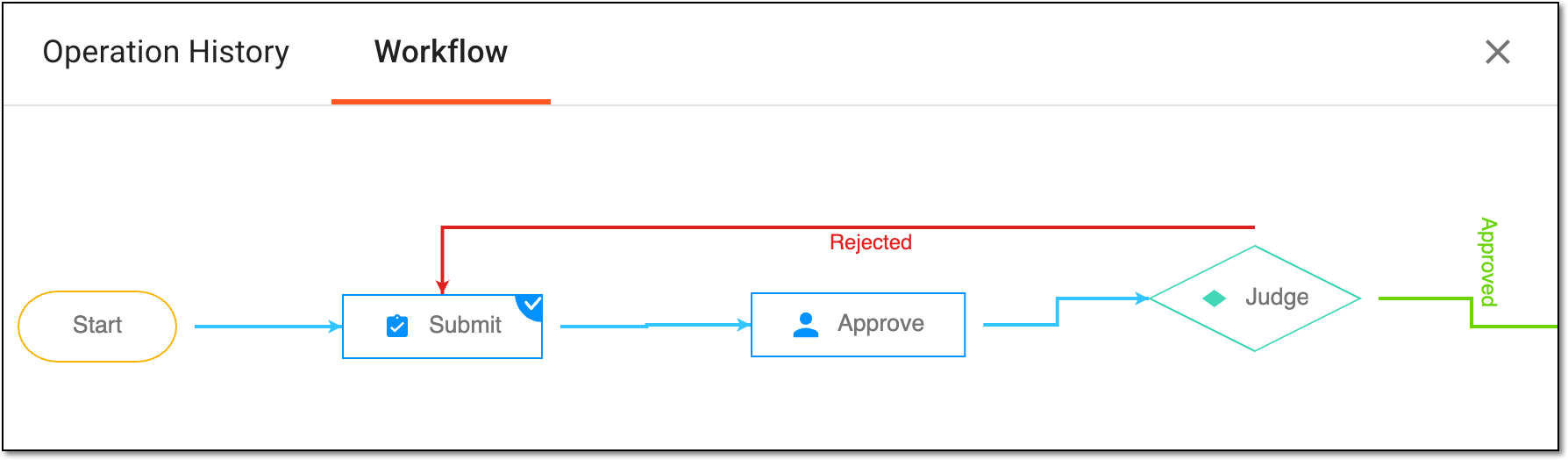 Figure 7. Switching to associated workflow schema
Approve
Select this option to validate the payment request.
Due Date of Next Work Step
Select the date before which the next auditing action must be performed before considered overdue.
Comment
Enter auxiliary details to to support your approval.
Username or Email*
Enter your username or email that you use to log in to the eClinical applications.
The field is only available if the signature is enabled for the Approve node of the associated payment approval workflow.Password*
Enter the password that you use to log in to the eClinical applications.
The field is only available if the signature is enabled for the Approve node of the associated payment approval workflow and if you use the authorization method by providing your login and
                                        password.
Send Code
Select
 to send the temporary PIN code to your email for which the SSO method is configured.
The button is only available if the signature is enabled for the Approve node of the associated payment approval workflow and if you use the authorization method via SSO.Code*
Enter the temporary PIN code that you received via email.
The field is only available if the signature is enabled for the Approve node of the associated payment approval workflow and if you use the authorization method via SSO.Title
Represents the title of the user autopopulated from the ADMIN application based on the selected user name or email.
SUBMIT
Select
 to confirm your action.
CANCEL
Select
 to discard the changes without saving and close the dialog.
Important
For security, the system logs you out after three failed attempts to confirm your identity with a password or code.
Sign the payment request by providing your credentials as explained in the following table.
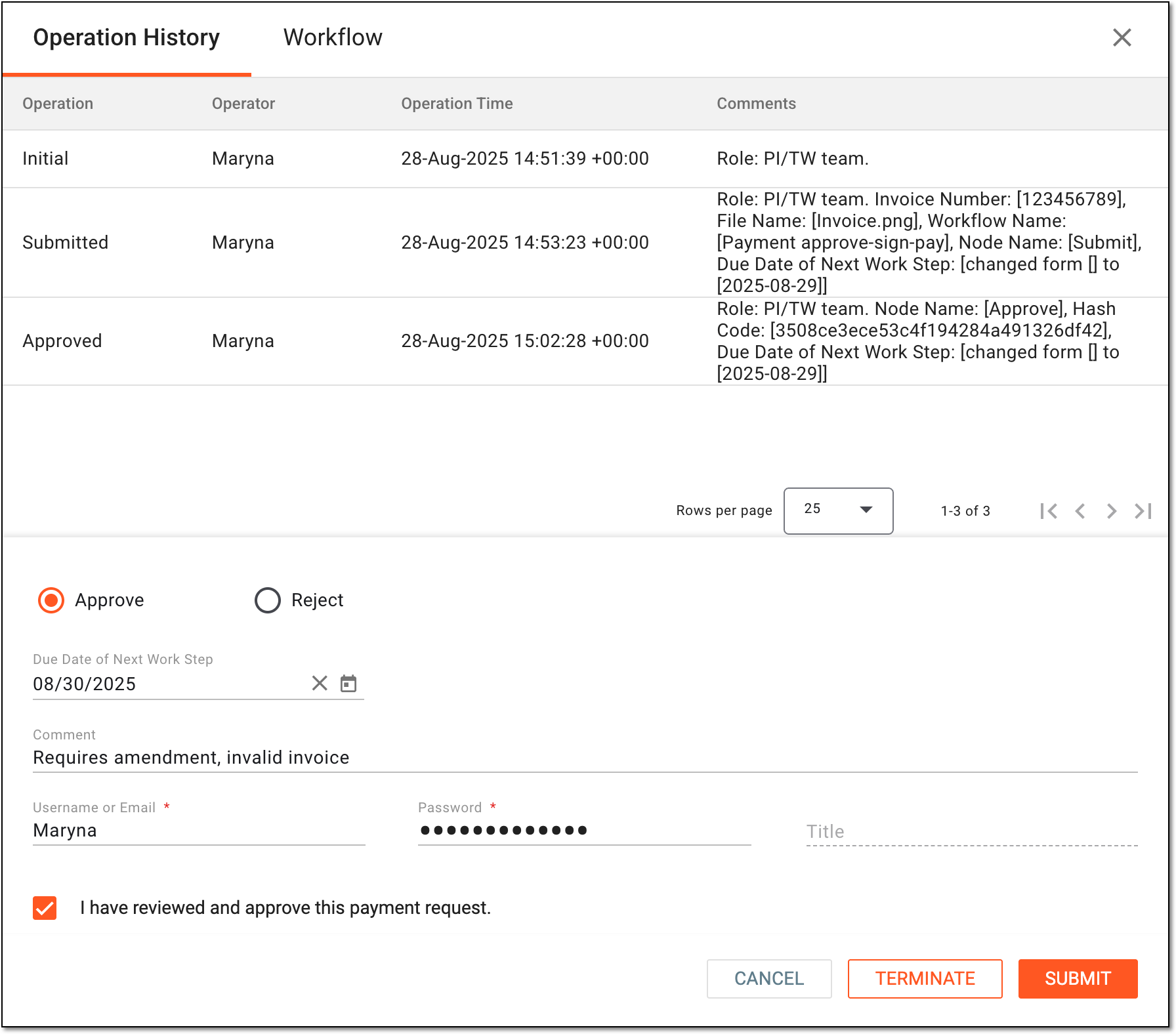 Figure 8. Signing payment request
Tip
In the following table, mandatory elements are marked with an asterisk (*).
Element
Details
Operation History
The tab that opens by default represents the complete log of operations performed to the payment request from its creation and up to date.
Workflow
Switch to this tab to see the workflow according to which the payment request audit is performed.
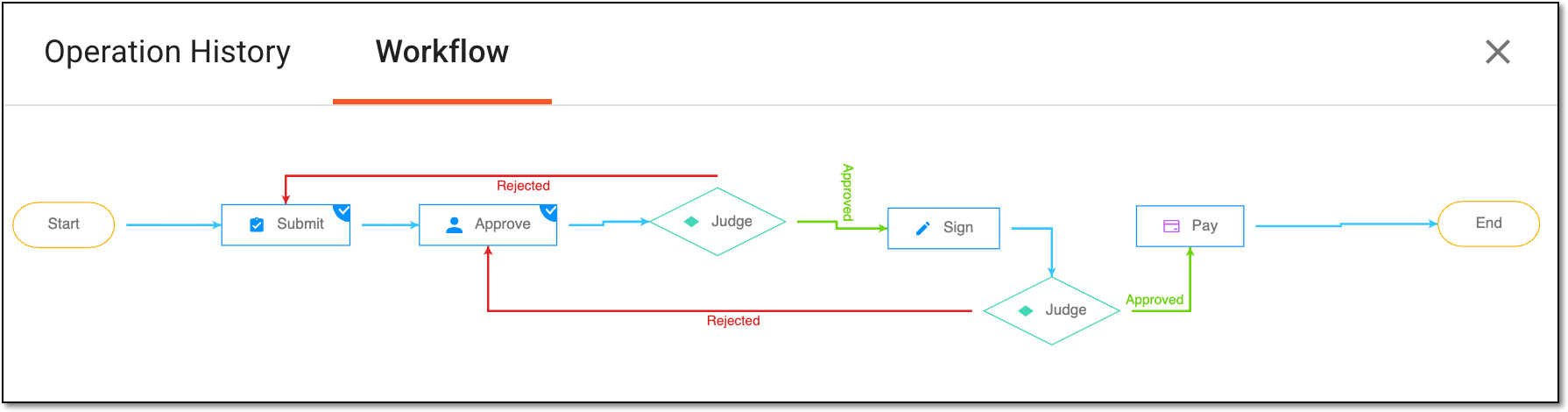 Figure 9. Switching to associated workflow for request signature
Approve
Select this option to validate the payment request.
Due Date of Next Work Step
Select the date before which the next auditing action must be performed before considered overdue.
Comment
Enter auxiliary details to to support your approval.
Username or Email*
Enter your username or email that you use to log in to the eClinical applications.
Password*
Enter the password that you use to log in to the eClinical applications.
The field is only available if you use the authorization method by providing your login and password.Send Code
Select
to send the temporary PIN code to your email for which the SSO method is configured.The button is only available if you use the authorization method via SSO.Code*
Enter the temporary PIN code that you received via email.
The field is only available if you use the authorization method via SSO.Title
Represents the title of the user autopopulated from the ADMIN application based on the selected user name or email.
SUBMIT
Select
to confirm your action.CANCEL
Select
to discard the changes without saving and close the dialog.Important
For security, the system logs you out after three failed attempts to confirm your identity with a password or code.
Pay the payment request by providing your credentials as explained in the following table.
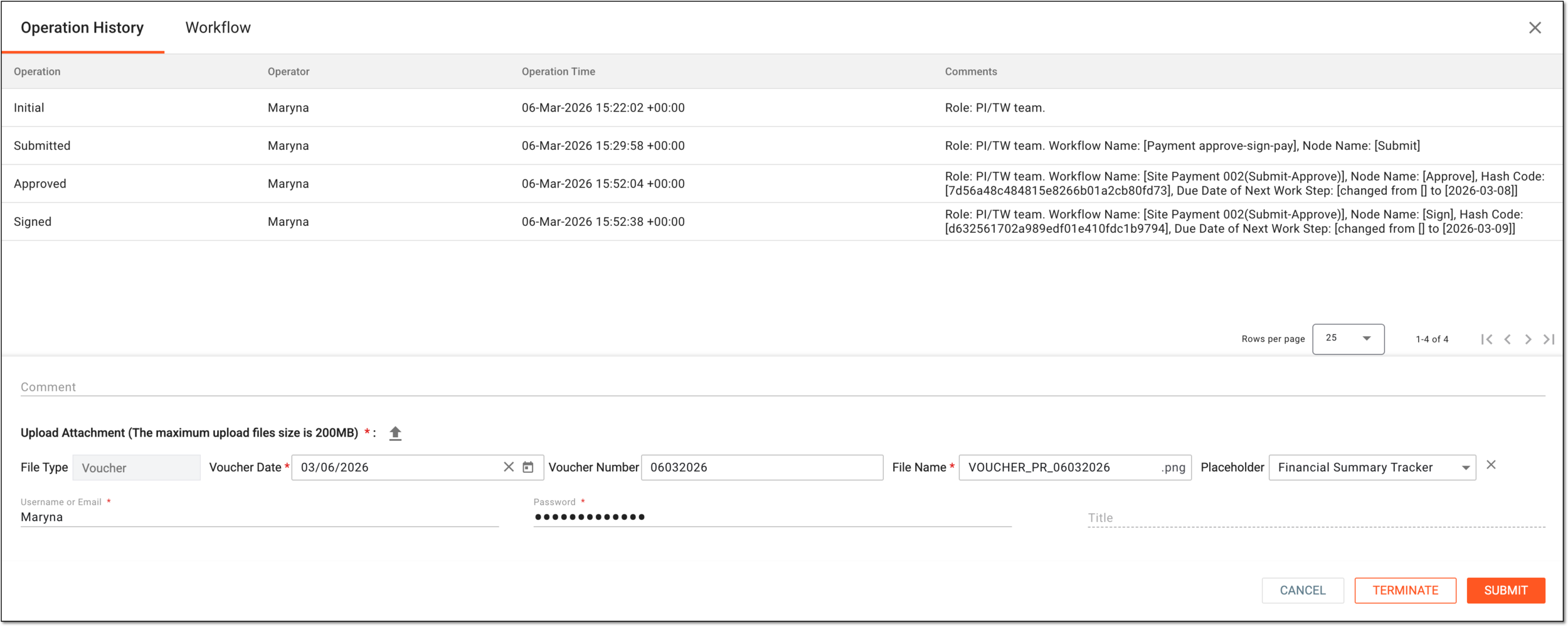 Figure 10. Paying payment request
Tip
In the following table, mandatory elements are marked with an asterisk (*).
Element
Details
Operation History
The tab that opens by default represents the complete log of operations performed to the payment request from its creation and up to date.
Workflow
Switch to this tab to see the workflow according to which the payment request audit is performed.
Figure 11. Switching to associated workflow for request signature
Comment
Enter auxiliary details to to support your approval.
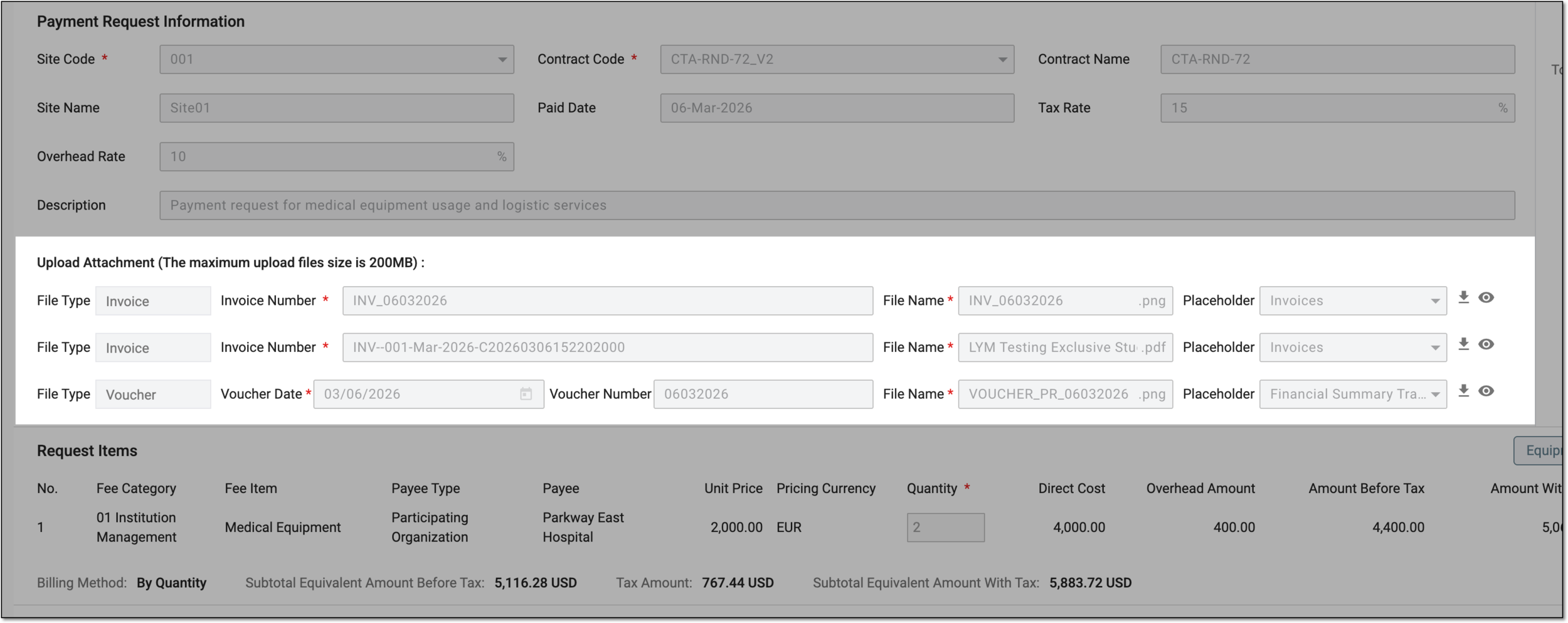
Upload Attachment (Maximum upload file size is 200MB)*
Select
 to attach a file to the request, such as the voucher confirming the payment.
This option is mandatory only if the requirement for a voucher upon payment is enabled in the respective workflow setting. Otherwise, the upload is optional.File Type
Represents Voucher as the preselected type of document for the paying operation. This value cannot be manually changed.
This field becomes available once if a file is uploaded.Voucher Date*
Select the date when the payee received payment according to the request.
This field becomes available once if a file is uploaded.Voucher Number
Enter the identifier of the voucher file if applicable
This field becomes available once if a file is uploaded.File Name*
Represents the name of the uploaded file that you can customize if needed.
This field becomes available once if a file is uploaded.Placeholder
Select the file placeholder that further categorizes the document you are adding. For vouchers, the Financial Summary Tracker placeholder is selected by default but can be changed. The selected placeholder determines the file categorization when populated to eTMF.
This field becomes available once if a file is uploaded.Username or Email*
Enter your username or email that you use to log in to the eClinical applications.
Password*
Enter the password that you use to log in to the eClinical applications.
The field is only available if you use the authorization method by providing your login and password.Send Code
Select
to send the temporary PIN code to your email for which the SSO method is configured.The button is only available if you use the authorization method via SSO.Code*
Enter the temporary PIN code that you received via email.
The field is only available if you use the authorization method via SSO.Title
Represents the title of the user autopopulated from the ADMIN application based on the selected user name or email.
SUBMIT
Select
to confirm your action.CANCEL
Select
to discard the changes without saving and close the dialog.Important
For security, the system logs you out after three failed attempts to confirm your identity with a password or code.
As an approver or signer, dismiss the payment request by selecting the Reject option and providing the due date for the follow-up action and stating the mandatory reason for your action. This becomes useful if you find any discrepancies or issues in the request and cannot verify for it. Based on the assigned workflow, rejected request returns to some previous stage of processing.
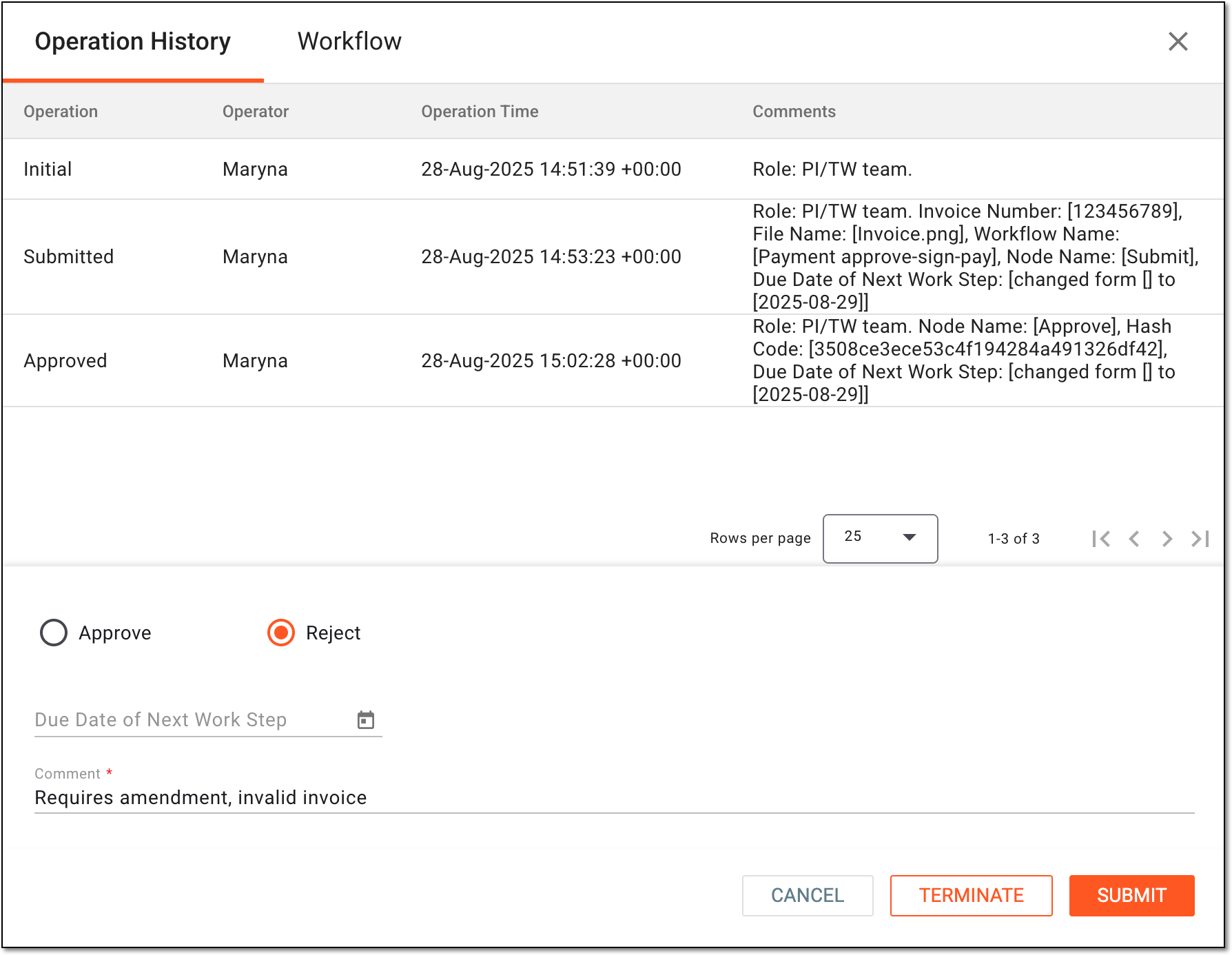 Figure 12. Rejecting payment request
Tip
Under the Operation History tab, review the log of all actions performed with the request, who performed them, and when.
Go to the Workflow tab to check the associated schema and all the steps of the payment request audit workflow.
Abort the auditing process and all the following workflow stages for the payment request by selecting
 . Then in the dialog that appears, provide the
mandatory reason for your action and confirm the termination. This becomes useful if you find the payment request invalid and cannot verify it, moreover, you see no reason to forward its maintenance to the following users.
. Then in the dialog that appears, provide the
mandatory reason for your action and confirm the termination. This becomes useful if you find the payment request invalid and cannot verify it, moreover, you see no reason to forward its maintenance to the following users.Important
To terminate audit for the payment request, you must have the Payment Request > Terminate Request by Submitter permission granted to your user role in ADMIN.
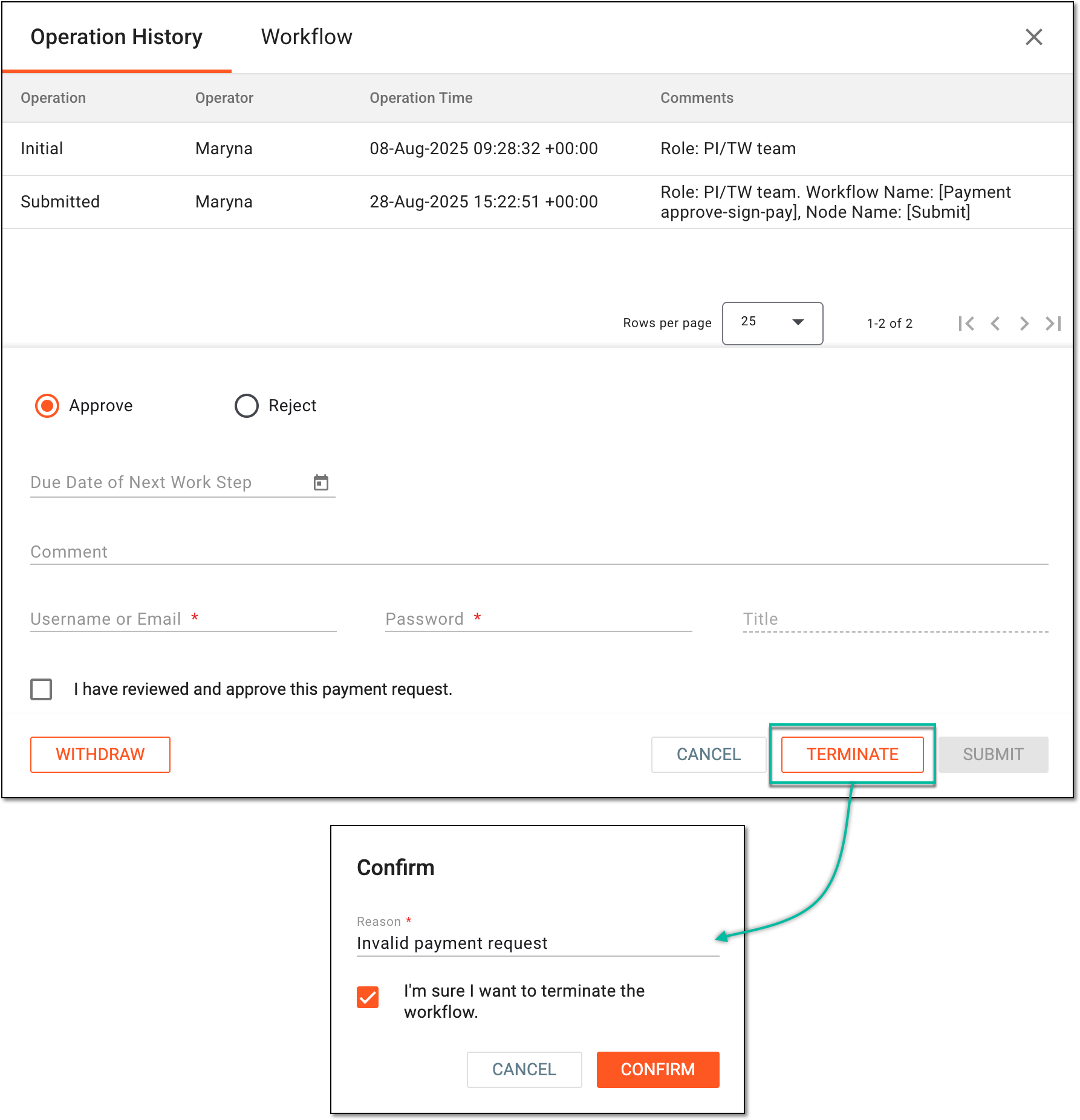 Figure 13. Terminating audit for payment request
Tip
Under the Operation History tab, review the log of all actions performed with the request, who performed them, and when.
Go to the Workflow tab to check the associated schema and all the steps of the payment request audit workflow.
Mark the payment request as void (redundant) by selecting
 . Then in the Reason dialog that appears, provide the
mandatory reason for your action. This becomes useful if you find the submitted payment request invalid and want to discard it.
. Then in the Reason dialog that appears, provide the
mandatory reason for your action. This becomes useful if you find the submitted payment request invalid and want to discard it.Important
You can only withdraw the submitted request in the Auditing status that is not yet approved.
To withdraw the payment request, you must have the Payment Request > Withdraw Request by Submitter permission granted to your user role in ADMIN.
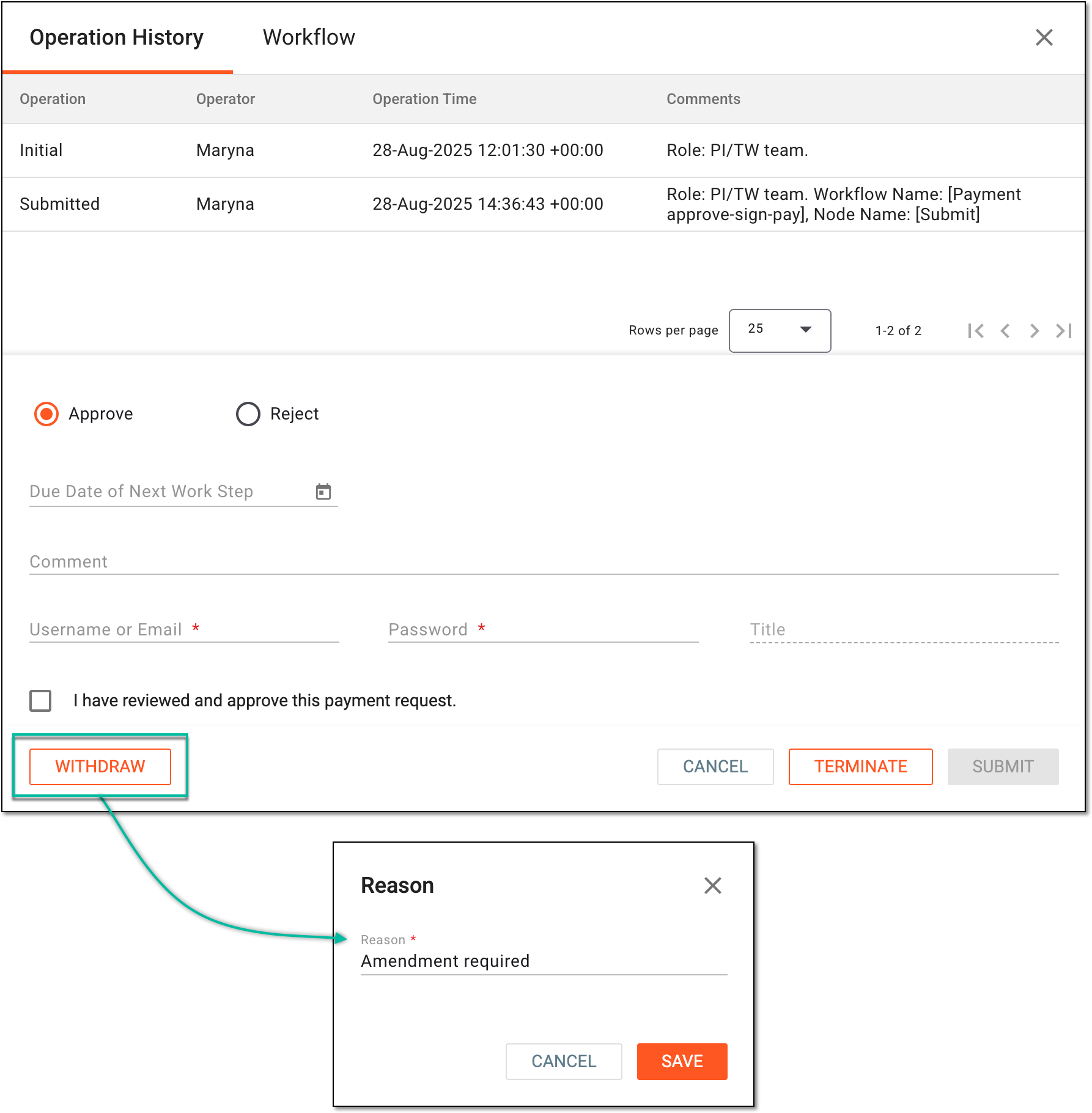 Figure 14. Withdrawing payment request
Once audited, based on your performed action, the payment request obtains the following status:
-
Auditing: the payment request is rejected and requires further review.
-
Approved: the payment request is approved and signed.
-
Paid: the payment is issued to the payees according to the request.
-
Voided: the payment request is terminated or withdrawn.
Tip
Any of the uploaded or system-generated files in the payment request can be downloaded to your computer or opened in a new browser tab for preview by selecting Download  or Preview
  ,
respectively.
,
respectively.
An eClinical application that represents an administrative system used to manage users, authorities, and sponsors at the company level. It provides studies, sites, and sponsors with high-granularity role-based access management across all eClinical applications.
An electronic version of a trial master file (TMF) is a type of content management system for a clinical trial used to organize and store files required for compliance with government regulatory authorities like the FDA, EMA, or others.
Get to know all the possibilities of the app with the comprehensive eTMF User Guide.
A schema, each step of which represents a stage of a specific entity lifecycle in the system.
A workflow can be considered an instrument to help control various actions on system entities for the sake of accountability, as it limits the actions that can be performed on the entity associated with a workflow. This provides an additional tier of scrutiny, and the approval/rejection mechanism reduces the risk of unintended impact on sensitive resources and important information.
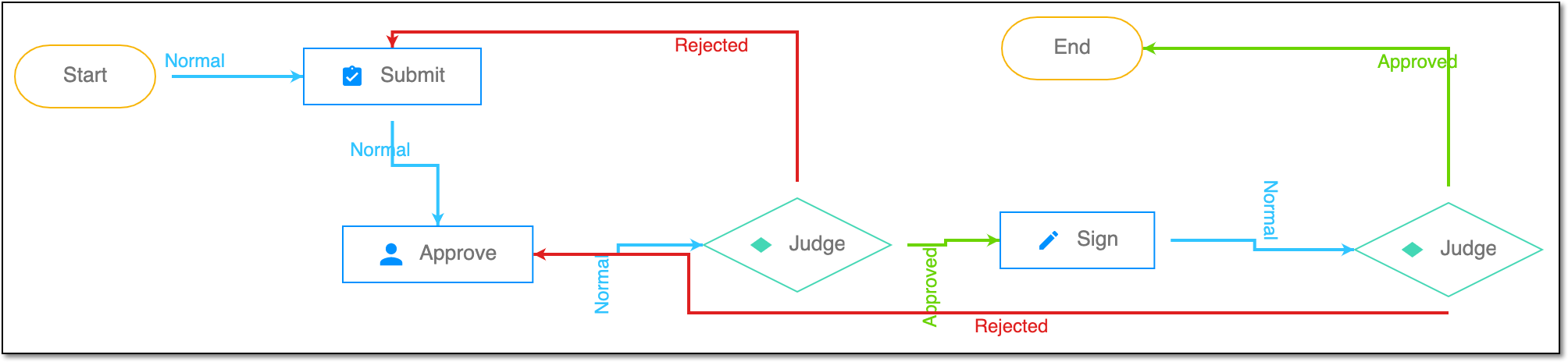 |
For instance, in eTMF, the workflow dictates the procedure of file and folder management from the moment of upload to the approval stage; in CTMS, the workflow controls the process of creation, completion, and approval of a trip report; in EDC, the workflow covers the process of source document handling.