Subject management
A subject is a healthy volunteer or a patient enrolled to participate in the clinical trial according to criteria defined in the study protocol. The management of subjects can occur in two different eClinical applications: EDC or IWRS depending on the system configuration.
Important
To be able to register and handle subject interaction from IWRS, the Managing Subjects value must be set to In IWRS in the ADMIN application.
Once you configure to manage subjects in IWRS for your study, a variety of features becomes available. You can view detailed information on each subject, handle randomization, and track the dispensation of treatment drugs for each subject.
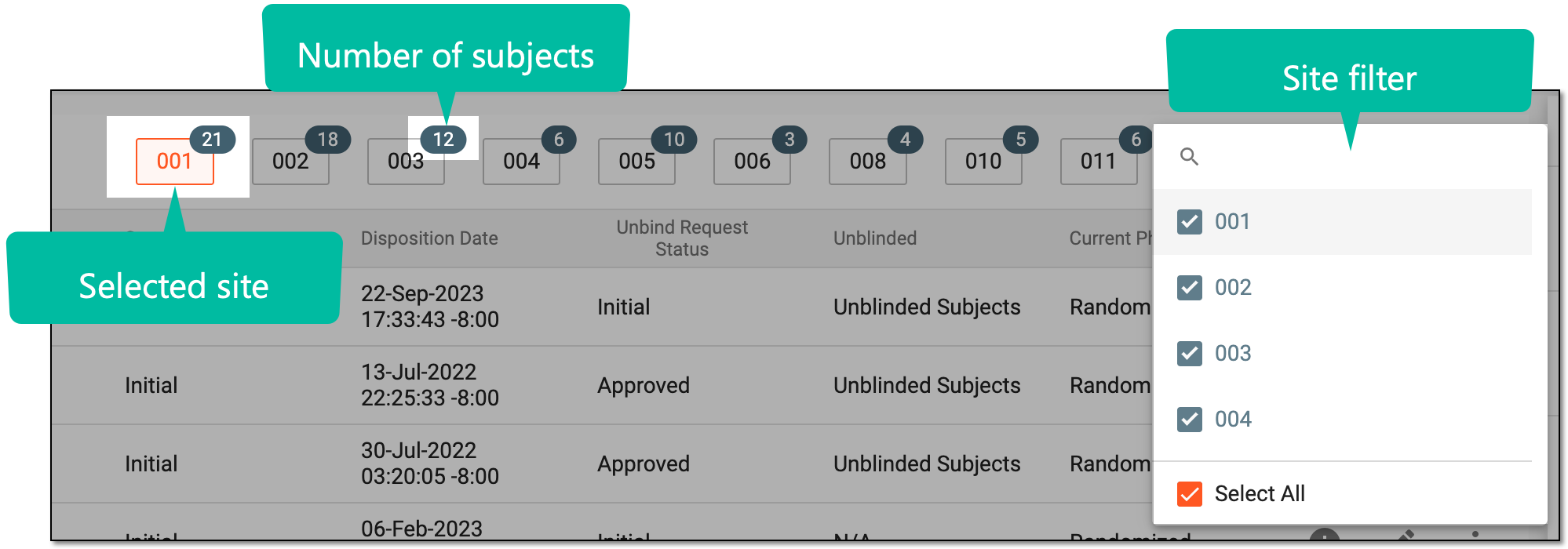
To quickly filter or navigate to the subject you want to view or manage, you can use the site code filter given in the workspace toolbar. By default, the first site code filter in the list is selected displaying the subjects registered at the respective site. You can switch between the sites or hide the sites you do not want to see on the list.
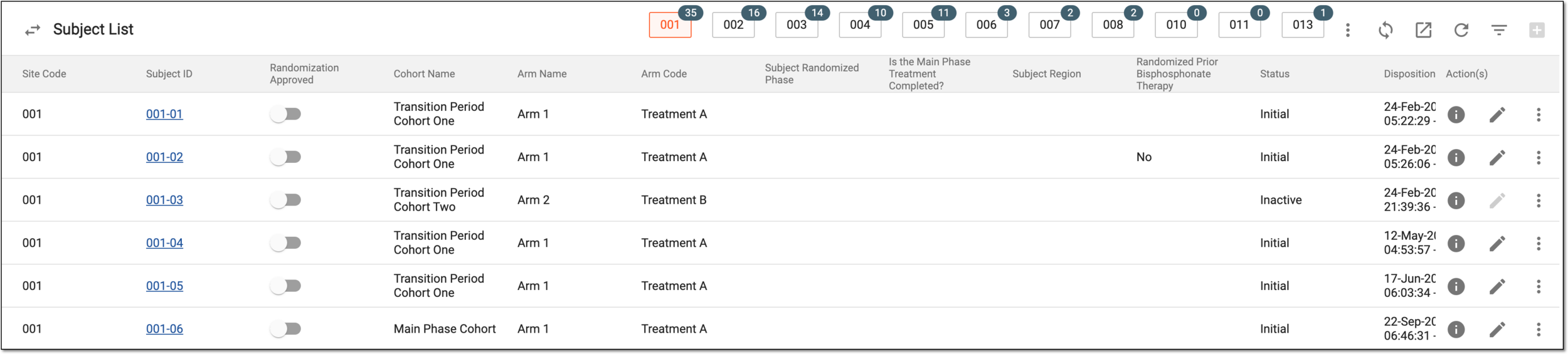
Detailed information on the subjects and the possible options can be found in the following table.
|
Column |
Details |
|---|---|
|
Site Code |
Represents the code number of the site at which the subject is registered. |
|
[Unique ID Label] |
Represents a unique identifier assigned to a subject. Selecting the unique ID value navigates you to the respective subject's details, such as:
|
|
Randomization Approved |
Represents an option to approve or withdraw the subject randomization. This column is available only if the Randomization Approval Required option has been enabled. |
|
Randomization ID |
Represents the randomization number assigned to the subject. However, if the study does not use randomization or the subject is not randomized, then the randomization ID is not assigned. |
|
Initial |
Indicates whether the status of the subject is initial. |
|
Arm Name |
Represents the arm to which the subject is allocated. This is a blinded property so you can see information here only with proper blinding permissions. |
|
Cohort Name |
Represents the name of the cohort to which the subject belongs.
|
|
[Subject-specific factor] |
Represent the columns named following the configured factors of the subject-specific treatment factor range, that are set to be displayed in reports. There can be as many such columns as configured factors. The names of such factors can be customized upon configuration. However, if the same factor is used as a randomization factor for a subject (period factor), its original name is displayed in the table instead of a custom alias. For instance, if the subject's age and sex are configured as subject-specific factors in IWRS, two columns named "Age" and "Sex" are available in the table. |
|
Status |
Represents the current status of a subject. |
|
Disposition Date |
Represents the date and time according to the timezone of the site where the subject has been randomized. |
|
Unblind Request Status |
Represents the status of the unblinding request if one has been submitted for a specific subject. |
|
Unblinded |
Indicates whether the subject is blinded or unblinded. |
|
Current Phase |
Represents the current study phase of the subject that is populated from the EDC application or from IWRS when the subject phase is updated. If the subject is discontinued, then this column displays the subject phase as Discontinued. |