Subject scheduled dispensing plan
A subject dispensing plan outlines the procedures for administering a particular drug or treatment to human subjects in a clinical trial. When the visit dispensing is defined in IWRS, the system automatically creates a dispensing plan for subject visits in the EDC application. This subject dispensing plan is also reflected in IWRS and it indicates the drugs that must be dispensed to the subject during corresponding visits.
Important
The dispensing plan that does not apply to the particular subject in terms of treatment factors is not displayed under the Subject Scheduled Dispensing Plan tab. Therefore, it is possible that some visits are not included in a dispensing plan.
For example, treatment A is created for male subjects and treatment B is created for female subjects. Then for the female subjects, in the Subject Scheduled Dispensing Plan subtab, only visits for treatment B are displayed, whereas visits for treatment A are hidden.
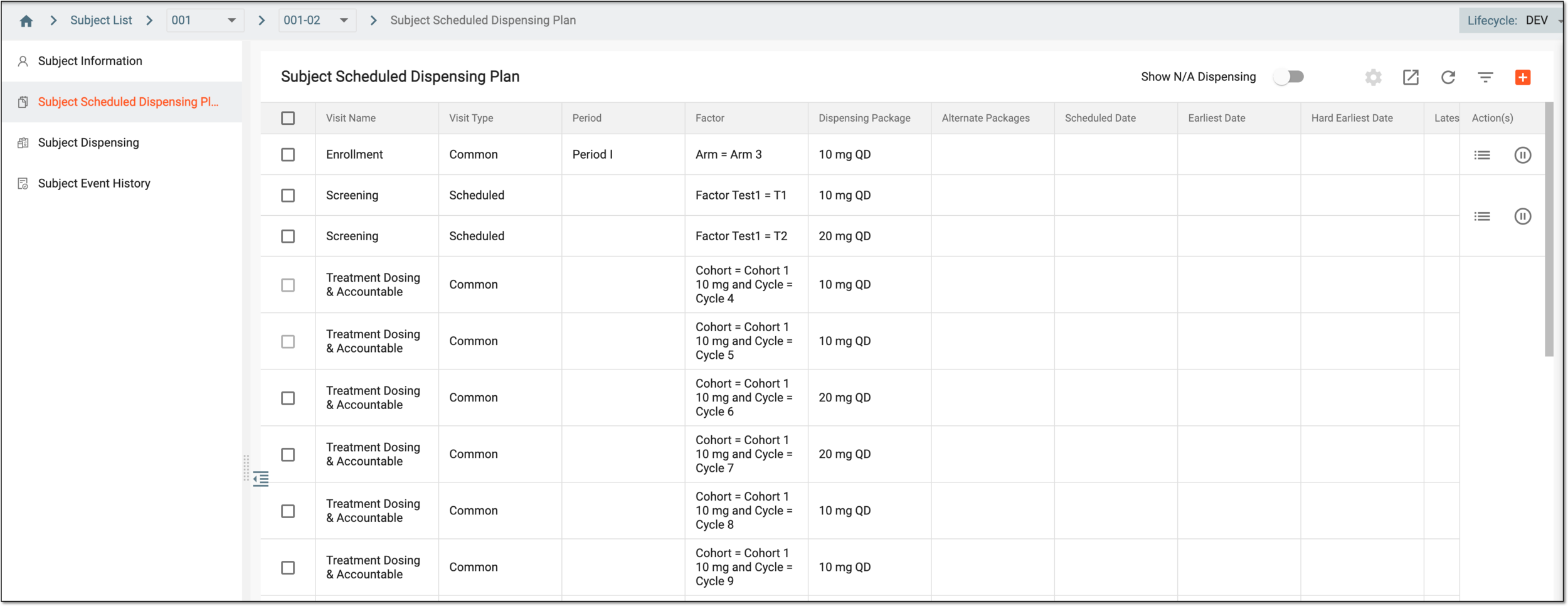
The Subject Scheduled Dispensing Plan tab contains detailed information about each subject's dispensing plan. These details are explained in the following table.
Tip
Turn the Show N/A Dispensing toggle on or off to show or hide the dispensing plans that are currently not applicable for the subject based on the treatment group (cohort) to which they belong.
Reviewing the dispensation plans that are not applicable for the subject according to their current treatment becomes helpful in assessing the possibility of changing their dispensing plan with potential dosage decrease or increase, drug intake schedule change, and other adjustments.
|
Column |
Details |
|---|---|
|
Visit Name |
Represents the name of the subject's visit during which the drugs need to be dispensed as defined in the EDC application. The visit name is the same for all the subjects in the study. |
|
Visit Type |
Represents the visit type defined for the subject's visit for a specific study in the EDC application. |
|
Period |
Represents the period defined for the subject's visit for a specific study. |
|
Factor |
Represents dispensing package's determining factors that have been configured for subjects. |
|
Dispensing Package |
Represents the name of the dispensing package.
|
|
Alternative Packages |
Includes the list of dispensing packages that can be used as an alternative to the main dispensing package. |
|
Scheduled Date |
Represents the date when the dispensation is scheduled to occur.
|
|
Earliest Date |
Represents the earliest date of the dispensing window when the dispensation may occur.
|
|
Hard Earliest Date |
Represents the earliest hard date of the dispensing window when the dispensation may occur.
|
|
Latest Date |
Represents the latest date of the dispensing window when the dispensation may occur.
|
|
Hard Latest Date |
Represents the latest hard date of the dispensing window when the dispensation may occur.
|
|
Dispensing Date |
Represents the date and time according to the timezone of the site in which the dispensing has occurred. |
|
Status |
Represents the status of the dispensing plan, which can be any of the following:
|
|
Active |
Represents the dispensing plan activation state:
|
