Manage subject details
The Detail page provides you with the functionalities to view and manage the information of a subject registered in the eClinical platform. The information that you can view and manage includes general specifications of subjects such as their blinding status, treatment period, and so on, along with the subject's drug dispensation details.
-
In the IWRS application header, select the SUBJECT tab.
-
From Subject List that opens, select the needed site and subject.
 Figure 1. Selecting site and subject
-
On the page that opens, you can view and manage the details of the selected subject under the following tabs:
-
Subject Information: select this tab to view detailed information about the subject. This tab is preselected by default.
-
Subject Scheduled Dispensing Plan: select this tab to create, edit, and manage the dispensing plans.
-
Subject Dispensing: select this tab to create and manage dispensation items for the subject.
-
Subject Event History: select this tab to view the history of actions done with the selected subject.
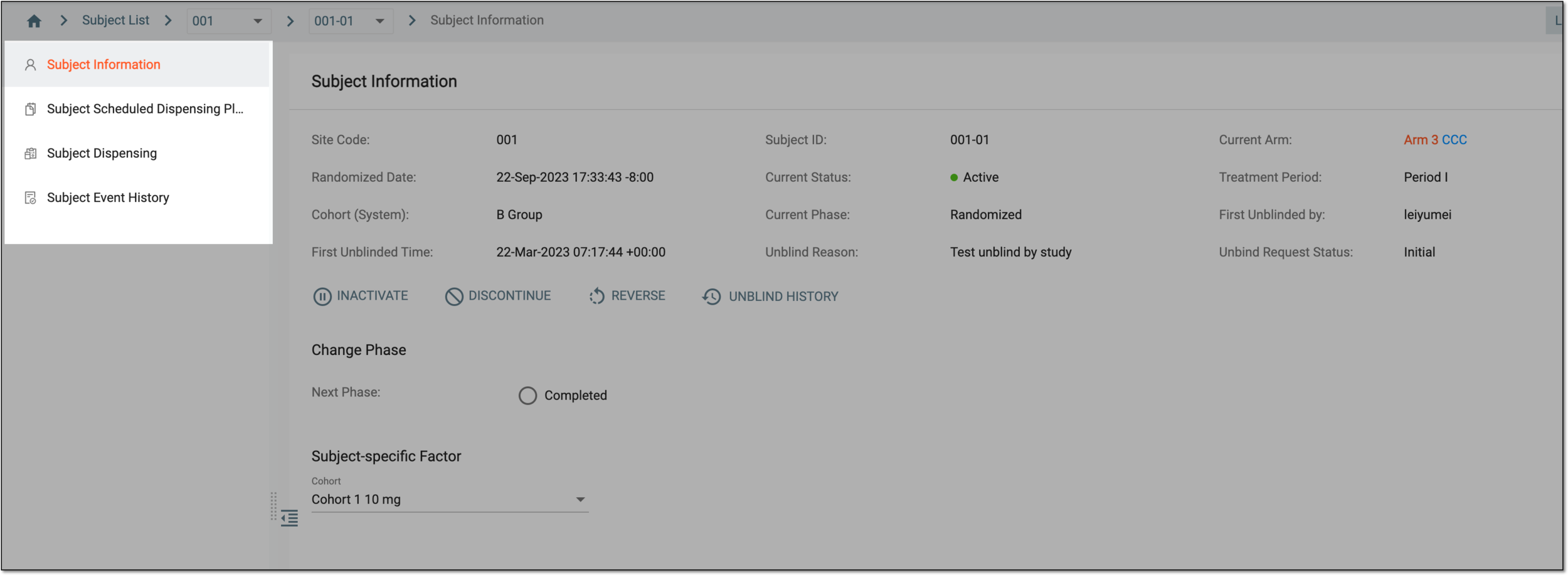 Figure 2. Accessing subject details
-
You have viewed all the details pertinent to your selected subject.