Subject dispensing
Subject dispensing refers to the process of assigning a specific treatment or medication to a study subject. Once a subject has been assigned to a treatment group, the appropriate medication or treatment is dispensed to them based on the study protocol. In the IWRS system, the dispensation of drugs to each subject occurs depending on the randomization result.
Once the subjects have been assigned a specific item, the dispensation can start. The process of dispensing medication to study participants happens via adding visits to the subject dispensing plan beforehand. After the visits have been added, you can start creating scheduled/unscheduled or manual dispensations.
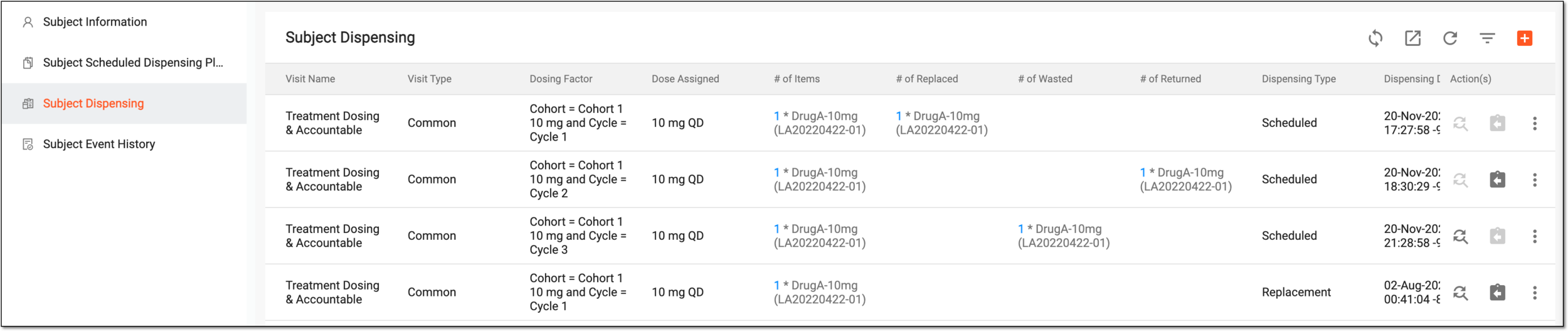
Within the Subject Dispensing page, you can operate with dispensed items for a selected subject. The grid columns on this page are explained in the following table.
Important
Some of the columns displayed in the figure may not be visible if the Hide Item Number permission has not been assigned to you.
|
Column |
Details |
|---|---|
|
Visit Name |
Represents the name of the visit during which the medication is dispensed to the selected subject. |
|
Visit Type |
Represents the type of a visit and can be one of the following:
|
|
Dosing Factor |
Represents the selected factor value for the subject dosing. |
|
Dose Assigned |
Represents the dispensing package assigned to the subject for the visit. |
|
# of Items |
Represents the total number of item(s) and their lot numbers that have to be dispensed to the subject at the visit. |
|
# of Replaced |
Represents the total number of item(s) and the lot number that has been replaced during the dispensation of the subject at the visit. |
|
# of Wasted |
Represents the total number of item(s) and the lot number that has been wasted during the dispensation of the subject at the visit. |
|
# of Returned |
Represents the total number of item(s) and the lot number that has been returned during the dispensation of the subject at the visit. |
|
Dispensing Type |
Represents the dispensing type selected by the user while dispensing medication to the selected subject. The types are as follows: Manual, Scheduled, Unscheduled, and Replacement (when the drug item has been replaced). |
|
Dispensing Date |
Represents the date and time according to the timezone of the site where the drug has been dispensed to the subject. |
|
Operation Date |
Represents the date and time of drug dispensing to the subject according to your timezone. |
|
Dispensing By |
Represents the name of the user who has dispensed items to the selected subject. |
|
Comments |
Represents the comment added by the user while creating the dispensation. |
|
Is Backfilled |
Indicates whether the drug dispensation has been distributed offline at the site (Yes) or in IWRS first (No). |
|
Sync to EDC |
Indicates whether the drug dispensation information has been synced to the EDC application. If not, you can sync to EDC manually. |