Change subject site
Typically, when subjects are enrolled in a clinical trial, they are assigned to specific sites that they will be most comfortable attending for their future visits or that are equipped with the appliances needed for their treatment. Sometimes, you might need to change the subject site in a course of a clinical trial, for instance, in case of the subject relocation.
Important
If, upon registration, the subject ID has been generated with the site code as a part of it (for instance, 001-111, where 001 is the site code), changing the subject site does not influence the subject ID. So if the subject moves to site 002, the ID remains the same—001-111.
-
In the IWRS application header, select the SUBJECT tab.
-
Above the Subject List table that opens, select the site to which the subject of your interest is currently assigned.
 Figure 1. Selecting site to display its subjects
-
Next to the needed subject, from the Actions column, select More
 >
Change Subject Site
>
Change Subject Site  .
.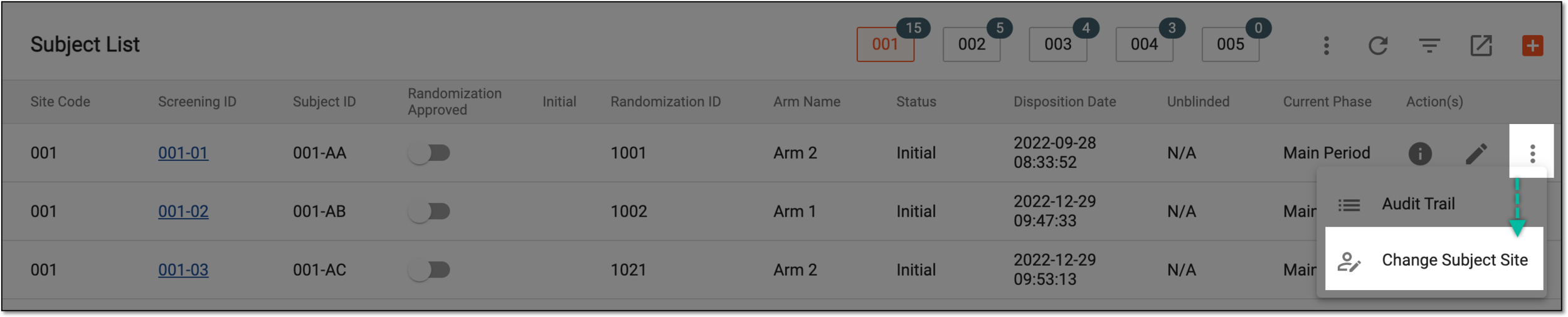 Figure 2. Change Subject Site option
-
In the Change Subject Site dialog that opens, complete the fields as explained in the following table.
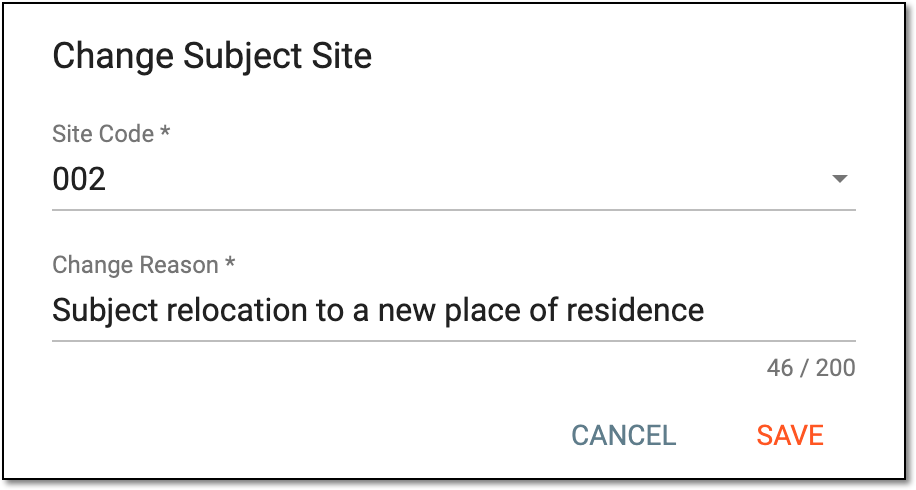 Figure 3. Changing subject site
Tip
In the following table, mandatory elements are marked with an asterisk (*).
Element
Details
Site Code*
Select the code of the site to which you want to reassign the subject.
Change Reason*
Enter the reason why the subject site needs to be changed.
SAVE
Select
 to save the implemented changes.
CANCEL
Select
 to discard the changes without saving.
Once saved, the subject is reassigned to another site and disappears from the current site subject list. To find this subject, go the the subject list of the newly assigned site.