Subject list
The Subject List page of the EDC application lists all subjects registered at a certain site with some information about them (such as the current subject phase, status, and so on). This page is mainly used by clinical research coordinators (CRCs) to analyze subject data and perform various actions on it or by data managers (DMs) to access data entry for their subjects.
For example, from the subject list, you can activate or deactivate a subject, discontinue a subject, change their status, export subject data, drill down to their visit and form lists, where you can actually start entering clinical data, and many more.
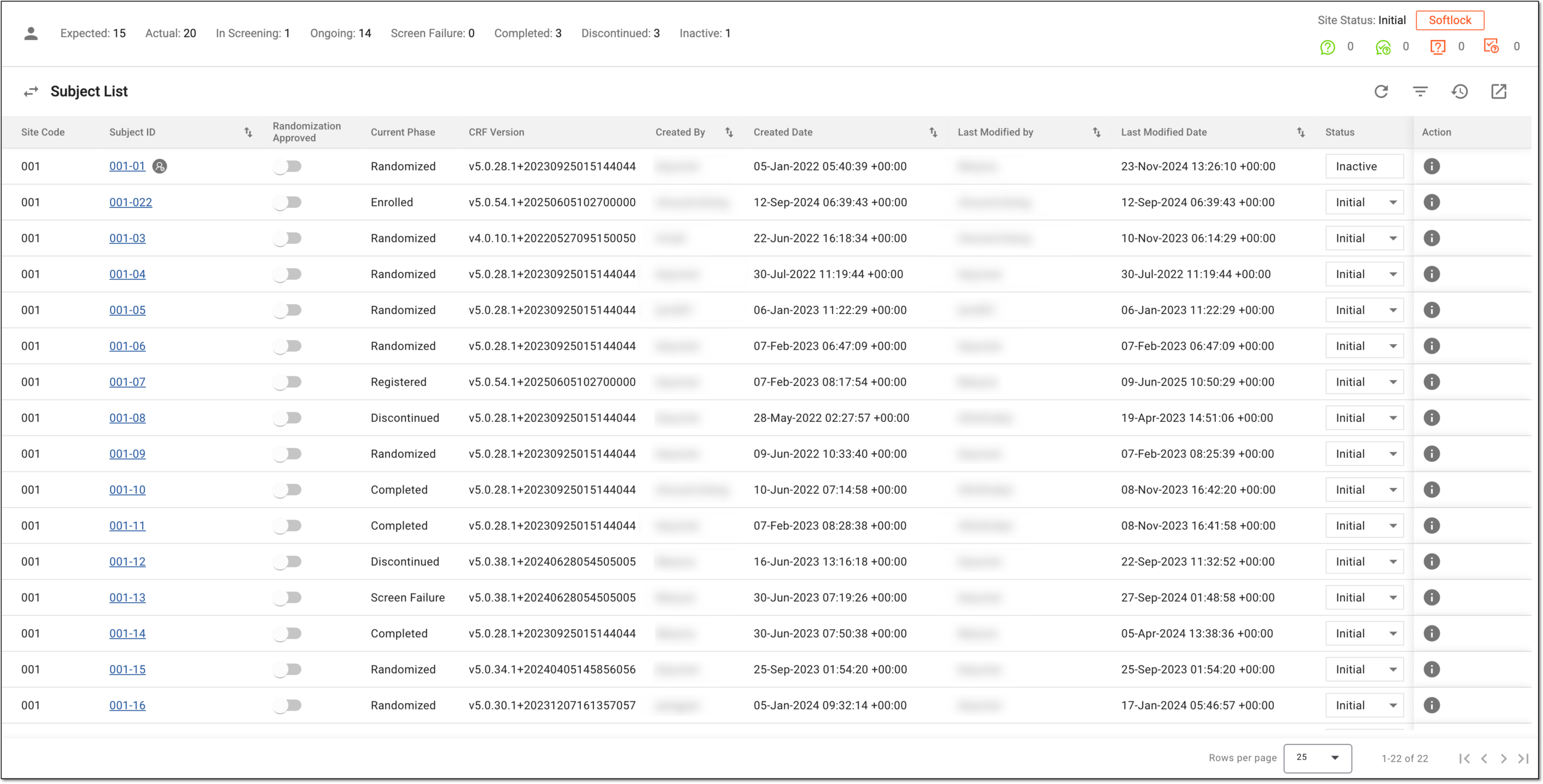
The following table provides you with the most relevant information about the Subject List page and subject details available on it.
|
Column |
Details |
||
|---|---|---|---|
|
Site Code |
Represents a unique identification number of the site where clinical data is expected to be collected for a particular subject. |
||
|
[Unique ID Label] |
Represents a unique ID of the subject whose clinical data is expected to be collected. Select the link and drill down to the subject data entry page, where you can view the visits and enter clinical data for a certain subject.
|
||
|
Randomization Approved |
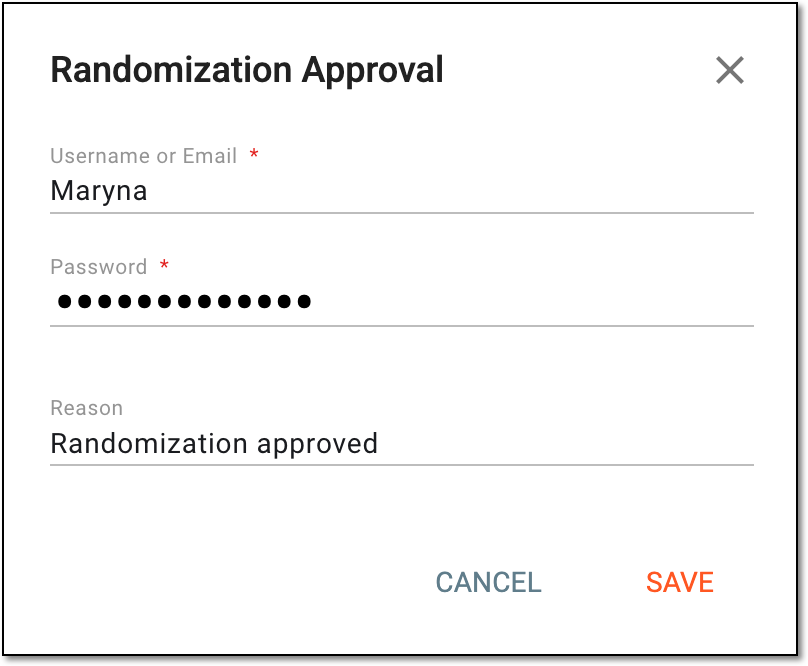
Turn this toggle on or off to approve or withdraw subject randomization as follows. Turn the toggle on and in the dialog that appears, enter your credentials and select SAVE to approve subject randomization. Once approved, the randomization phase becomes available for the subject in the Next Phase column.
Figure 2. Approving randomization
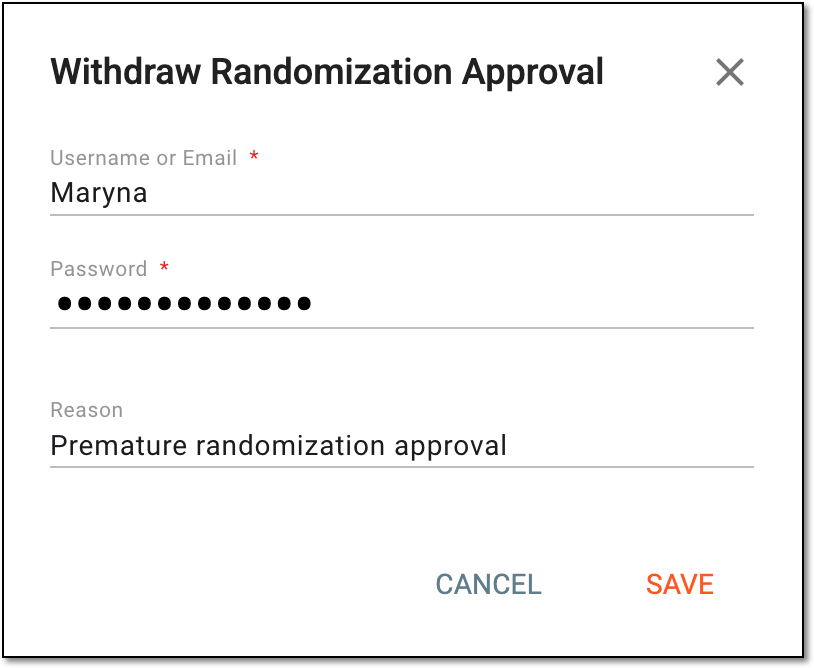
Turn the toggle off and in the dialog that appears, enter your credentials and select SAVE to withdraw subject randomization. Once confirmed, the randomization phase disappears from the Next Phase column.
Figure 3. Withdrawing randomization
|
||
|
Current Phase |
Represents the current phase of a particular subject within a clinical trial lifecycle (for example, Enrolled, Completed, Screen Failure, and so on).
|
||
|
Next Phase |
Represents the next expected phase of the clinical trial lifecycle for a particular subject that is also an active link to move the subject to the next phase.
|
||
|
CRF version |
Represents the version of the case report form that is used in the study to collect data from each participating subject. |
||
|
Created By |
Represents the name of the user who has created a subject in the EDC system. |
||
|
Created Date |
Represents the date when the subject is created. |
||
|
Last Modified By |
Represents the name of the user who has last modified the subject. |
||
|
Last Modified Date |
Represents the date of the latest subject modification. |
||
|
Status |
Represents the current status of the subject in the course of the study. To change the subject status, select the value and from the dropdown menu, choose the next available status as follows:
Figure 4. Changing subject status
|

On the Subject List page, you can perform the following actions:
Important
All the actions performed with subjects and their data are recorded by the system, and the history of such actions can be reviewed via the Audit Trail functionality.
In a clinical trial, a location where the subject treatment and drug dispensation occur. It can be a hospital, a private laboratory, or other institutions.
A specific phase that a subject has to complete in the course of a clinical trial to move further to the next phase. For instance, Screening, Enrolled, Randomized, and others.
 |
In eClinical, subject phases are designed individually for each study via the SD application, although they are referenced in others, like IWRS or EDC.
A person responsible for the successful planning, execution, and management of clinical trials. The CRC’s scope of work might include study preparation, site setup, patient recruitment, regulatory compliance control, data collection, and more.
In the eClinical system, the Clinical Research Coordinator (CRC) user role is granted to a person who works on a site with subjects and is responsible for entering data to EDC, ensuring the data is entered correctly according to all requirements, and answering queries from data managers on any questionable data pieces.
A person responsible for managing and ensuring the integrity, accuracy, and confidentiality of data collected during clinical trials. The DM’s scope of work might include maintaining the quality of data, complying with regulatory requirements, and supporting the overall success of clinical research.
In the eClinical system, the Data Manager (DM) user role is granted to a person who is mainly responsible for cleaning the data, making sure the data is entered correctly according to all requirements and industry standards, and creating manual queries for clinical research coordinators on any questionable data pieces. Before the study goes live, works with the sponsor and receives and addresses their feedback to set up the study and CRFs in EDC in a way that the sponsor approves.
An eClinical application that represents unified and configurable subject randomization and trial supply management tool for subject grouping, drug inventories, shipments, and dispensations, as well as other vital processes during a clinical trial.
Get to know all the possibilities of the app with the comprehensive IWRS User Guide.
A process during which subjects receive their random numbers and are assigned to different arms based on the randomization scheme.
An eClinical application that provides functionality to design and configure a study (clinical trial), namely to configure CRFs, set subject phases, visits, and others.
The application supports the design of the CDSIC ODM-compliant electronic CRFs to support EDC and eDiary data collection and management.
Get to know all the possibilities of the app with the comprehensive SD User Guide.
A specialized document in a clinical trial designed to collect the subject data.
See also eCRF.
A person responsible for overseeing and monitoring a clinical trial to ensure it is conducted in compliance with regulatory standards and protocols. The CRA’s scope of work might include protocol review, site selection and initiation, monitoring, data entry control, and more.
In the eClinical system, the Clinical Research Associate (CRA) user role is assigned to a person who works with the sites, and in EDC, mainly has to make sure that the entered data is truthful to the source document. CRA checks the source document in a process called source data verification and ensures that everything entered by the clinical research coordinators is valid to avoid any discrepancies caused by human errors.
A person responsible for overseeing and conducting the research study at a specific investigational site or multiple sites, depending on the study's design. The role of a PI is multifaceted and involves various responsibilities, such as study oversight, protocol adherence, participant recruitment and informed consent implementation, regulatory compliance, and so on.
In the eClinical system, the Principal Investigator (PI) role that is assigned to a person who oversees the data entering and signs off subjects—gives authorized confirmation that all the entered data is valid and follows the industry standards. The responsibilities of PI can vary depending on study requirements.