Supply plan for site
In a clinical trial, sites are locations where the subject receives medication during their treatment. The process of providing subjects with items needed for the treatment is called dispensation. To keep the site inventory sufficient for all upcoming dispensations, the sites follow specific supply plans.
A supply plan represents a set of required parameters—such as item units, minimum and maximum stock values, and so on—that is configured to automate the process of item supply to sites to always maintain a sufficient amount of medications for all subjects registered at this site.
Important
The resupply shipment requests start triggering according to the selected plan only after the initial shipment request is sent manually or autotriggered based on the set conditions.
Note that the supply plan will not account for the dispensation needs of the subjects who are discontinued or inactivated or the inactivated dispensing plans. This precaution is required to avoid oversupplying the sites with items.
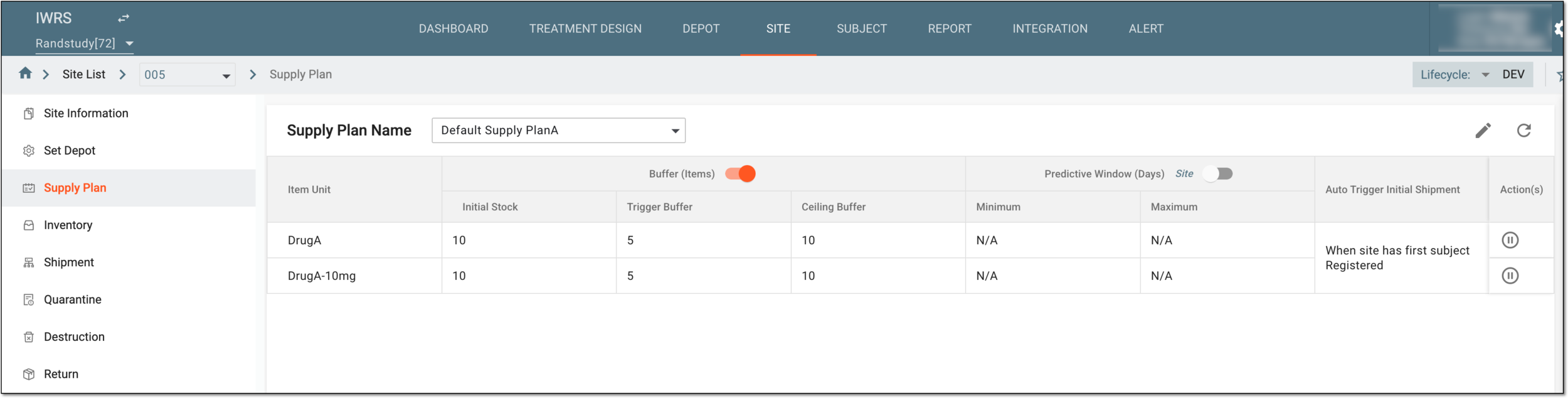
In IWRS, you can select and modify a supply plan for a site from the Supply Plan page the elements of which you can find described in the following table.
|
Element |
Details |
|---|---|
|
Supply Plan Name |
Select the supply plan for your site. The supply plan displayed here is the currently effective one for the site.
|
|
Item Unit |
Represents the product unit that is being supplied for the site according to the selected supply plan. |
|
Buffer (Items) |
Configure as follows:
|
|
Initial Stock |
Represents the quantity of an item present at the beginning of a study and is decided by the sponsor keeping in mind a number of factors, including storage capability, estimated consumption rate, and others.
|
|
Trigger Buffer |
Represents the quantity of an item that when the item count reaches or falls below, triggers an automatic stock replenishment request. The automated shipment must request a quantity that does not exceed the item's ceiling buffer. A number of factors must be kept in mind while defining this value, such as the recruitment rate, the rate of item consumption, transportation time, along with other factors that might prevent the timely administration of the item.
|
|
Ceiling Buffer |
Represents the maximum quantity of an item that can be present on a site. Usually, when the trigger buffer is surpassed, an automatic shipment request is sent to the supplier depot. The number of items in the request is calculated like this: Requested quantity = Ceiling Buffer value - (number of items available on site + number of items in transit).
|
|
Predictive Window (Days) |
Configure as follows:
|
|
Minimum |
Represents the number of days from the current date that outline the time frame for the calculation of the site inventory sufficiency for all dispensations that are supposed to occur during this time frame. If the Predictive Window (Days) toggle is turned on, the system checks all the subject dispensing schedules during the outlined Minimum time frame and compares the estimated number of items needed for upcoming dispensations to the current site inventory and does the following:
|
|
Maximum |
Represents the number of days from the current date to outline the time frame for the calculation of the number of items to be included in the supply shipment requested based on the Minimum period calculations. The total quantity of items in the request is calculated for all the subject dispensations that are supposed to occur during the time frame outlined by Maximum. |
|
Auto Trigger Initial Shipment |
Indicates if the system is configured to trigger an initial shipment for a site automatically and under which condition:
|
From the Supply Plan page, you can perform the following actions:
In a clinical trial, a location where the subject treatment and drug dispensation occur. It can be a hospital, a private laboratory, or other institutions.
Medical care given to a subject to mitigate or cure an illness, injury, or reduced health status. In a clinical trial, treatment may include prescribed drugs, biologics, devices, physical or psychotherapies, and such other procedures.
In eClinical, a unit of a drug that is being tested in a clinical trial is referred to as an item.
An investigational product that is used in a study. In eClinical, it can be viewed as an equivalent to a drug name to distinguish items at all stages of their lifecycle—manufacturing, shipment, dispensation to subjects, or else.
Another name for the product unit in the IWRS system is item unit.
Any person, company, institution, group, or organization that is a client of EDETEK and a user of the eClinical system.
In the eClinical system, the Sponsor role is assigned to the user who oversees or pays for a clinical trial and collects and analyzes the data. Before the study goes live, the Sponsor users work closely with the data managers, configuring CRFs and other aspects to make sure everything meets their requirements before giving the green light for the study to go live. In the course of a trial, the Sponsor users make requests for amendments in the system according to a new protocol version, changes in business requirements, or other needs.
A specific phase that a subject has to complete in the course of a clinical trial to move further to the next phase. For instance, Screening, Enrolled, Randomized, and others.
 |
In eClinical, subject phases are designed individually for each study via the SD application, although they are referenced in others, like IWRS or EDC.