Supply plan
During a clinical trial, each site has to have enough items (drugs) to cover the subject treatment process and perform drug dispensation on time. The supply plans are created to automate shipment requests and simplify the item delivery process. In the supply plan, you can specify which item in which amounts should be shipped to the site, the trigger volume to request a new shipment, and so on.
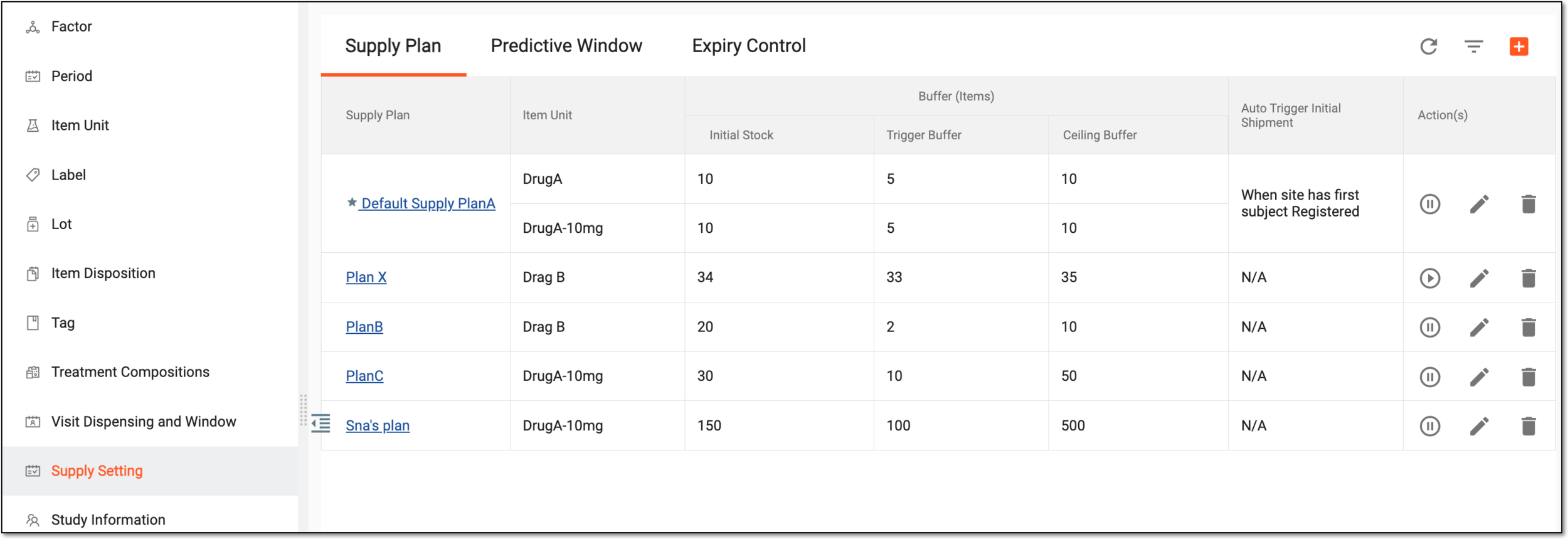
In IWRS, the supply plans are created and managed under the TREATMENT DESIGN tab > Supply Setting subtab > Supply Plan subtab.
|
Column |
Details |
|
|---|---|---|
|
Supply Plan |
Represents the supply plan name. |
|
|
Item Unit |
Represents the product unit that is being supplied according to this supply plan. |
|
|
Buffer (Items) |
Initial Stock |
Represents the number of items in the initial stock of a site. It also represents the number of items in the initial shipment to the site. When the site manually triggers the initial shipment, a shipment request is sent to the supplier depot, and the number of items in the request equals the initial stock minus the number of items available in the site's inventory. |
|
Trigger Buffer |
Represents the number of items set as a trigger buffer for a shipment request. That is, when the number of available items in the site's inventory is lower than or equal to the trigger buffer value, a shipment request to the supplier depot is triggered automatically. |
|
|
Ceiling Buffer |
Represents the number of items set as a ceiling buffer. When the trigger buffer is surpassed and an automatic shipment request is sent to the supplier depot, the number of items in the request equals the ceiling buffer minus the number of available items left in the site's inventory. |
|
|
Status |
Represents whether the status of the supply plan is Active or Inactive. Under the Supply Plan subtab of the TREATMENT DESIGN tab, you can set the active or inactive status for each supply plan. Inactivating one of the supply plans pauses the autosupply for it on the sites that use this supply plan. That is, the system stops triggering shipments for product units that are shipped according to this plan. To restore the autosupply, activate the supply plan. |
|