Configure predictive supply window
In IWRS, the supply plans are created to automate shipment requests and simplify the item (drug) delivery process for sites.
With the Predictive Window functionality, you can also configure the system to assess the upcoming dispensations within a specific time frame and calculate and request the items to suffice for all the dispensations. Moreover, you can configure the study-level time frames for all sites or generate specific configurations for different countries.
-
In the IWRS application header, select the TREATMENT DESIGN tab.
-
From the left pane, select the Supply Setting subtab.
-
On the page that opens, from the contents panel, select the Predictive Window tab.
-
In the form that appears, configure the values as explained in the following table.
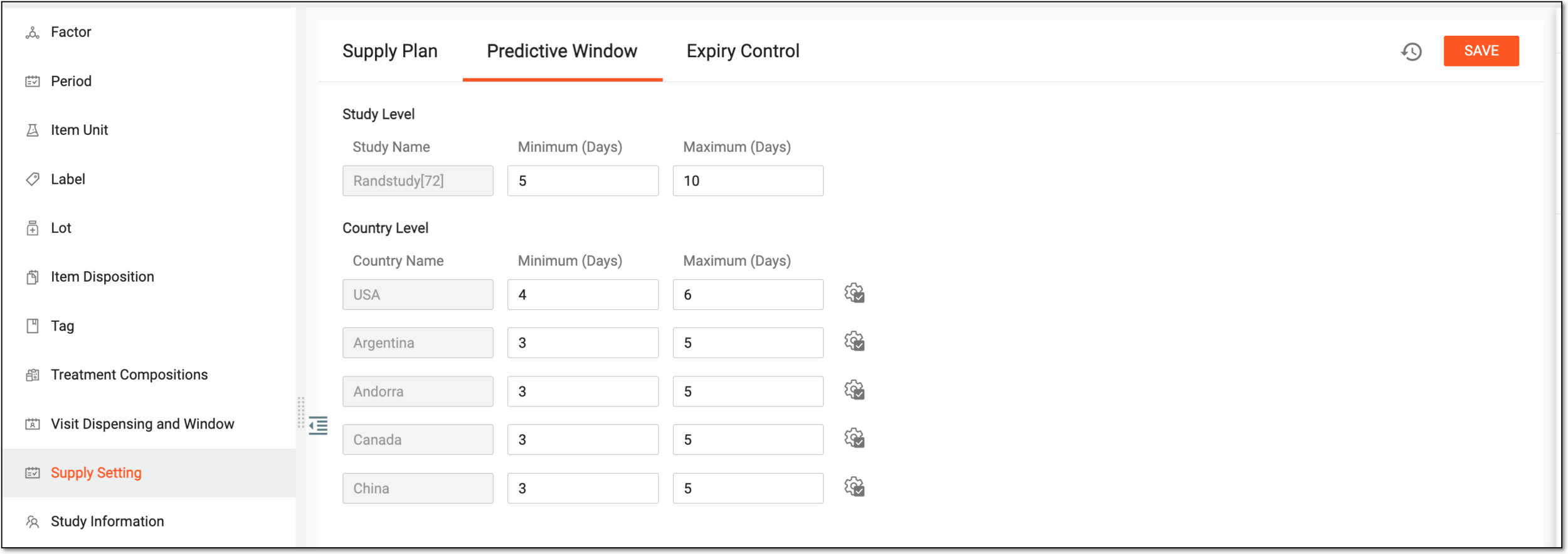 Figure 1. Configuring predictive window
Element
Details
Study Level
Study Name
Represents the name of the study for which you can configure the study-level parameters for the supply prediction window. The value is read-only.
Minimum (Days)
Enter the number of days from the current date to outline the time frame for the calculation of the site inventory sufficiency for all dispensations that are supposed to occur during this time frame.
If configured, the system checks all the subject dispensing schedules during the outlined time frame and compares the estimated number of items needed for upcoming dispensations to the current site inventory and does the following:
-
If the inventory is not sufficient for all dispensations, the system automatically generates the supply shipment request.
-
If the site inventory is sufficient for all dispensations, the supply shipment request is not created.
Maximum (Days)
Enter the number of days from the current date to outline the time frame for the calculation of the number of items to be included in the supply shipment generated based on the Minimum (Days) period calculations.
If based on the Minimum (Days) time frame, the site inventory is insufficient for all upcoming dispensations, the system generates a supply shipment request. The total quantity of items in the request is calculated for all the subject dispensations that are supposed to occur during the time frame outlined by Maximum (Days).
Country Level
Country Name
Represents the name of the country for which you can configure the country-level parameters for the supply prediction window. The value is read-only, and there are as many countries as configured for your study in the CTMS application.
Minimum (Days)
Enter the number of days from the current date to outline the time frame for the calculation of the site inventory sufficiency for all dispensations that are supposed to occur during this time frame.
If configured, the system checks all the subject dispensing schedules during the outlined time frame and compares the estimated number of items needed for upcoming dispensations to the current site inventory and does the following:
-
If the inventory is not sufficient for all dispensations, the system automatically generates the supply shipment request.
-
If the site inventory is sufficient for all dispensations, the supply shipment request is not created.
Maximum (Days)
Enter the number of days from the current date to outline the time frame for the calculation of the number of items to be included in the supply shipment generated based on the Minimum (Days) period calculations.
If based on the Minimum (Days) time frame, the site inventory is insufficient for all upcoming dispensations, the system generates a supply shipment request. The total quantity of items in the request is calculated for all the subject dispensations that are supposed to occur during the time frame outlined by Maximum (Days).
Apply to All
Select
 next to the configuration of one of the countries to apply them to all the rest.
SAVE
Select
 to save the implemented configurations.
 -
Once saved, the predictive window settings are applied to all the study sites or by country, depending on your configurations. You can also view the operation history to check all the changes in the predictive window configurations.