Set return depot for site
In a clinical trial, sites cover the dispensation process and for this, the item inventory of the site must be enough to provide all subjects who are treated there. During their handling, some drugs in the inventory get damaged, expire, or are left over after treatment and must be returned to the supplier for proper handling—destruction or else.
To establish where all the items of the site must be sent back, you need to set up a depot that will receive all such return shipments.
-
In the IWRS application header, select the SITE tab.
-
On the Site List page that opens, in the table, select the site code of your interest.
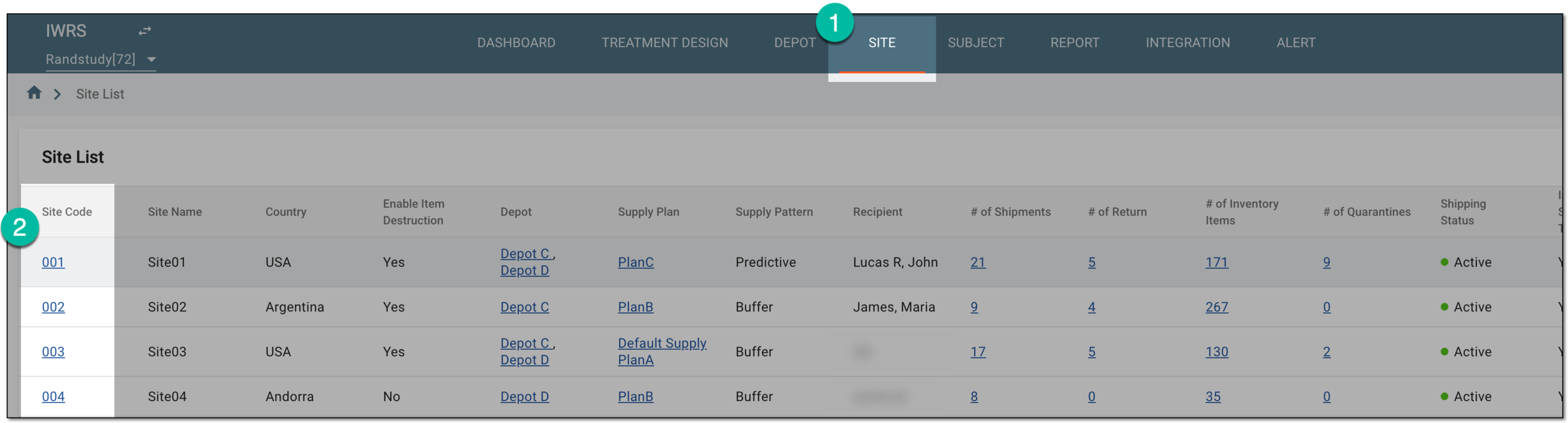 Figure 1. Selecting site to open its details
-
On the page that opens, in the left pane, select the Set Depot subtab.
-
On the Set Depot page that opens, from the workspace toolbar, select Set Return Depot
 .
. Figure 2. Accessing return depot setting
-
In the Set Return Depot dialog that opens, from the dropdown menu, select the depot name that you need to act as the return one for the site.
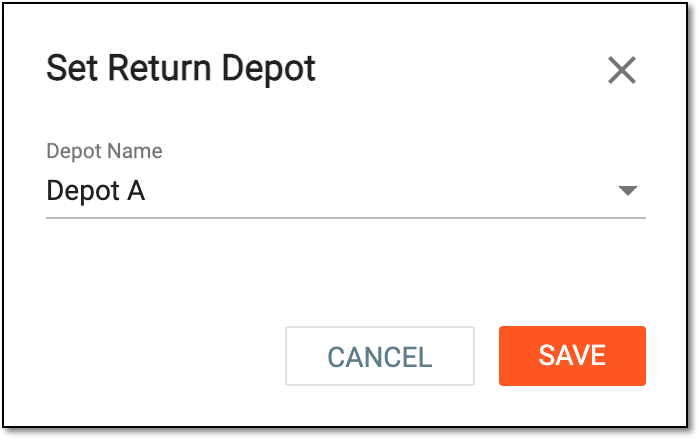 Figure 3. Setting return depot
Important
Only the depots that have been marked as the return are available in the Depot Name dropdown menu of the Set Return Depot dialog.
-
Select
 to save the implemented changes.
Upon saving, the chosen depot is set as a return and is to be automatically populated as a return depot value when returning items for the site.