System documents for data acknowledgment
Data acknowledgment before the end of the study is a process of confirming the receipt and accuracy of data and findings collected during a clinical trial.
In the EDC application, you can define the system documents that have to be acknowledged before the end of the study and then create individual tasks per each system document dataset to be acknowledged by the dedicated personnel.
The system documents for data acknowledgment in EDC are as follows:
-
Subject PDFs: the information in this document is fetched from the Raw Data report which provides an opportunity to export individual subject PDFs.
-
All Query Report: the information in this document is fetched from the All Query report.
-
Subject SAEs: the information in this document is fetched from the SAE report.
Under the End of Study > System Document page, you can see the list of all currently existing tasks for data acknowledgment and their details explained in the following table.
Important
To access the System Document module of EDC, you need to have respective permissions granted to your user role via the ADMIN application:
-
Read: allows the user to see but not perform actions within the module.
-
Write: allows the user to see and perform actions within the module, such as downloading system documents.
-
Add: allows the user to see and perform actions within the module, such as creating system document acknowledgment tasks.
-
Delete: allows the user to see and perform actions within the module, such as deleting system document acknowledgment tasks.
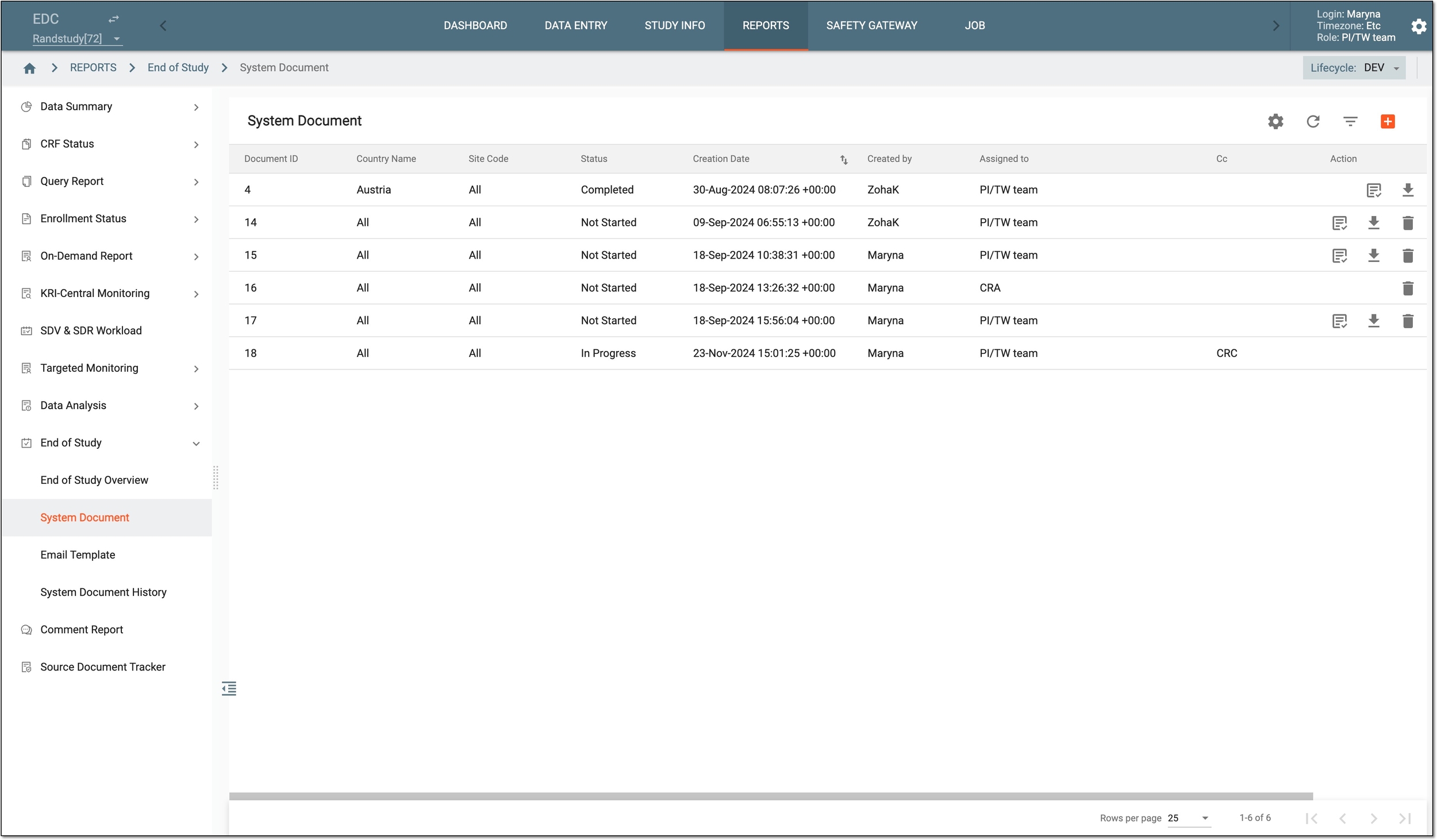
|
Column |
Details |
|---|---|
|
Document ID |
Represents the unique identification number of the system document associated with the data acknowledgment task. |
|
Country Name |
Represents the name of the country of the location of the sites where the data acknowledgment task must be completed. |
|
Site Code |
Represents the unique identification number of the site where the data acknowledgment task must be completed. |
|
Status |
Represents either of the following statuses of the task:
|
|
Creation Date |
Represents the date when the data acknowledgment task is created. |
|
Created by |
Represents the name of the user who created the data acknowledgment task. |
|
Assigned to |
Represents the name of the user to whom the data acknowledgment task has been assigned. |
|
CC |
Represents the name of the user or the user role who is added as a receiver of the system document task notification but not made the assignee of the task. |
From the System Document page, you can perform the following actions: