Download system document
Data acknowledgment before the end of the study is a process of confirming the receipt and accuracy of data and findings collected during a clinical trial.
In EDC, once the respective task is created and the system document is acknowledged, the data must be downloaded from the system before the study is closed in EDC.
Important
You can only download the system files if the data acknowledgment task is assigned to you or your user role and you have the System Document > Write permission granted to your user role via the ADMIN application.
The data acknowledgment task is only marked as Completed after the system document is acknowledged and downloaded.
-
In the EDC application header, select the REPORTS tab.
-
On the page that opens, in the left pane, select End of Study > System Document.
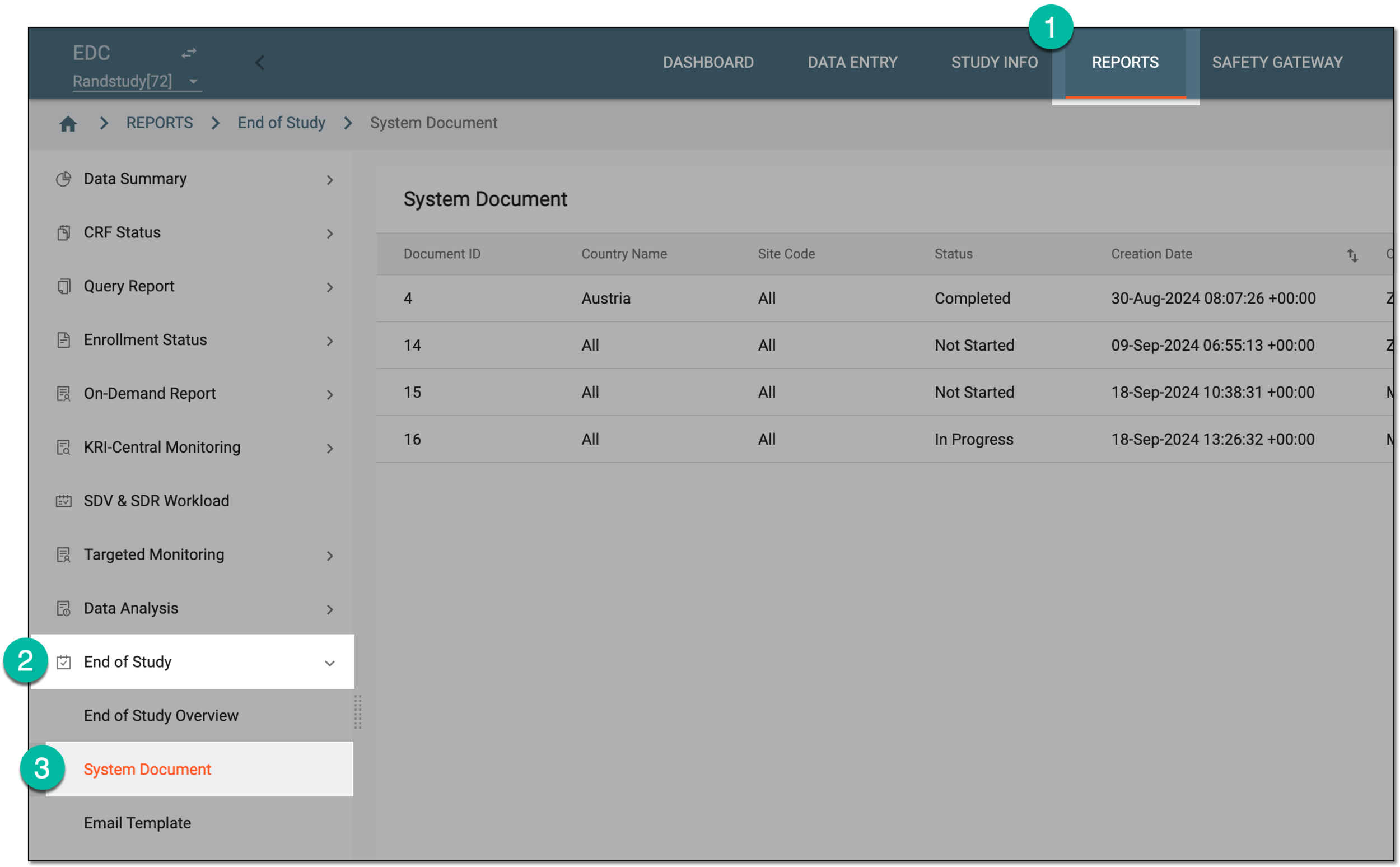 Figure 1. Accessing system documents
-
On the System Document page that opens, next to the needed task, under the Action column, select Download
 .
.Important
The download option
does not appear if the task is not assigned to you or your role.If you attempt to download the unacknowledged file, the electronic signature dialog appears for you to acknowledge the system document before download.
 Figure 2. Downloading system documents
Once downloaded, a ZIP archive becomes available on your computer. The archived folder contains all the system documents selected for your data acknowledgement task upon creation.
Tip
Once acknowledged system document is downloaded, the task status changes to Completed, and this change is momentarily reflected in the End of Study Overview statistics.