View all queries report
The All Query Report table displays all the manual and system-created queries per visit, form, item, and record. The report includes data on the query status, topic, due or overdue, replies, users addressing them, inactivation reasons, and other useful details.
Tip
The query details in the report are provided in the site's primary language—which can differ from the study language—as the site's primary language is the original language of data entry and record keeping.
-
In the EDC application header, select the REPORTS tab.
-
On the page that opens, in the left pane, select the Query Report subtab to expand the list of available reports and select All Query Report.
-
On the All Query Report page, you can adjust your report data with the following options:
-
Display Site Name: turn this toggle on or off to show or hide the Site Name column in your report.
-
Only show activated data: turn this toggle on or off for your report to exclude or include the data on queries that belong to inactivated forms.
-
-
In the resulting report, review query details as explained in the following table.
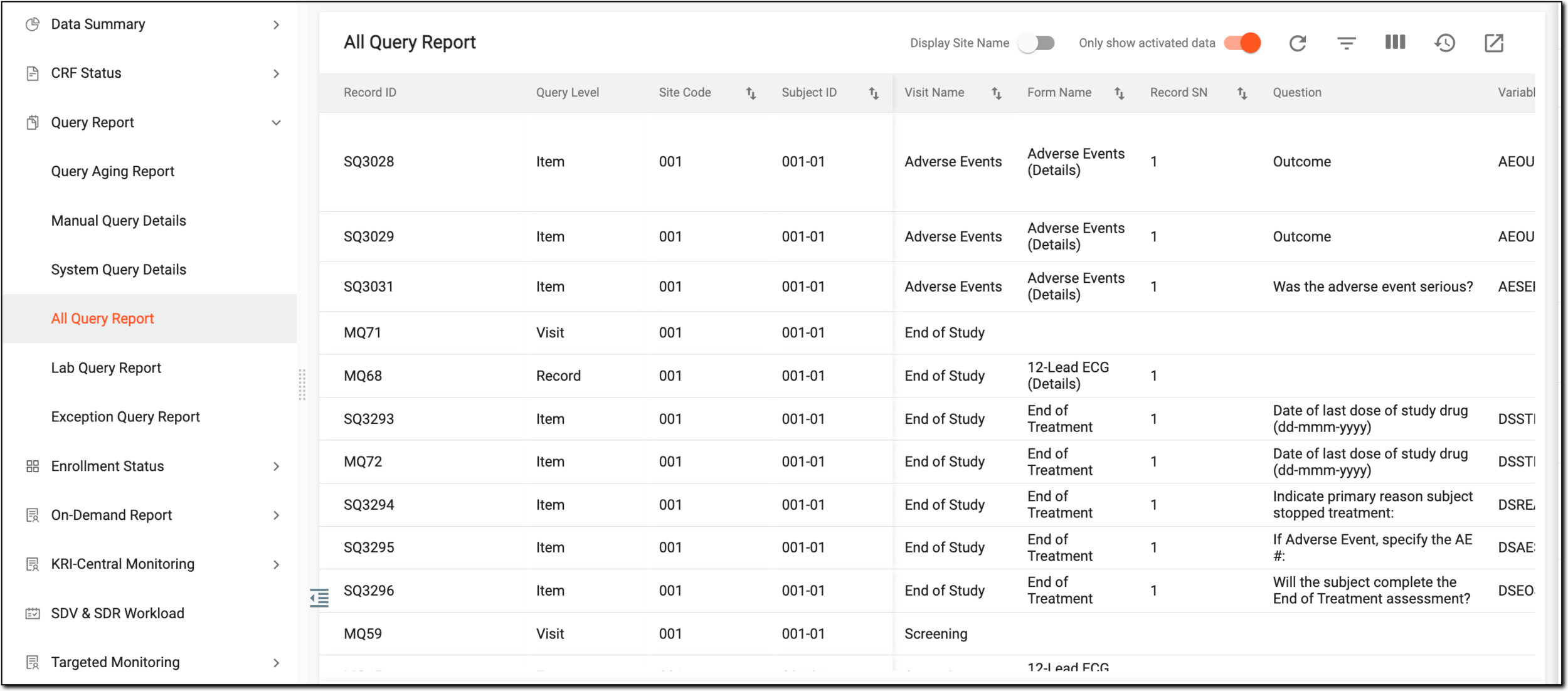 Figure 1. All queries report
Column
Details
Record ID
Represents the unique identifier assigned to the query that remains constant throughout the EDC application.
Query Level
Represents the stage at which the query is created, such as Form, Visit, Record, or Item.
Site Code
Represents the code of the site to which the visit or form the query belongs.
Site Name
Represents the name of the site to which the visit or form the query belongs. The value for the site name is pulled from CTMS.
This column is only available if the Display Site Name toggle is turned on.[Unique ID Label]
Represents the unique identifier of the subject under which the query is created for a particular visit, form, record, or item.
The column name depends on the unique ID label configuration of your study in IWRS.Visit Name
Represents the name of the visit for which the query has been created.
Form Name
Represents the name of the form in which the query resides.
Record SN
Represents the serial number (SN) of a form record in which the query resides.
Question
Represents the question in the form for the value of which the query is opened.
Variable
Represents the name of the form variable for the value of which the query is opened.
Value
Represents the data entry that is questioned by the query.
Type
Represents the type of the query—System or Manual.
Query Topic
Represents the inquiry text of the query that is also an active link. Selecting this link redirects you to the form or visit hosting the query with the query panel enabled for your review and interaction.
Queried By
Represents the following based on the query type:
-
For Manual queries, represents the name of the system user who opened the query.
-
For System queries, the value is always DM because all system queries by default are considered as created by the data manager (DM).
Owner Role
Represents the user role currently responsible for query handling in the EDC system.
This is needed in the case that during the study, the sponsor decides to change the role in charge of query handling in the system. Then, the Creation Role value remains as is, but the owner role reflects the new role assigned to query management.
For instance, the user role that has been responsible for opening queries in EDC is "DM_001." Then the sponsor decided, that the users of the role "DM_002" must be in charge of query creation. Now in the report, you can see that Creation Role is "DM_001," however, Owner Role is "DM_002."
Creation Role
Represents the following based on the query type:
Creation Date
Represents the date when the query was opened.
Query Age (days)
Represents the age of the query—for how many days the query is open and active before it is resolved. The query age can be different from the period passed from the creation date if, for some time, the form to which it belongs was inactivated. The query aging is only calculated when the form is active.
Assigned To
Represents the user role to whom the query is assigned.
Pending Action From
Represents the user role who has to review and update the value questioned by the query.
Status
Represents the current query status: Open, Answered, Closed, or Paused.
Overdue
Represents whether the query has passed its due date (Yes) or not (No).
Final Reply Text
Represents the text of the last reply added to the query.
Final Reply Date
Represents the date and time when the last reply was added to the query.
Final Reply By
Represents the name of the system user who added the last reply to the query.
Closed By
Represents the name of the user who closed the query.
Closed Date
Represents the date and time when the query was closed.
-
Once the report details are analyzed, you can leave the page or perform other suggested manipulations.