CRF translation
For multilingual studies, where the data must be collected in various languages at sites located in different countries, the SD app proves invaluable, providing the capability to translate case report form (CRF) texts into multiple languages.
With the Translation feature, study teams can translate CRFs into different languages, meanwhile maintaining standardized data collection across international sites. This improves the overall success of studies and aligns with ethical considerations, emphasizing inclusiveness and respect for participant diversity within the research process.
Tip
The translation of preset CRF items and texts takes place within SD, while the data entry process occurs in EDC after the corresponding CRF version is published there. The EDC translation configurations are only possible in languages applied in SD.
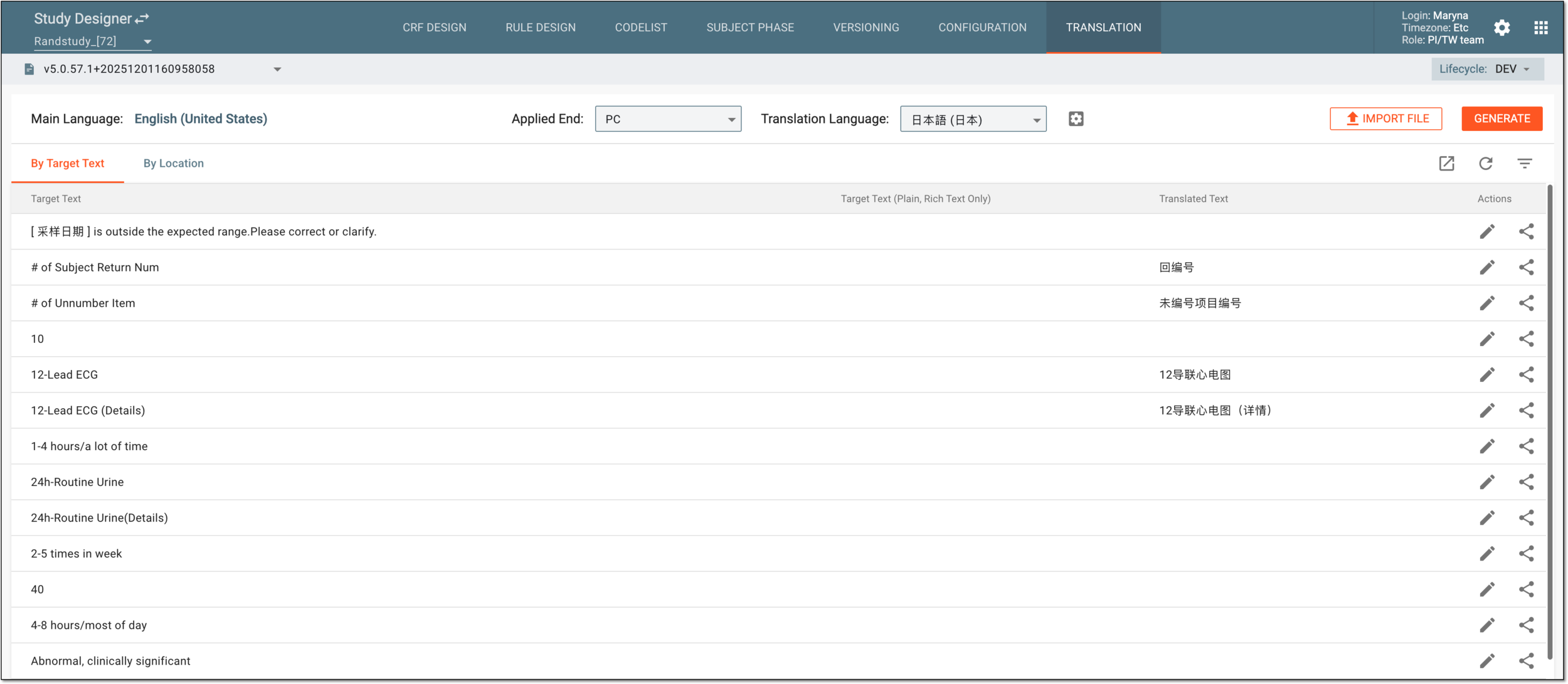
The translation texts can be accessed from the two tabs:
-
By Target: the table lists the texts of the CRF items, help and validation messages, and other entities configured in SD, organized by target texts and their respective translations, disregarding their location in the current study design. This provides a unified view of translations for the study. The translation updates you introduce here, apply to the target text in all locations where it is used.
-
By Location: the table lists the texts of the CRF items (currently, only codelist items) and their respective translations, organized by their location in the current study design. This provides a dedicated view and ability to introduce more targeted changes. The translation updates you introduce here, apply only to the target text in a certain location where it is used.
Tip
You can check the location of the text by viewing its references or ODM element path.
The elements of the Translation feature page are explained in the following table.
|
Element |
Details |
|---|---|
|
Main Language |
Represents the set primary language of the study data collection. |
|
Applied End |
Select the source of the target texts intended for translation—PC (desktop EDC app), eDiary, or eCOA. |
|
Translation Language |
Select the language in which you want to display target text translations in Translation Text List. |
|
By Target Text |
|
|
Target Text |
Represents the original text of the CRF item, codelist item, codelist name, help text, validation message, or another entity configured in SD. |
|
Target Text (Plain, Rich Text Only) |
Represents the plain (no formatting) version of the target text if the original one has rich text formatting applied. This is the text that will be translated to ensure that applied formatting does not affect the resulting translation. |
|
Translated Text |
Represents the translated version of the target text in the selected language. For codelist items, one target text can have multiple translations. |
|
By Location |
|
|
Name |
Represents the codelist name and in square brackets, the codelist item value. |
|
Node Type |
Represents the type of the item to which the target and translation texts apply. Currently, only the Codelist type is supported. |
|
Field |
Represents the parent element of the target text within the codelist in the XML file (if the translations are imported from XML). |
|
Target Text |
Represents the original text of the codelist item value intended for translation. |
|
Target Text (Plain, Rich Text Only) |
Represents the plain (no formatting) version of the target text if the original one has rich text formatting applied. This is the text that will be translated to ensure that applied formatting does not affect the resulting translation. |
|
Translated Text |
Represents the translated version of the target text in the selected language. |
In the following sections, you can learn about all the tools available to you when working with the CRF Translation feature in SD: