Apply translation languages
The Study Designer application provides the capability to translate CRF texts into multiple languages. This provides a significant advantage in global clinical trials where participants speak different languages. By addressing diverse linguistic needs, CRF translation promotes standardized data collection across international sites.
Before commencing the translation of CRF texts, EDETEK administrators predefine translation languages in the eClinical system. Once this is established, you need to select the appropriate languages in the Study Designer application, considering the necessary translation and location of future data collection—whether in the eCOA or eDiary mobile application, or the eClinical EDC system.
-
In the Study Designer application header, select the TRANSLATION tab.
 Figure 1. Accessing CRF translation functionality
-
From the workspace toolbar of the page that opens, select Setting
 .
. Figure 2. Accessing translation language setting
-
In the Translation Language dialog that appears, select languages for necessary applied ends—eCOA, eDiary, or PC depending on where the data is planned to be collected during the study.
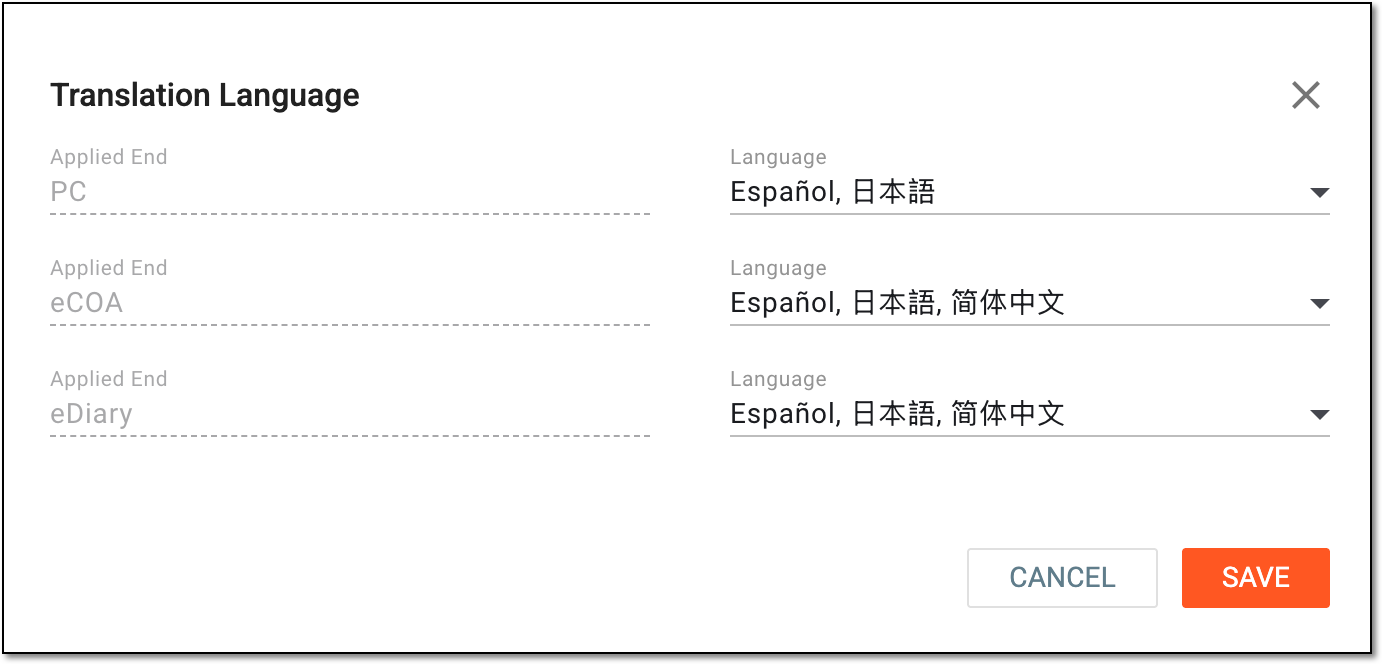 Figure 3. Applying translation languages
Tip
Each applied end represents the subtype of visits. The subtype defines the source of data collection for each visit. For example, if you select Spanish translation language for the eCOA applied end, only the main language and Spanish become available during data entry in the eCOA mobile application. However, the Spanish translation must be updated beforehand.
-
Select
 to apply the changes.
Once saved, translation languages are applied. You can now generate target texts for the CRF.