Delete CRF version
A CRF stands for case report form, a document used in clinical trials to collect and record study data. As the trial evolves, new insights or challenges may emerge, requiring changes to the CRF. These modifications, especially after data collection has commenced in the EDC system, lead to what is known as versioning. This process involves adapting the CRF to new protocol requirements or data collection processes during the clinical trial.
When maintaining CRF versions, you can delete the unnecessary ones when needed. The CRF versions may be deleted in order to keep only the most recent versions for the specific study.
Important
You can only delete CRF versions in the DEV lifecycle, considering they have never been published to EDC in any lifecycle.
-
In the Study Designer application header, select the VERSIONING tab.
 Figure 1. Accessing CRF versions
-
In the Version Information table, next to the needed CRF version, select More
 > Delete
  .
.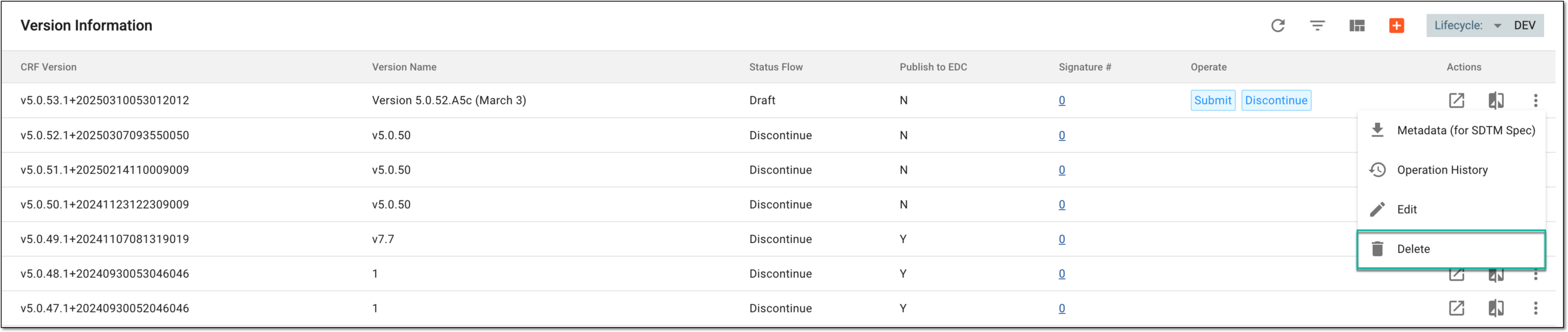 Figure 2. Selecting to delete CRF version
-
In the confirmation dialog that appears, select
 .
.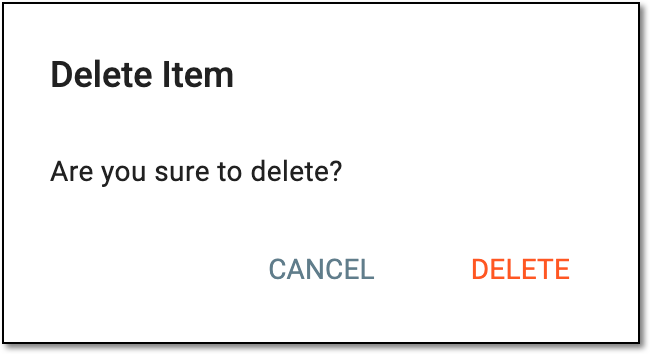 Figure 3. Deleting CRF version
Once confirmed, the CRF version is deleted.