Review domains prepared for coding
In the CODING application, you can examine which domains—associated with your coding batches—are prepared for the coding process, including what variables they contain, from which dictionaries these variables are derived, and what are their current statuses. By reviewing this data, you can confirm that the necessary domains are ready for processing and take appropriate actions to ensure a smooth coding flow.
-
In the Medical Coding application header, select the BATCH tab.
 Figure 1. Accessing batch configurations
-
In the Batch List table that appears, go to the coding batch, which domains you want to review, and select
 next to
it.
next to
it. Figure 2. Initiating domain reviewing
-
On the Domain List page that opens, in the table, review a list of domains prepared for coding, as explained in the following table.
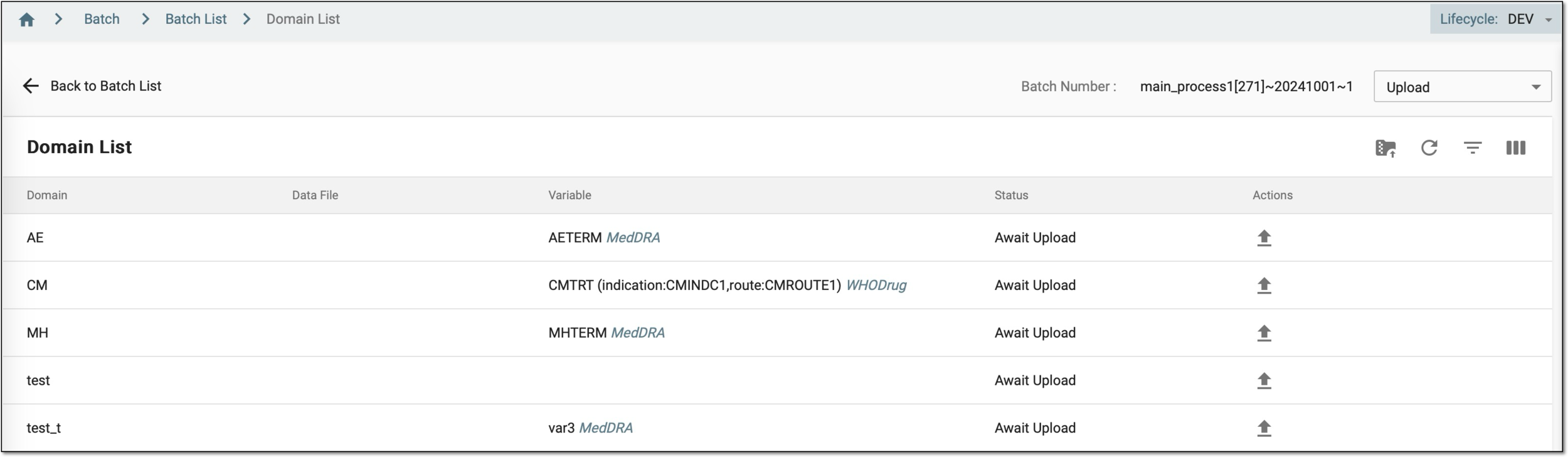 Figure 3. Reviewing domains prepared for coding
Column
Details
Domain
Represents the domain associated with the medical coding data, such as "AE" for adverse events or "CM" for concomitant medications.
The domains you see in this table depend on how the batch was created, as follows.
Data File
Displays a link to the file containing verbatim terms (VTs) uploaded to the domain. You can select this link to download the file for further offline usage. The column is blank if no files have been uploaded yet.
This column is not available for batches created using EDC import, as the data is automatically populated from the EDC system.Variable
Displays the specific variables within the domain that must be coded.
For example, "AETERM" (Adverse Event Term) with the label "MedDRA" or "CMTRT" (Concomitant Medication Treatment) with the label "WHODrug." These variables represent the data elements requiring medical coding.
Status
Indicates the current stage of the domain in the coding process:
After reviewing the domains prepared for coding, you can ensure that all necessary data is ready for the coding process, allowing you to make informed decisions and take the appropriate actions for effective coding management.