Domain configuration
In the Medical Coding module, the Domain subtab provides you with an opportunity to manage and configure various domains used in the coding process. Each domain represents a specific category of medical data, for example, Adverse Events (AE domain) or Concomitant Medications (CM domain), and contains the variables and configurations needed for accurate and consistent coding.
By configuring the domains, you ensure that data captured during the study is properly categorized and coded, facilitating clear and accurate analysis.
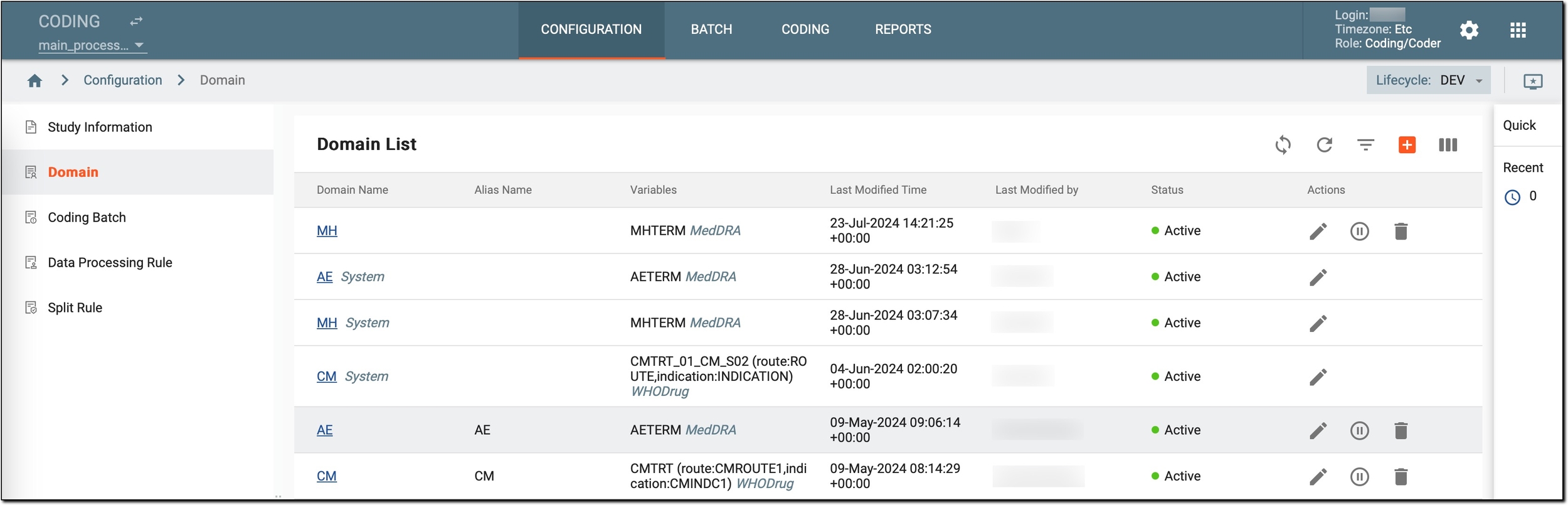
For example, the AE domain might include variables, such as AETERM (the term used to describe the adverse event) and be associated with the MedDRA dictionary. Configuring this domain ensures that all adverse event terms are coded consistently according to the MedDRA standards, enhancing the accuracy and reliability of your study data.
On this page, coders have access to the following options:
-
Sync system domain
 : synchronize the coding variable configurations of the SD application. This option is needed only for studies integrated with eClinical EDC. This ensures that the domain and variable definitions in the system match the most recent updates from SD, maintaining
consistency and accuracy across domain configurations.
: synchronize the coding variable configurations of the SD application. This option is needed only for studies integrated with eClinical EDC. This ensures that the domain and variable definitions in the system match the most recent updates from SD, maintaining
consistency and accuracy across domain configurations. -
View domain details: review the details of each domain, including its name, alias, variables, last modified time, last modified by, and status.
-
Create a new domain
 : initiate the creation of
a new domain. This involves defining the domain name and alias.
: initiate the creation of
a new domain. This involves defining the domain name and alias. -
Configure an existing domain: adjust the settings of a domain to fine-tune how it functions within the coding process.
-
Edit an existing domain
 : modify the alias name of a domain to
better reflect its purpose or make it more understandable for users.
: modify the alias name of a domain to
better reflect its purpose or make it more understandable for users. -
Activate
 /Inactivate
  : control the usage of specific
domains in the coding process by activating or deactivating them as needed.
: control the usage of specific
domains in the coding process by activating or deactivating them as needed. -
Delete
 : remove outdated or unnecessary domains
from the system.
: remove outdated or unnecessary domains
from the system.