Manage coding batches via Upload feature
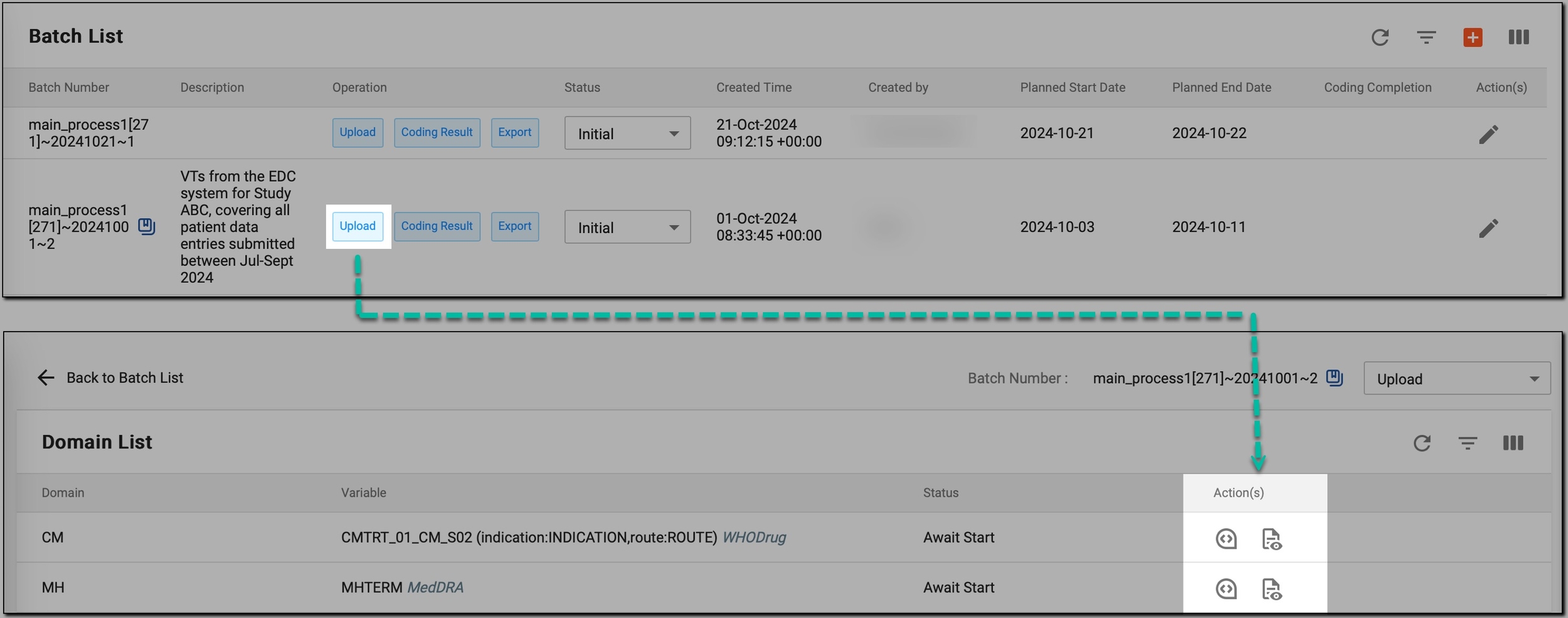
Once coding batches are created, you have the option to use the Upload feature to manage your coding batches effectively. This feature helps you perform various activities related to your coding batches, including:
-
Review domains prepared for coding: gain insights into the available domains prepared for coding, including their associated variables, dictionaries, and current status in the coding process.
-
Download original data files: retrieve files containing the verbatim terms (VTs) associated with the main variable of a specific domain, allowing for offline analysis or sharing of data.
-
Upload data files: upload files containing the VTs associated with the main variable of a specific domain, allowing for accurate association and streamlined processing in the coding flow.
-
Delete data files: permanently remove previously uploaded files with VTs from the system. This action ensures that outdated or incorrect verbatim terms are not used in the coding process.
-
Review uploaded data: view the results of the initial data upload (both from files and the EDC system), helping you check which VTs have been uploaded and prepared for coding. Additionally, if the coding process has been started, the system shows how VTs have been matched with dictionaries like MedDRA or WHODrug.
-
Start the coding process: initiate coding for the uploaded terms.
-
Cancel the coding process: stop the coding process that has already been started. This option is useful when there is a need to halt the coding due to errors in the uploaded VTs, changes in the domain configuration, or any other reasons that require the process to be revised before completion.
-
Preprocess domains: begin the preprocessing phase for domains that require additional data handling before coding can begin.