Subject information management
In EDC, the Subject Information feature comprises the Subject List table with all subjects enrolled in a study and their details—current phase, status, and so on.
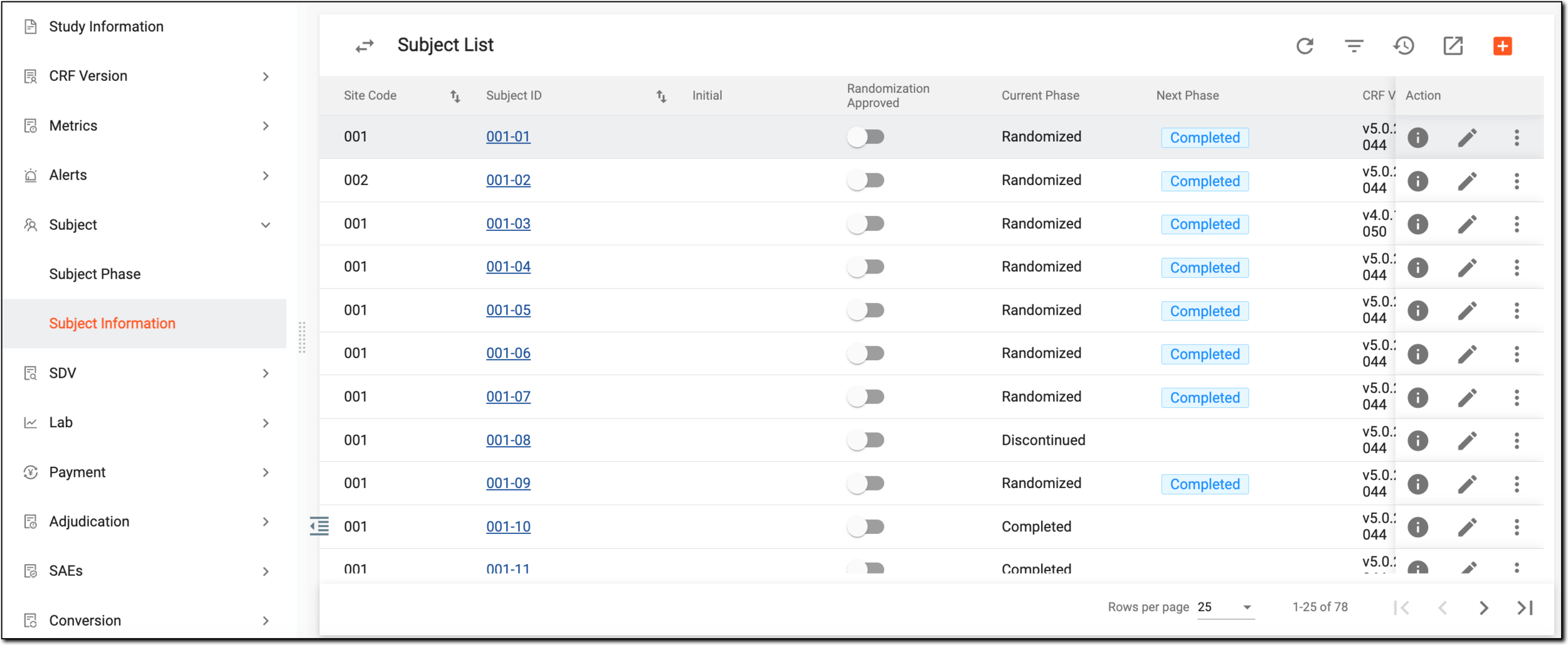
This page is mainly used by CRCs (clinical research coordinators) to analyze subject data and perform various actions on it.
For example, directly from the Subject List table you can activate or deactivate a subject, discontinue a subject, export subject data, drill down to the Subject data entry page where you can actually start entering clinical data for a certain subject, and many more.
The details of Subject List are explained in detail in the following table.
|
Column |
Details |
|---|---|
|
Site Code |
Represents the code of the site at which the subject is registered. |
|
[Unique ID Label] |
Represents a unique ID of the subject whose clinical data is expected to be collected. This is also an active link that navigates you to the DATA ENTRY > Visit Overview page, where you can view the visits and enter clinical data for a certain subject.
|
|
Current Phase |
Represents the current phase of a particular subject within a clinical trial lifecycle (for example, Enrolled, Completed, Screen Failure, and so on). The names of the phases are customizable and are initially set up in the Study Designer application. |
|
Next Phase |
Represents the next expected phase of the clinical trial lifecycle for a particular subject. Select the link to move the subject to the next phase. |
|
CRF Version |
Represents the version of the case report form that is used in the study to collect data from each participating subject. |
|
Created by |
Represents the name of the user who has created a subject in the EDC system. |
|
Created Date |
Represents the date and time of the subject creation in the EDC system. |
|
Last Modified By |
Represents the user name of a person who has made the latest updates to the subject. |
|
Last Modified Date |
Represents the date and time when the latest updates have been made to the subject. |
|
Status |
Represents the current status of the subject in the course of a clinical study:
|