Depot inventory by item
The Inventory > By Item tab gives you detailed information on each item accounted for in the depot: its label number, disposition, expiration date, and so on.
The data in the By Item table can be organized by product units or container units based on your study configurations.
Important
If no container units are configured in IWRS, then all operations in Inventory occur in product units.
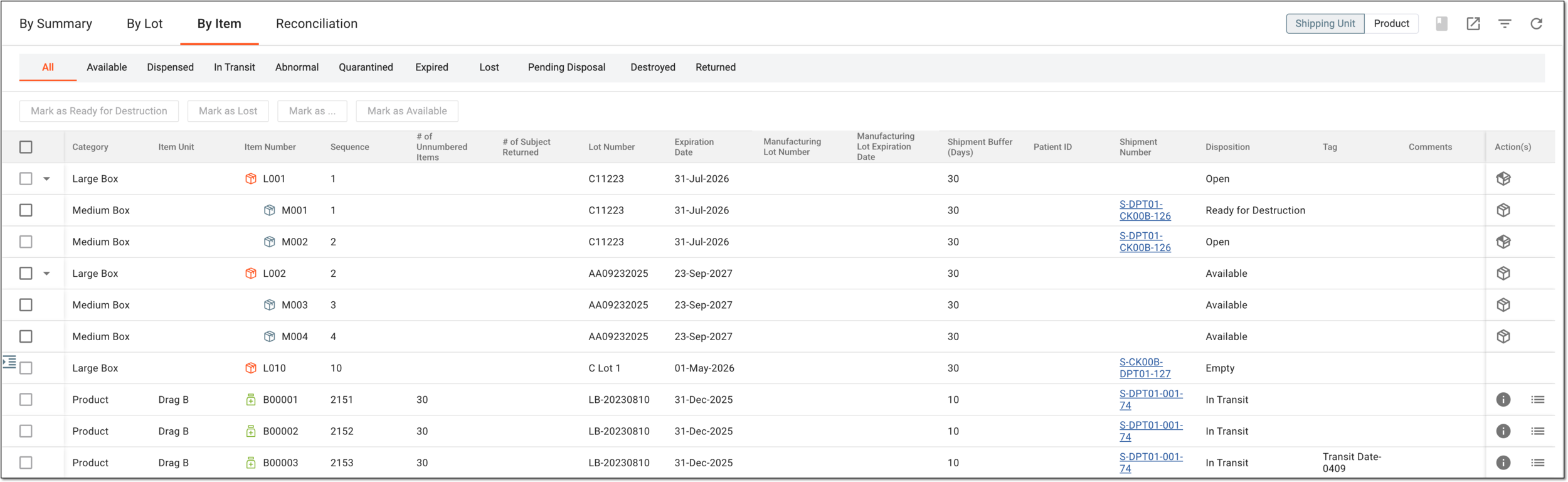
In the following table, you can find the description of each element of the By Item tab.
|
Element |
Details |
|---|---|
|
Shipping Unit/Product |
Switch between these filters to display the inventory statistics either by both shipping units (containers and products) or only by products.
|
|
Item disposition filters |
Select the needed tile (Available, Dispensed, In Transit, and so on) to filter the inventory by disposition and display only the pertaining product or container units. |
|
Category |
Represents one of the following:
|
|
Item Unit |
Represents the name of the product.
|
|
Item Number |
Represents the unique identification number of the product or container unit. |
|
Sequence |
Represents the sequential number of the product or container unit assigned to it in the system. |
|
# of Unnumbered Items |
Represents the number of unnumbered subitems within the product unit. For instance, if a product unit is a vial of pills, the number of pills in a vial is the value for this column.
|
|
# of Subject Returned |
Represents the number of unnumbered subitems returned by the subject. For instance, if the subject receives a vial of nine pills and then returns two, then 2 is the value for this column.
|
|
Lot Number |
Represents the unique identifier of a packaging lot to which the product or container unit belongs. |
|
Expiration Date |
Represents the expiration date configured for the packaging lot and indicating when the product or container unit expires. |
|
Manufacturing Lot Number |
Represents the unique identifier of a manufacturing lot to which the product unit belongs. |
|
Manufacturing Lot Expiration Date |
Represents the expiration date configured for the manufacturing lot and indicating when the product unit expires.
|
|
Expiry Buffer (days) |
Represents the number of days set as an expiration buffer. The buffer period prevents subjects from getting and taking items that are about to expire.
|
|
[Unique ID Label] |
Represents a unique identifier assigned to a subject to whom the items are dispensed or who returned the items.
|
|
Shipment Number |
Represents the product or container unit's latest shipment number (or a so-called shipment ID). Select the number to navigate to the corresponding shipment details page. |
|
Disposition |
Represents a current disposition of the product or container unit (open, available, in transit, expired, lost, and so on). |
|
Tag |
Represents the manually added tag, if any. Tags do not have any system logic; they are used as markers only.
|
|
Comment |
Represents a comment added to the product or container unit, if any. |
In the depot inventory by item, the following actions are available: