Add new container unit
In IWRS, containers are hierarchical units used to group and manage investigational medicinal products (IMPs) and placebos for shipping and inventory purposes. These containers serve as shipping units that enable the effective management of IMPs between depots and study sites, ensuring that products are properly categorized and tracked throughout their shipment lifecycle.
-
In the IWRS application header, select the TREATMENT DESIGN tab.
-
In the left pane, select the Item Unit subtab.
-
On the page that appears, select the Container Unit tab.
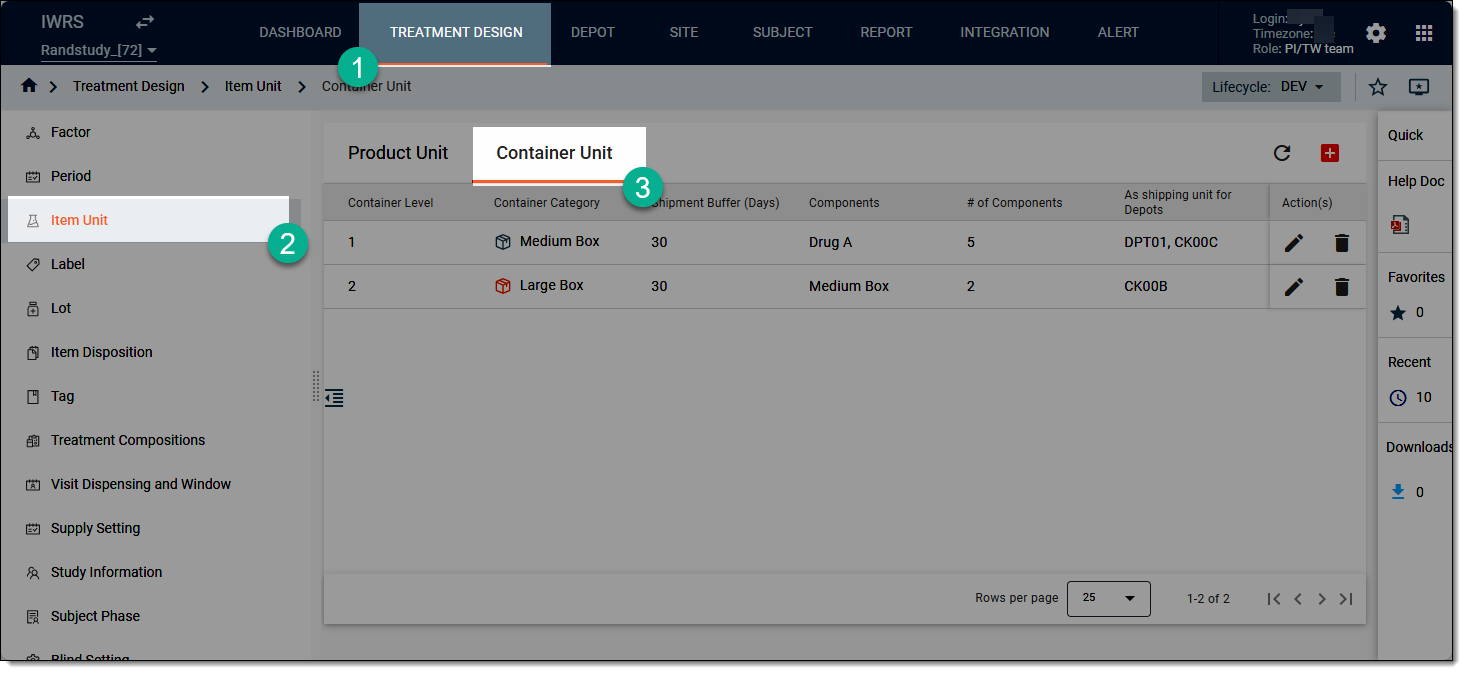 Figure 1. Accessing container unit list
-
On the page that opens, from the workspace toolbar, select New Item
 .
.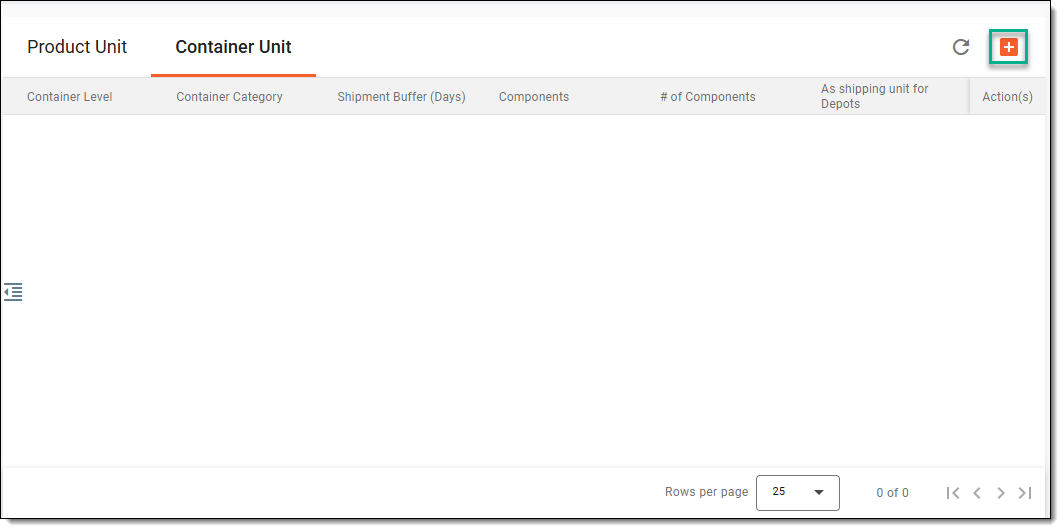 Figure 2. Accessing option to create container unit
-
In the dialog that opens, as per the system logic, you can only create two levels of container units one by one as explained in the following sections.
Important
Before creating the container units, make sure to create the level 1 container first.
The necessary information required to create the level 1 container unit is explained in the following table.
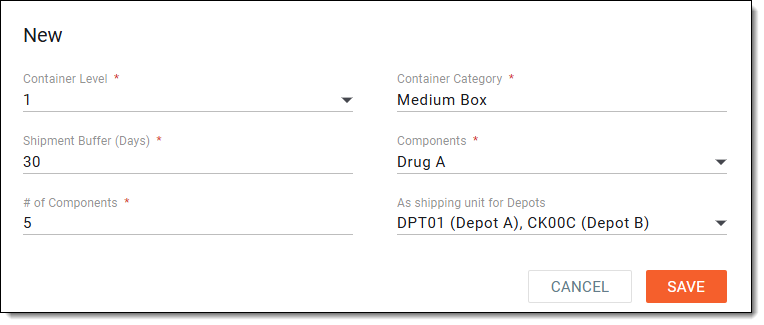 Figure 3. Creating level 1 container
Tip
In the following table, mandatory elements are marked with an asterisk (*).
Column
Details
Container Level
Select 1 as the parent unit for the product (for example, a medium box containing IMP units or sub products).
Currently, only one container level can be added per system configuration.Container Category
Enter the category or type of container based on the selected container level. This information helps in organizing site inventory and shipment logic, as well as labelling and identifying containers, for example, medium box, small box, and so on.
Shipment Buffer (days)
Enter the buffer period (number of days) used in inventory calculations to determine when a shipment should be triggered.
For example, if the shipment buffer is set to "7" days, the system will trigger resupply if inventory is projected to run out within seven days.
This functionality is similar to the one applied to the product units, but for the container unit, it must be unified across all products within
                                        the container.
Components
Select the products residing within the container, based on the selected container level.
For instance, if the selected container level is 1 (medium box), then the components must be IMPs, placebos, drugs, and so on.
# of Components
Enter number of components inside the container. This is used for label validation and inventory tracking.
This number must match the actual number of contents within the container to avoid invalid label mapping.As shipping unit for Depots
Select the depots from the list that are authorized to use this container type as a shipping unit. This feature limits shipment requests to specific container categories per depot.
For example, depot A can only ship medium boxes and depot B can only ship large boxes.
SAVE
Select
 to implement your changes.
CANCEL
Select
 to discard the container unit creation and close the dialog.
The necessary information required to create the level 2 container unit is explained in the following table.
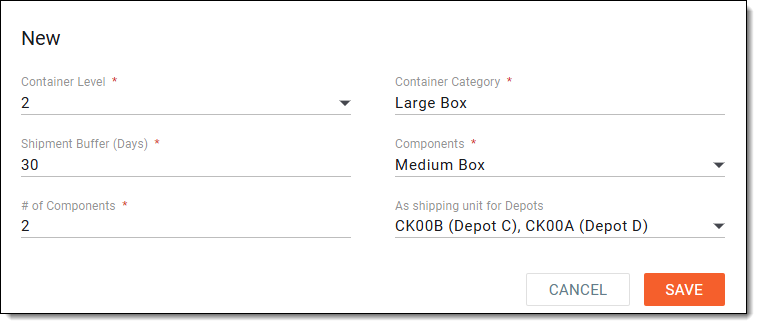 Figure 4. Creating level 2 container
Tip
In the following table, mandatory elements are marked with an asterisk (*).
Column
Details
Container Level
Select 2 as the parent unit for level 1 container (for example, a large box containing multiple medium boxes).
This container must be created after the level 1 container.Container Category
Enter the category or type of container based on the selected container level. This information helps in organizing site inventory and shipment logic, as well as labelling and identifying containers, for example, medium box, small box, and so on.
Shipment Buffer (days)
Enter the buffer period (number of days) used in inventory calculations to determine when a shipment should be triggered.
For example, if the shipment buffer is set to "7" days, the system will trigger resupply if inventory is projected to run out within seven days.
This functionality is similar to the one applied to the product units, but for the container unit, it must be unified across all products within
                                        the container.
Components
Select the products residing within this parent container. Normally, this field is autopopulated with the level 1 container.
For instance, if the selected container level is 2 (large box), then the components must be medium boxes.
# of Components
Enter number of components inside the container. This is used for label validation and inventory tracking.
This number must match the actual number of contents within the container to avoid invalid label mapping.As shipping unit for Depots
Select the depots from the list that are authorized to use this container type as a shipping unit. This feature limits shipment requests to specific container categories per depot.
For example, depot A can only ship medium boxes and depot B can only ship large boxes.
SAVE
Select
to implement your changes.CANCEL
Select
to discard the container unit creation and close the dialog.
Once saved, a new container unit has now been added. You can now upload and generate a package label for it.