Container unit list
In IWRS, containers are hierarchical units used to group and manage investigational medicinal products (IMPs) and placebos for shipping and inventory purposes. They act as parent units for product units and are defined at different levels.
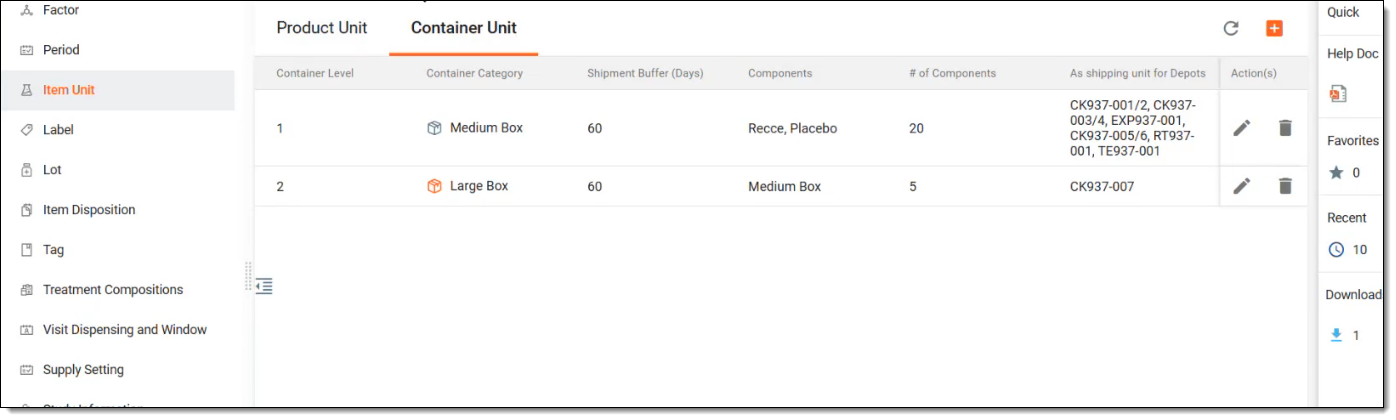
All the container units previously created in IWRS are displayed under TREATMENT DESIGN > Container Unit with the details explained in the following table.
|
Column |
Details |
|---|---|
|
Container Level |
Represents the hierarchical position of the container in the packaging structure.
|
|
Container Category |
Represents the category or type of container, aiding in organizing site inventory and shipment logic, as well as labelling and identifying containers, for example, medium box and large box. |
|
Shipment Buffer (days) |
Represents the buffer period (number of days) used in inventory calculations to determine when a shipment should be triggered. For example, if the shipment buffer is set to "7" days, the system will trigger resupply if inventory is projected to run out within seven days.
|
|
Components |
Represents the products residing within the container, based on the selected container level. For instance, if the selected container level is 1, then the components must be IMPs, placebos, and so on. On the contrary, if the selected container level is 2, then the components must be of the level 1 container unit. |
|
# of Components |
Represents the user-defined number of components inside the container. This is used for label validation and inventory tracking. |
|
As shipping unit for Depots |
Represents the depot names that are authorized to use this container type as a shipping unit. This feature limits shipment requests to specific container categories per depot. For example, depot A can only ship medium boxes and depot B can only ship large boxes. |
The following actions can be applied to the container units you see in the container unit list:
-
Add a new container unit: to create a new container unit from scratch to group individual products so it can be used in the shipment creation request from a depot to a site.
-
Edit a container unit: to make updates and edits to your container units.
-
Delete a container unit: to delete container units you no longer need.