PDF import
With the PDF Import functionality, you can import safety data from the unstructured source documents, such as scanned SAE forms in the PDF format. The files can be uploaded manually or you can configure the email intake to pull the files automatically from the predefined mailbox and land them to PV for further processing. Based on the preconfigured template, the system is able to analyze and transcribe the file to retrieve the data and create an ICSR in PV.
Important
If you want to use PDF autotranscription, you need to provide a template to EDETEK administrator for the system to be configured to recognize your similar PDF uploads and properly interpret their contents.
This functionality saves time on manual data entry efforts and facilitates batch uploads. It offers the capability to upload multiple files simultaneously and process them, dividing them into multiple safety reports. Additionally, you can upload a bundle of files, select the primary one as the source of safety data, and attach the remaining files as source documents to your case. You can also configure the email intake to pull the files automatically from the predefined mailbox and land them to PV for further processing.
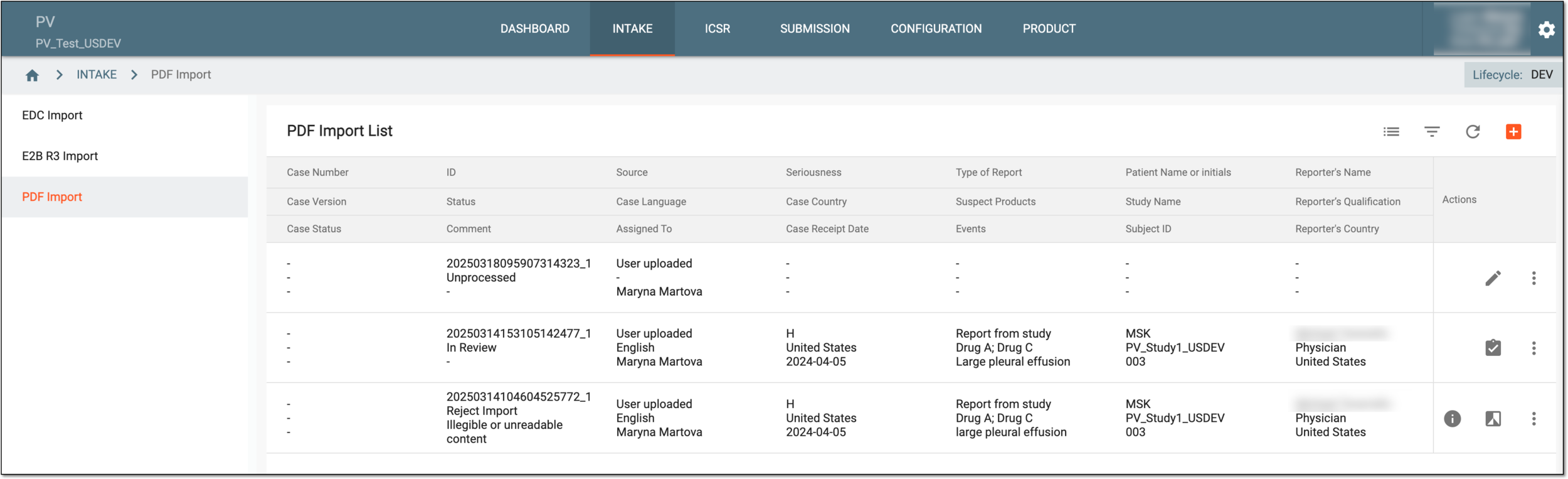
All the records for uploaded or retrieved from emails PDFs—the ones used to create ICSRs, rejected, or not yet processed—can be found in PDF Import List. The details available are interpreted in the following table.
Tip
The records on the list are based on the study access permission granted to you via ADMIN.
|
Column |
Details |
|---|---|
|
Case Number |
Represents the unique identifier assigned by the system to the ICSR created or updated based on the data retrieved from the uploaded PDF. This value becomes available after a successful review and creation of an initial or follow-up report or upon an update of the existing ICSR with retrieved data. This value is also an active link that you can select to open the ICSR in the new browser page. |
|
Case Version |
Represents the version of the case created based on the data retrieved from the uploaded PDF. For instance, if the initial case is created, the version is 001, if the first follow-up is made to the initial version, the version is 002, the second follow-up is 003, and so on. |
|
Case Status |
Represents the current status of the case created based on the data retrieved from the uploaded PDF. |
|
ID |
Represents the unique identifier assigned by the system to the PDF file or a batch of files simultaneously uploaded to the system. This ID helps track the original import record even if it is split into multiple file groups that result in different ICSRs. |
|
Status |
Represents the current status of the PDF or its extracted data processing that can be one of the following:
|
|
Comment |
Represents the comment entered by the user when accepting the safety data to create an ICSR or rejecting the data import. |
|
Source |
Represents the origin of the file for data import as follows:
|
|
Case Language |
Represents the language of the ICSR management. |
|
Assigned To |
Represents the name of the user to whom the ICSR is assigned for review in PV. |
|
Seriousness |
Represents the level of the seriousness of extracted ICSR as the concatenated value when any event meets the criteria such as:
|
|
Case Country |
Represents the country where the first AE occurred at the time of the initial case processing. |
|
Case Receipt Date |
Represents the latest date when the safety data is received. |
|
Type of Report |
Represents how the report originated, for instance, Report from Study or Spontaneous Report. |
|
Suspect Products |
Represents the concatenated value of all suspect products divided by semicolon. |
|
Events |
Represents the concatenated value of all reported events names divided by semicolon. |
|
Patient Name or initials |
Represents the patient's name or initials. The value can be masked (MSK) for blinding. |
|
Study Name |
Represents the study for which the case is reported. |
|
Subject ID |
Represents the unique identifier assigned to the subject during the course of the study. |
|
Reporter's Name |
Represents the name of the individual who reported the case. |
|
Reporter’s Qualification |
Represents the occupation of the individual who reported the case. |
|
Reporter's Country |
Represents the country of origin of the individual who reported the case. |
|
Creator |
Represents the name of the user who uploaded the file for processing. |
|
Create Time |
Represents the exact date, time, and time zone indicator of when the file is uploaded to PV. |
|
Modified By |
Represents the name of the user who performed the latest amendment to the file or extracted safety data. |
|
Modified Time |
Represents the exact date, time, and time zone indicator of when the latest amendment is made to the file or extracted safety data. |
In the following sections, you can learn more about available operations for PDF import: