Email intake configuration
In PV, you can set up the system to automatically retrieve files—SAE forms—from emails sent to a specific mailbox. When retrieved, these files land in the PDF Import module where the data is processed and imported as new or follow-up ICSR. The email intake functionality helps you minimize manual file upload operations, fast-forward the data retrieval process, and eliminate potential human error.
Important
Contact the EDETEK administrator for assistance in preconfiguring the mailbox with needed subfolders and other technical parameters—such as email and PDF templates and more—to suit the email intake process.
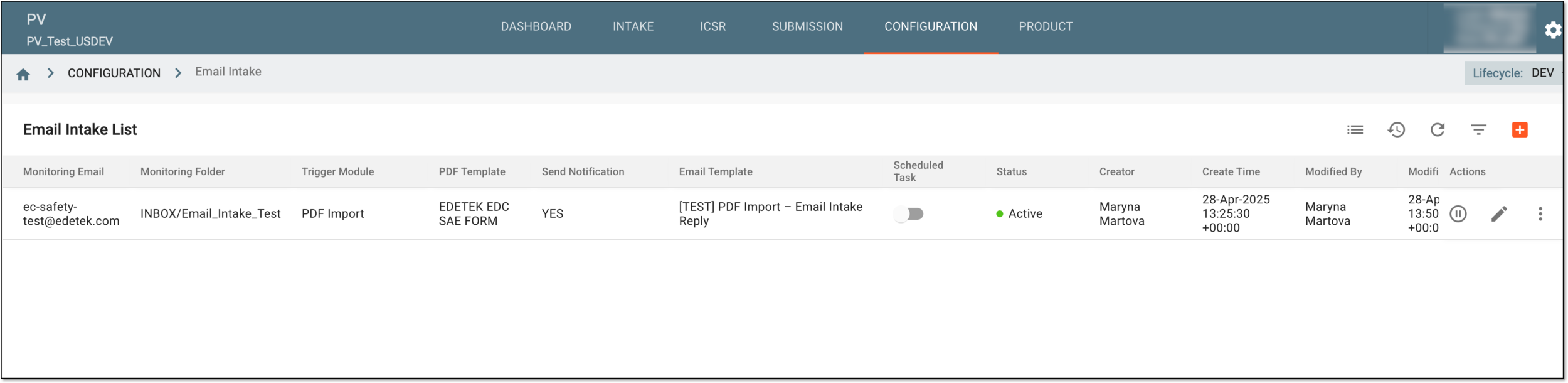
From the Email Intake List page, you can access all the email intake configurations and their details as explained in the following table.
|
Column |
Details |
|---|---|
|
Monitoring Email |
Represents the email to which the files are sent and then retrieved from by the PV system. |
|
Monitoring Folder |
Represents the folder under the preconfigured mailbox that is being checked for any incoming emails with files for retrieval. |
|
Trigger Module |
Represents the name of the PV module—PDF Import—that hosts the files retrieved from emails for further processing and import to the system. |
|
PDF Template |
Represents the name of the PDF template preconfigured for you in PV by the EDETEK administrator, aiding the system to recognize your similar PDF files and properly interpret their contents. |
|
Send Notification |
Represents if the successful data processing notification is sent or not as follows:
|
|
Email Template |
Represents the name of the email notification template that is automatically sent when the data from the email intake file is successfully imported to PV.
|
|
Scheduled Task |
Сontrol the email intake process as follows:
|
|
Status |
Represents the current state of the email intake configuration—activated or inactivated. |
|
Creator |
Represents the name of the system user who added the email intake configuration. |
|
Create Time |
Represents the exact date, time, and time zone indicator when the email intake configuration was added. |
|
Modified By |
Represents the name of the system user who last edited the email intake configuration. |
|
Modified Time |
Represents the exact date, time, and time zone indicator when the email intake configuration was last edited. |