Activate/Inactivate email intake configuration
In PV, you can set up the system to automatically retrieve files—SAE forms—from emails sent to a specific mailbox by adding the email intake configurations. Once the configuration is added, it obtains the active status. However, you can change the status from active to inactive or back to better suit the current state of readiness or to control the unintended actions with your configuration.
Important
There are certain operations that rely on the email intake configuration activation status, such as:
-
You can delete the email intake configurations only of the Inactive status.
-
You can enable the email intake configurations only of the Active status.
For instance, the email intake configuration is added but requires further adjustments as it is a draft setup awaiting client's details. Thus, you inactivate it to reflect in the system that it is not ready to be used and prevent other users from accidentally enabling it.
-
In the PV application header, select the CONFIGURATION tab.
-
On the page that opens, from the left pane, select Email Intake.
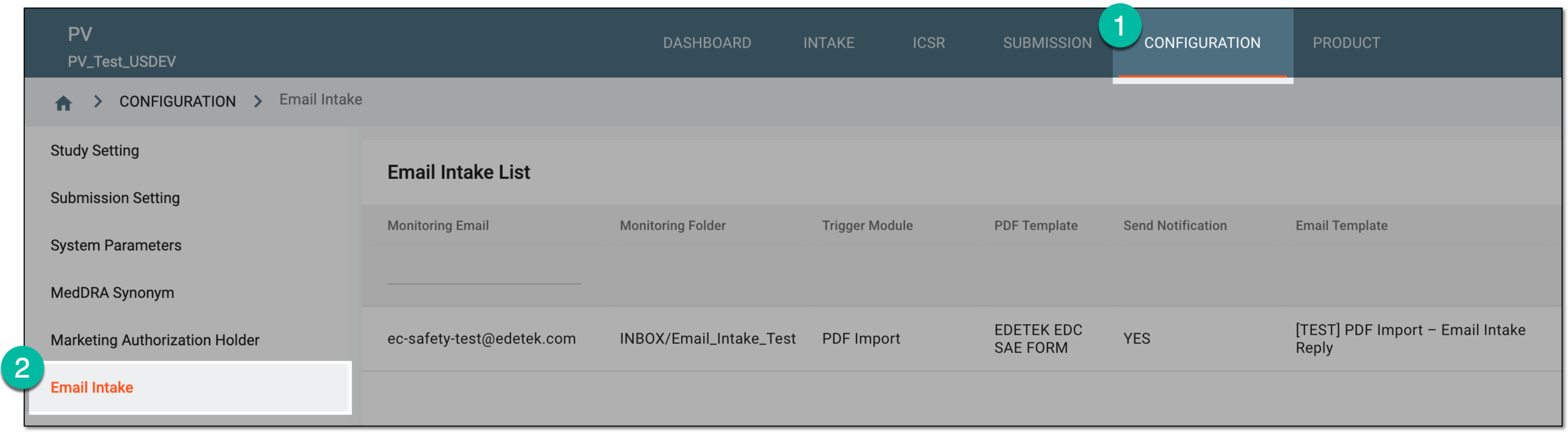 Figure 1. Accessing email intake configuration
-
In the Email Intake List table that appears, locate the configuration for which you need to change the status. Then in the Actions column, select one of the following:
-
Activate
 : to make the email intake configuration active and available for enabling and running in the system.
 Figure 2. Selecting option to activate email intake configuration
-
Inactivate
 : to make the email intake configuration inactive and only available for deletion until activated
again.
: to make the email intake configuration inactive and only available for deletion until activated
again. Figure 3. Selecting option to inactivate email intake configuration
Important
You cannot inactivate the enabled email intake configuration.
-
Once the needed option is selected, the status of the email intake configuration becomes Active or Inactive, accordingly.