View inventory accountability details
The Inventory Accountability Details report in the IWRS application provides comprehensive statistics per product unit at your study sites. With this data, for each individual drug (product unit), you can track how many items are shipped to, dispensed from, and currently available in the inventory of sites, as well as other details useful for statistical analysis.
Important
In Unblind Inventory Accountability Metrics, you only see the product units for which the subject return is required.
To view this report, you must have the Unblind Inventory Accountability Metrics permission granted to your user role via the ADMIN application.
-
In the IWRS application header, select the REPORT tab.
-
On the page that opens, in the left pane, select Inventory Report > Unblind Inventory Accountability Metrics.
-
In the Unblind Inventory Accountability Metrics table that opens, view the quarantine items details as explained in the following table.
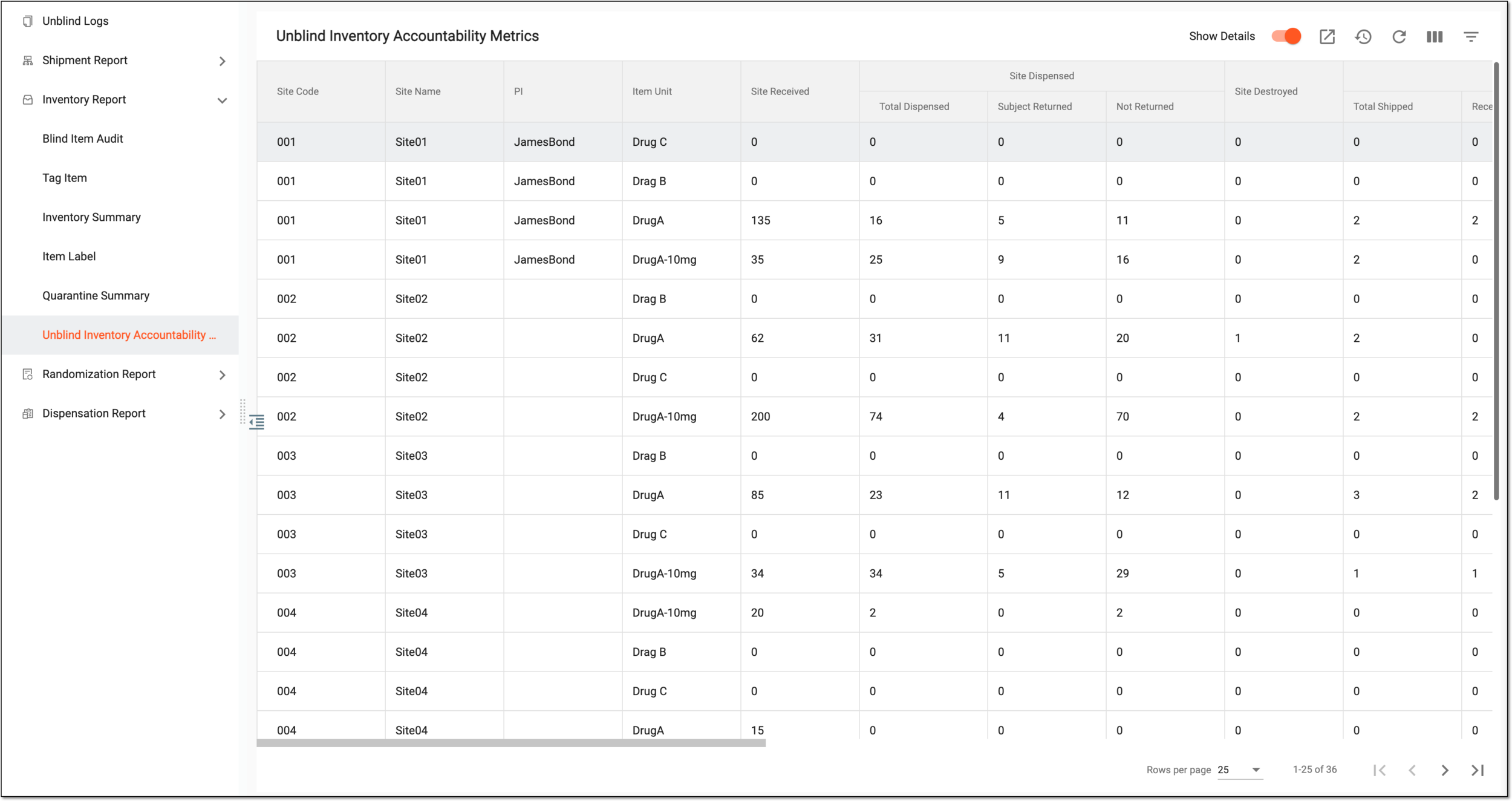 Figure 1. Viewing inventory accountability details
Tip
From the workspace toolbar, select Visible Columns
 to choose the columns you want to show or hide
from the report before viewing it.
to choose the columns you want to show or hide
from the report before viewing it.-
Show Details: turn this toggle on to enable more columns with in-depth statistics for Site Dispensed, Site Returned for Destruction, Site Returned Available Items, and Items at Site data. If turned off, only the total number of items is displayed for these categories.
-
Visible Columns
: use to choose the columns you want to show or hide from the report before
viewing it.
Column
Details
Site Code
Represents the code of the site for which the item accountability statistics are given.
Site Name
Represents the name of the site for which the item accountability statistics are given.
PI
Represents the name of the principal investigator (PI) responsible for the site's inventory and shipments.
Item Unit
Represents the name of the item unit (investigational product or drug) whose accountability statistics are given.
Site Received
Represents the total number of items delivered to the site during its participation in a study.
Site Dispensed
Represents one of the following:
-
If the Show Details toggle is turned off, this column represents the total number of items dispensed (given) by the site to the subjects.
-
If the Show Details toggle is turned on, this column is divided into three: Total Dispensed, Subject Returned, and Not Returned, each representing their values.
Total Dispensed
Represents the total number of items dispensed (given) by the site to the subjects.
This column is only available if the Show Details toggle is turned on.Subject Returned
Represents the total number of dispensed items returned by subjects to the site for some reason, for instance, if they were expired.
This column is only available if the Show Details toggle is turned on.Not Returned
Represents the total number of items that were dispensed to the subjects and not returned afterward.
This column is only available if the Show Details toggle is turned on.Site Destroyed
Represents the total number of items that were destroyed at the site due to some reason, for instance, if they were damaged.
Site Returned for Destruction
Represents one of the following:
-
If the Show Details toggle is turned off, this column represents the total number of items that were returned for destruction by the site to the respective depot.
-
If the Show Details toggle is turned on, this column is divided into three: Total Shipped, Received, Lost, and In Transit, each representing their values.
Total Shipped
Represents the total number of items that were returned for destruction by the site to the respective depot.
Received
Represents the total number of items that were returned for destruction by the site to the respective depot and are already confirmed as received by the recipient.
Lost
Represents the total number of items that were returned for destruction by the site to the respective depot, however, marked as lost by the recipient.
In Transit
Represents the total number of items that were returned for destruction by the site to the respective depot, however, they are still being delivered.
Site Returned Available Items
Represents one of the following:
-
If the Show Details toggle is turned off, this column represents the total number of available items returned by the site to the respective depot for some reason, for instance, due to excess inventory.
-
If the Show Details toggle is turned on, this column is divided into three: Total Shipped, Received, Lost, and In Transit, each representing their values.
Total Shipped
Represents the total number of available items returned by the site to the respective depot.
Received
Represents the total number of available items that were returned by the site to the respective depot and are already confirmed as received by the recipient.
Lost
Represents the total number of available items that were returned by the site to the respective depot, however, marked as lost by the recipient.
In Transit
Represents the total number of available items that were returned by the site to the respective depot, however, they are still being delivered.
Items at Site
Represents one of the following:
-
If the Show Details toggle is turned off, this column represents the total number of items currently available in the site inventory.
-
If the Show Details toggle is turned on, this column is divided into three: Total Shipped, Received, Lost, and In Transit, each representing their values.
Total at Site
Represents the total number of items currently accounted for in the site inventory in various statuses (item dispositions).
Available
Represents the total number of items currently accounted for in the site inventory in the Available status.
Expired
Represents the total number of items currently accounted for in the site inventory in the Expired status.
Lost
Represents the total number of items currently accounted for in the site inventory in the Lost status.
Damaged
Represents the total number of items currently accounted for in the site inventory in the Damaged status.
Quarantined
Represents the total number of items currently accounted for in the site inventory in the Quarantined status.
Unavailable (external)
Represents the total number of items currently accounted for in the site inventory in one of the custom-configured dispositions.
Pending Disposal
Represents the total number of items currently accounted for in the site inventory in the Pending Disposal status.
-
You have viewed the unblinded inventory accountability metrics. You can also export the report data to work with it offline.