View inventory accountability details
The Inventory Accountability Details report in the IWRS application provides comprehensive statistics per item at your study sites and depots. However, the details of this report are intended for blinded users as the item unit information is not disclosed. With this data, for each item, the supply managers can track current disposition, location—site or depot, reconciliation status, and other details useful for statistical analysis.
Important
In Inventory Accountability Details, you only see the item units that are packaging for unnumbered items and for which the subject return is required.
To view this report, you must have the Inventory Accountability Details permission granted to your user role via the ADMIN application.
-
In the IWRS application header, select the REPORT tab.
-
On the page that opens, in the left pane, select Inventory Report > Inventory Accountability Details.
-
In the Inventory Accountability Details table that opens, view the quarantine items details as explained in the following table.
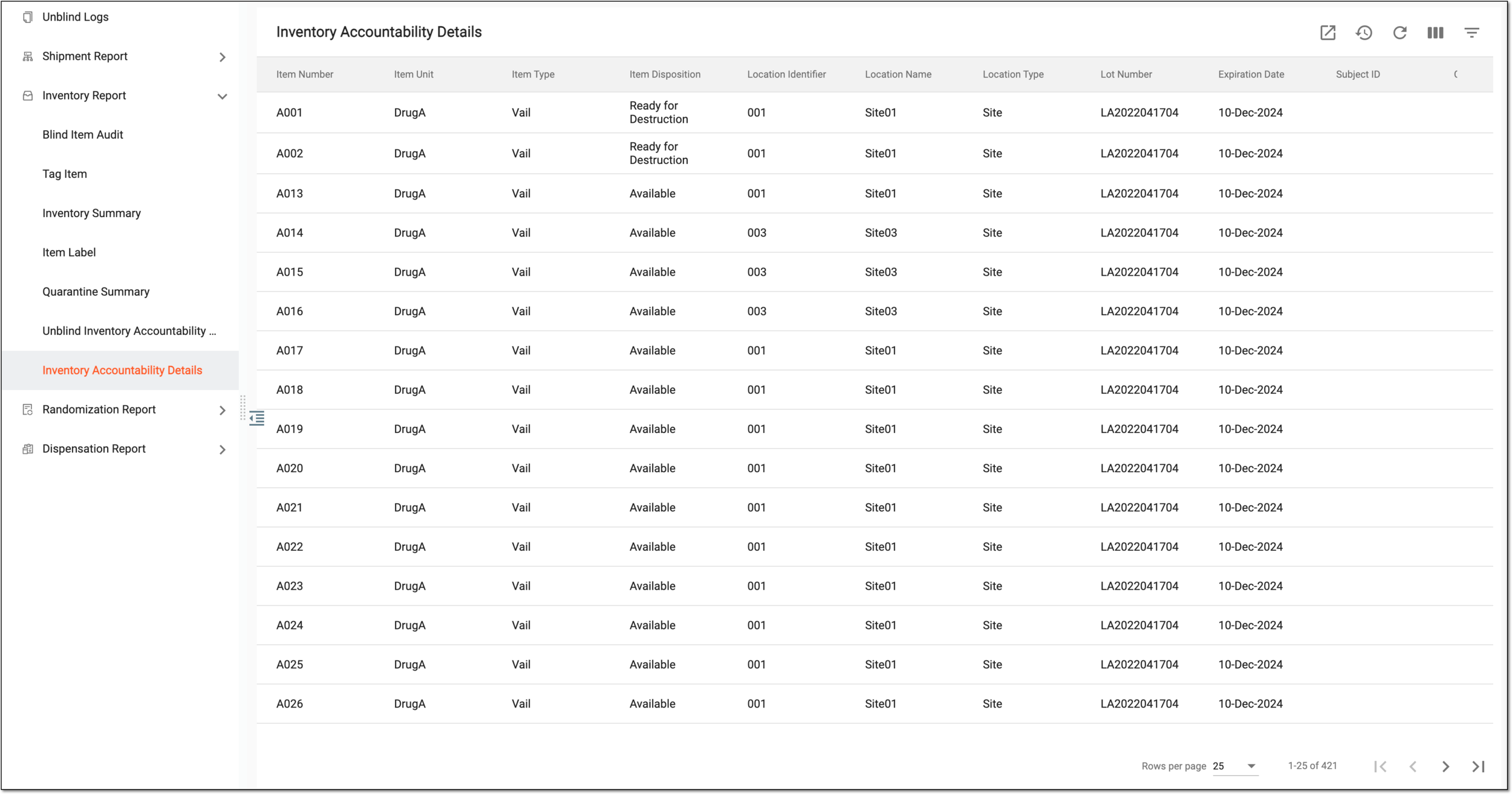 Figure 1. Viewing inventory accountability details
Tip
From the workspace toolbar, select Visible Columns
 to choose the columns you want to show or hide
from the report before viewing it.
to choose the columns you want to show or hide
from the report before viewing it.Column
Details
Item Number
Represents the unique identification number of the item.
Item Unit
Represents the unit (name) of the item, for instance, Vitamin C.
Item Type
Represents the type of packaging that the item is, for instance, a vial or a blister.
Item Disposition
Represents the current item status at the inventory of the current item location—site or depot—for instance, Available, In Transit, Ready for Destruction, or else.
Location Identifier
Represents the unique identification number of the current item location—site or depot.
Location Name
Represents the name of the current item location—site or depot.
Location Type
Represents if the current item location is Site or Depot.
Lot Number
Represents the unique identification number of the packaging lot to which the item belongs.
Expiration Date
Represents the expiration date of the item that is the same as the packaging lot to which the item belongs.
Subject ID
Represents the unique identification number of the subject to whom the item is dispensed.
Count by Site
Represents the number of items in a packaging counted by the clinical research coordinator (CRC) when it was returned by the subject.
Monitor Count
Represents the number of items in a packaging counted upon site inventory reconciliation by the monitor—most commonly clinical research associate (CRA).
Monitor Reconciliation Status
Represents the status of the item set by the monitor—most commonly CRA—upon site inventory reconciliation. It can be one of the following:
-
Not Reconciled: the status represents that the reconciliation was not performed.
-
Complete: the status represents that reconciliation is completed and the item is finalized to one of the conclusions—Ready for Destruction or To be Returned.
-
With Exception: the status represents that reconciliation is completed partially and not all items in packaging can receive their conclusion.
Site Reconciled by
Represents the name of the user who performed site inventory reconciliation.
Depot Reconciliation Count
Represents the number of items in a packaging counted by the monitor at the depot upon performing depot inventory reconciliation.
Depot Reconciliation Status
Represents the status of the item set by the monitor upon depot inventory reconciliation. It can be one of the following:
-
Not Reconciled: the status represents that the reconciliation was not performed.
-
Complete: the status represents that reconciliation is completed and the item is ready to be destroyed by the depot.
-
With Exception: the status represents that reconciliation is completed but not all items from the packaging are intended for destruction.
Depot Reconciled by
Represents the name of the user who performed depot inventory reconciliation.
-
You have viewed the inventory accountability details. You can also export the report data to work with it offline.