Perform site inventory reconciliation
An inventory reconciliation is a practice mostly performed by the clinical research associate (CRA) to ensure the quantity of items to be returned to the depot or destroyed at the site is valid according to the previously reported numbers by the clinical research coordinator (CRC).
For instance, after the subject treatment ended, they returned a vial of unused tablets which the site now has to dispose of. The CRC counts that there are 15 tablets left and marks those in the IWRS system as ready for destruction. Then, the CRA comes to the site to validate the calculations done by CRC on the leftover drug and verify that the amount of items to be destroyed is correct. This process of validation is called reconciliation.
Important
In IWRS, the reconciliation functionality can be enabled or disabled individually for each product unit upon configuration.
The site reconciliation list contains all the items for which the functionality is enabled and that were received by the site during their participation in a trial, except for the items that were resupplied to another site or returned to the depot, as those have never been used at the site and do not require to be handled in any way.
-
In the IWRS application header, select the SITE tab.
-
On the Site List page that opens, in the table, select the site code of your interest.
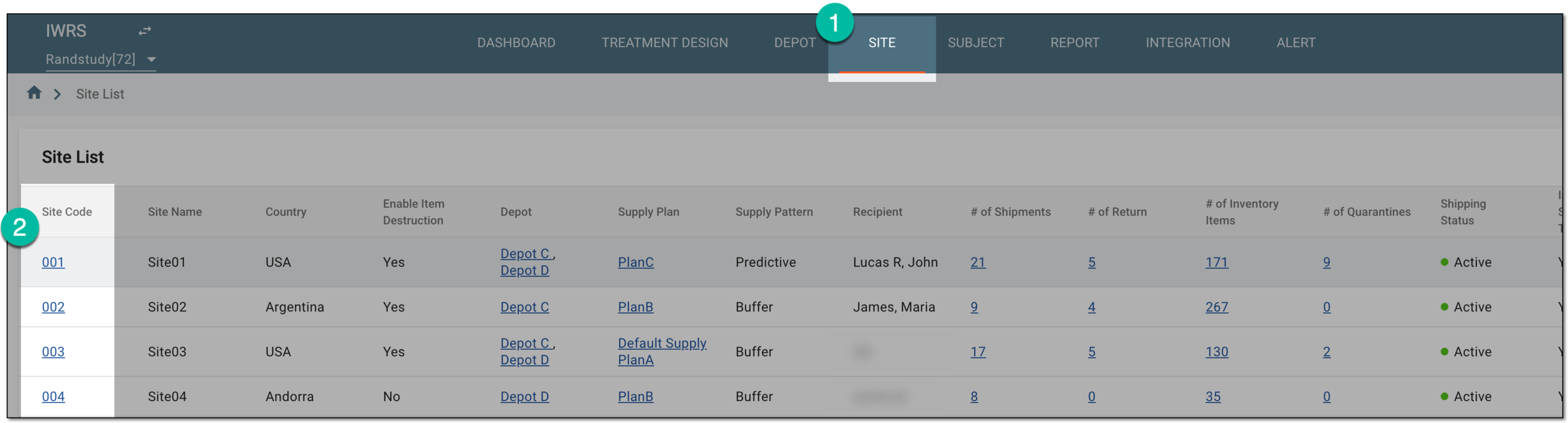 Figure 1. Selecting site to open its details
-
On the page that opens, from the left pane, select Inventory.
-
On the inventory page, from the contents panel, select Reconciliation.
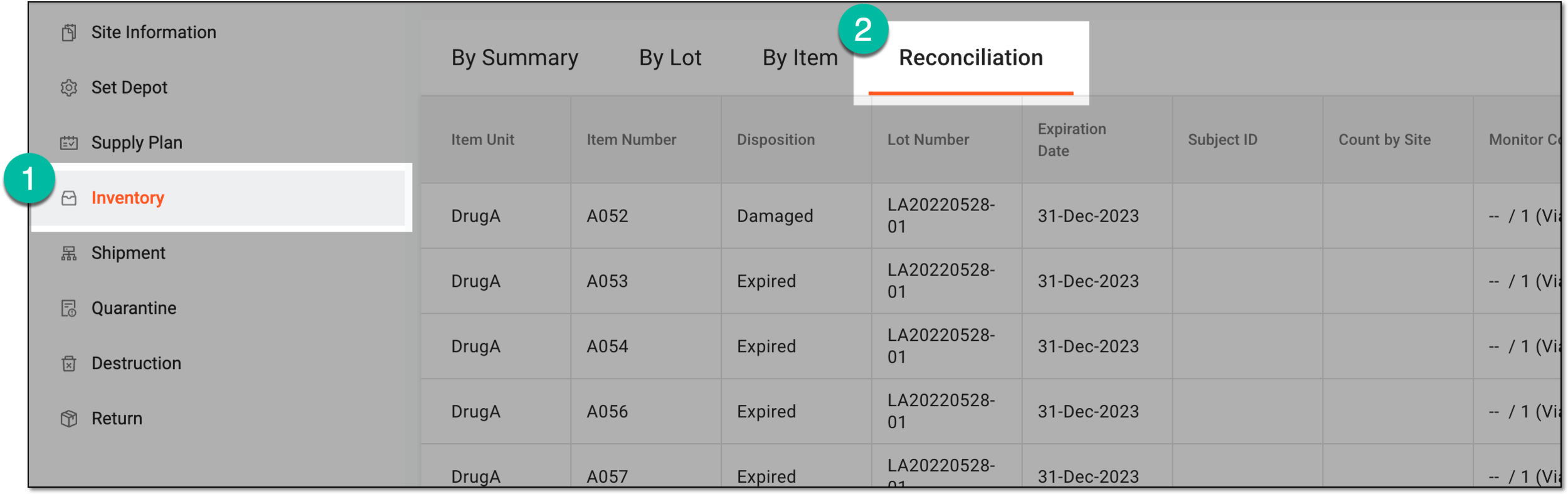 Figure 2. Accessing site inventory reconciliation
Tip
Once you open the reconciliation page for a site, you can use the breadcrumbs navigation to switch between different sites' reconciliation lists without returning to the Site List page.
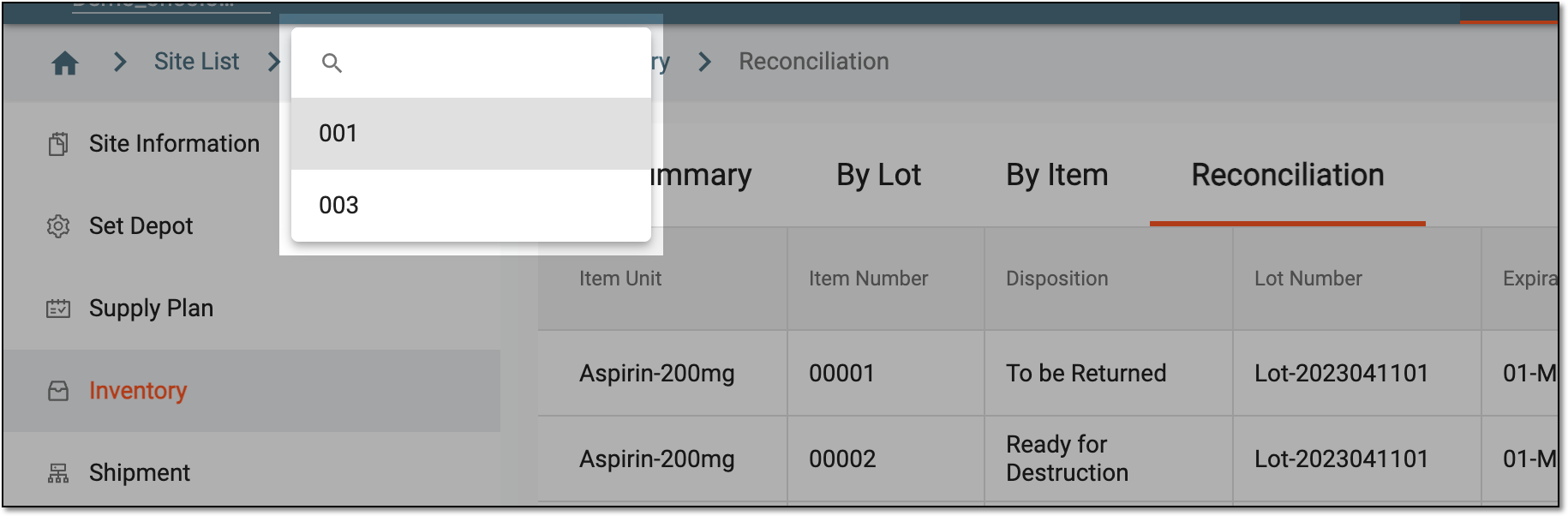 Figure 3. Switching sites from reconciliation page
-
In the Reconciliation table, review the items intended for reconciliation as interpreted in the following table.
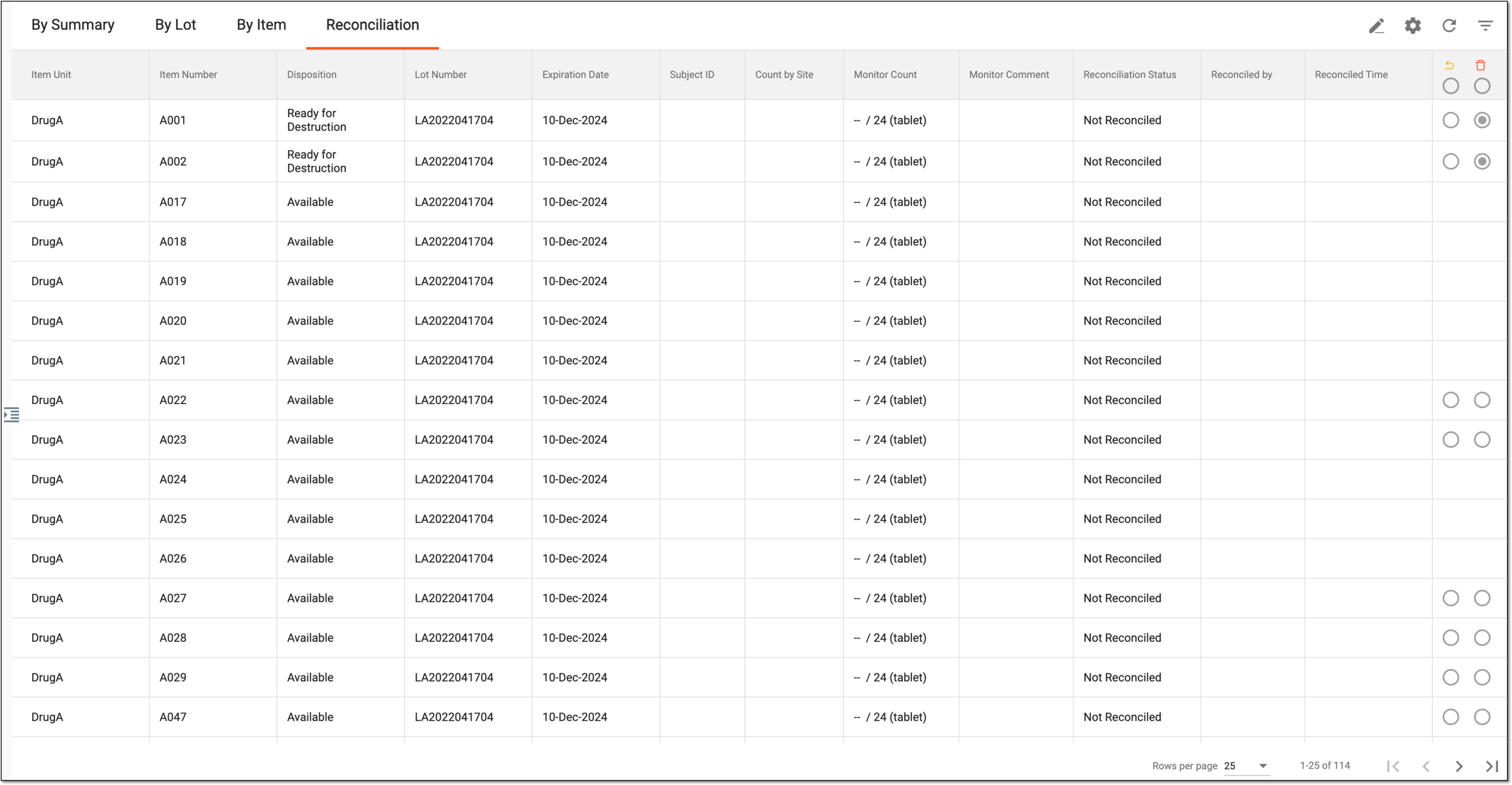 Figure 4. Reconciliation list for site
Column
Details
Item Unit
Represents the unit (name) of items for reconciliation.
Item Number
Represents the unique number of the item.
Disposition
Represents the current status of the item in the site inventory, such as Available, To be Returned, or else.
Lot Number
Represents the unique identification number of the packaging lot to which the item belongs.
Expiration Date
Represents the expiration date of the item which is the same as the expiration date of its packaging lot.
Subject ID
Represents the unique identification number of the subject to whom the item is dispensed.
Count by Site
Represents the number of unnumbered items in a packaging intended for reconciliation as specified by the site representative, most commonly, CRC.
For instance, if there is a vial with five tablets, then this value is 5.
Monitor Count
Represents the number of unnumbered items in a packaging that must be returned/destroyed out of the total number of items in a packaging as specified by the monitor upon reconciliation, most commonly, by CRA.
For instance, if there is a vial with a total of eight tablets dispensed to the subject and five of them were returned to the site to be destroyed after the end of treatment, then this value is 5/8 (tablet).
Monitor Comment
Represents the comment added by the monitor upon reconciliation.
Reconciliation Status
Represents the current status of item reconciliation—Complete, With Exception, or Not Reconciled.
Reconciled by
Represents the name of the user who performed reconciliation for the item.
Reconciled Time
Represents the time when the reconciliation is performed for the item.
-
Proceed to item reconciliation one by one or in bulk as follows.
From the workspace toolbar, select Edit
 and in the Reconciliation
table, perform actions as explained in the following table.
and in the Reconciliation
table, perform actions as explained in the following table.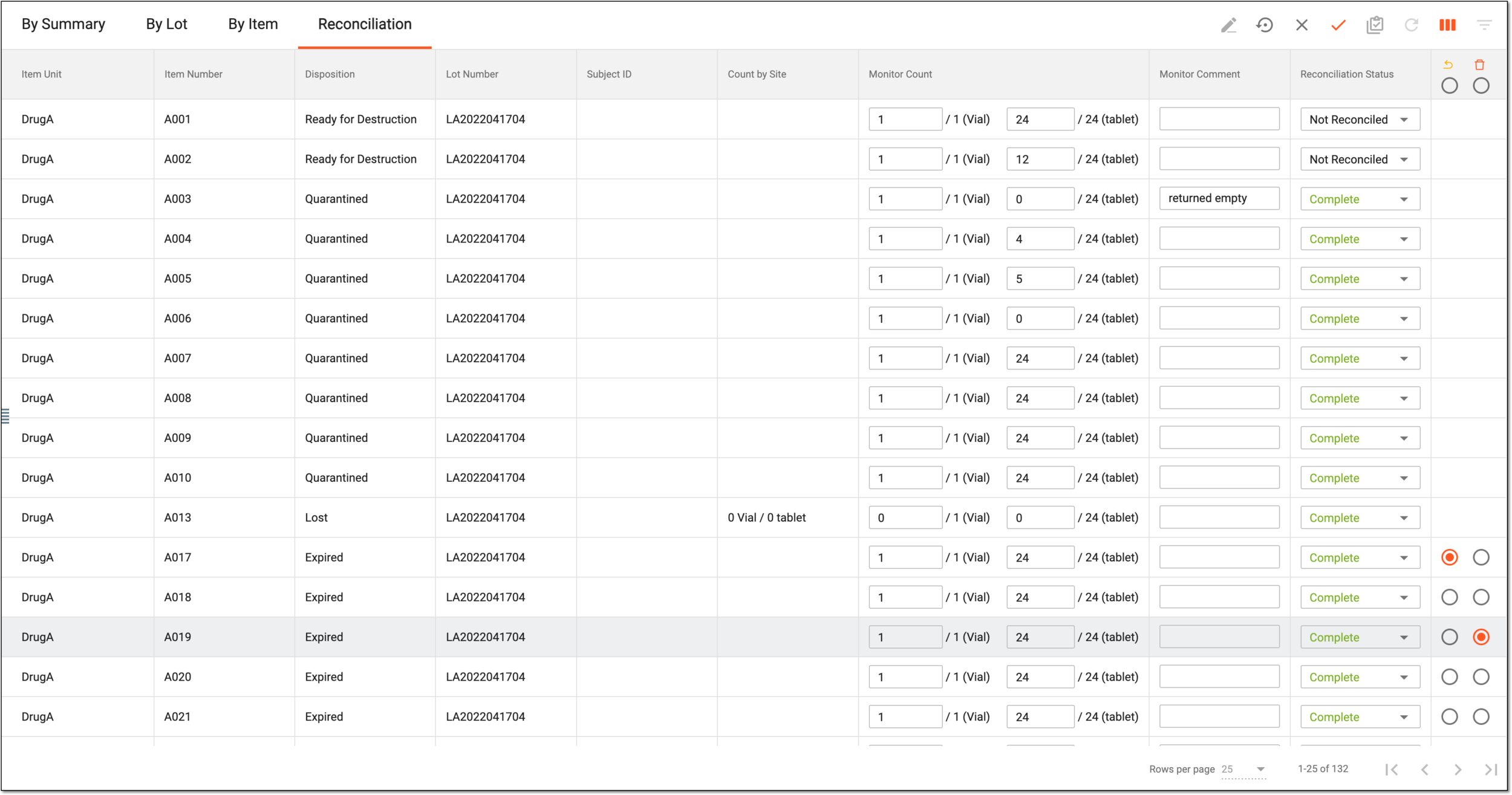 Figure 5. Reconciling items at site
Element
Details
Monitor Count
Enter the number of unnumbered items in a packaging that must be returned or destroyed out of the total number of items in a packaging.
Monitor Comment
Enter a comment to support your reconciliation action and provide auxiliary information.
This field becomes mandatory if the Reconciliation Status is set to With Exception.Reconciliation Status
Select the status of item reconciliation as follows:
-
Not Reconciled: select this status if you cannot reconcile the item at the moment.
-
Complete: select this status if reconciliation is completed and you can give a conclusion if the item is to be returned or destroyed.
-
With Exception: select this status if reconciliation is completed partially and you can provide details of why in the comments.
If this status is selected, the Monitor Comment field becomes mandatory for
                                              completion.
To be Returned

Select the option in this column to mark the reconciled icon as ready to be sent back to the return depot for further destruction.
Ready for Destruction

Select the option in this column to mark the reconciled icon as ready to be destroyed at the site.
This option is only available for the sites for which item destruction is enabled.Save
Select
 to save the reconciliation results.
Restore
Select
 to restore the values in the Reconciliation table to the original and discard all your currently
applied changes, however, stay in the editing mode and start over.
to restore the values in the Reconciliation table to the original and discard all your currently
applied changes, however, stay in the editing mode and start over.Cancel
Select
 to discard all your currently applied changes and exit the editing mode in the Reconciliation table.
-
From the workspace toolbar, select Batch Reconcile
 to mark all the items from the reconciliation
list as completed and autopopulate the number of items and subitems (unnumbered items) according to the site-specified values.
to mark all the items from the reconciliation
list as completed and autopopulate the number of items and subitems (unnumbered items) according to the site-specified values.Important
If there is no site-specified value or custom entry, the system considers all unnumbered items within the item to be returned.
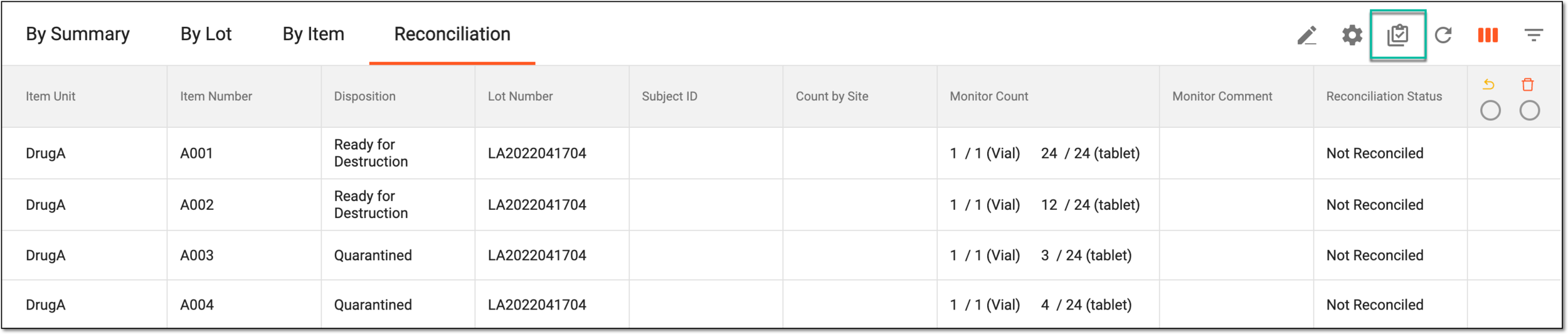 Figure 6. Reconciling items in bulk
-
In the Batch Reconcile dialog that appears, confirm your action by selecting
 .
.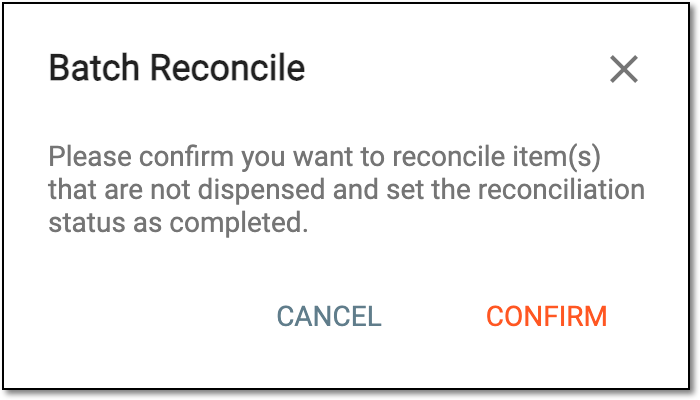 Figure 7. Confirming to reconcile items in bulk
-
Upon saving, the reconciliation for site items is complete. The reconciliation list must now be signed by the user in charge to enable item destruction at the site or shipment to the return depot—depending on the obtained reconciliation status.