View subject safety report
The subject safety refers to the monitoring of AE and SAE occurrence rates in enrolled subjects at each study site. The calculated rate can help identify whether the incidence of AEs is increasing or decreasing over time, whether there are a significant number of severe AEs, and whether AEs are more likely to occur early in the treatment period or whether they are more likely to occur later.
The statistics presented in the Subject Safety report are pulled from the CTMS application based on the number of KRIs created with the Subject Safety category and have the risk indicator related to the rate of AE and SAE occurrence in study subjects. These statistics include the data on the total number of reported AEs, the AE rate in enrolled subjects, and so on.
-
In the EDC application header, select the REPORTS tab.
-
In the left pane of the page that opens, expand the KRI-Central Monitoring tab to see the list of available reports.
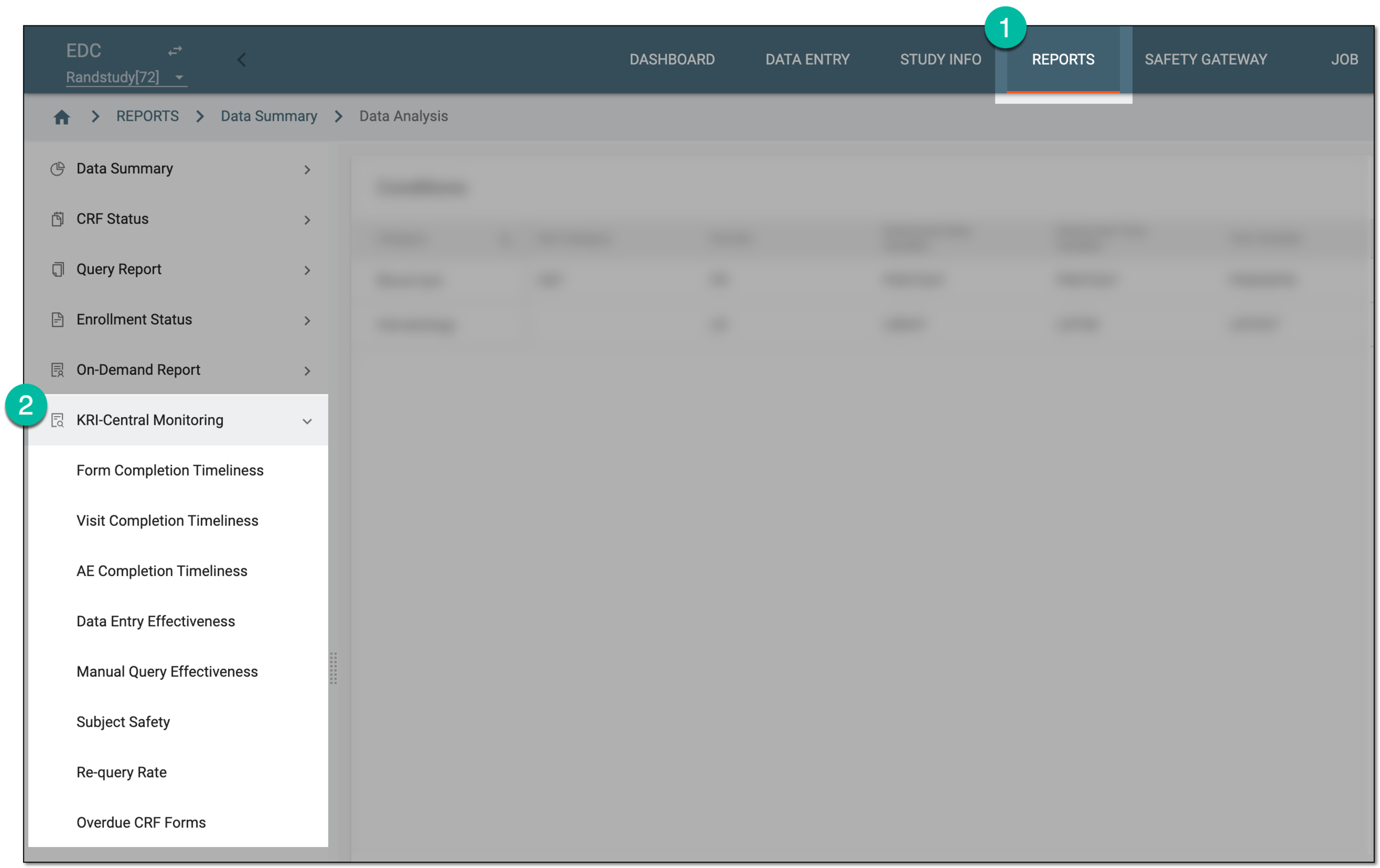 Figure 1. Accessing KRI reports
-
From the list that appears, select Subject Safety.
-
In the Summary tab that opens, arrange and analyze the summary statistics on subject safety information as explained in the following table.
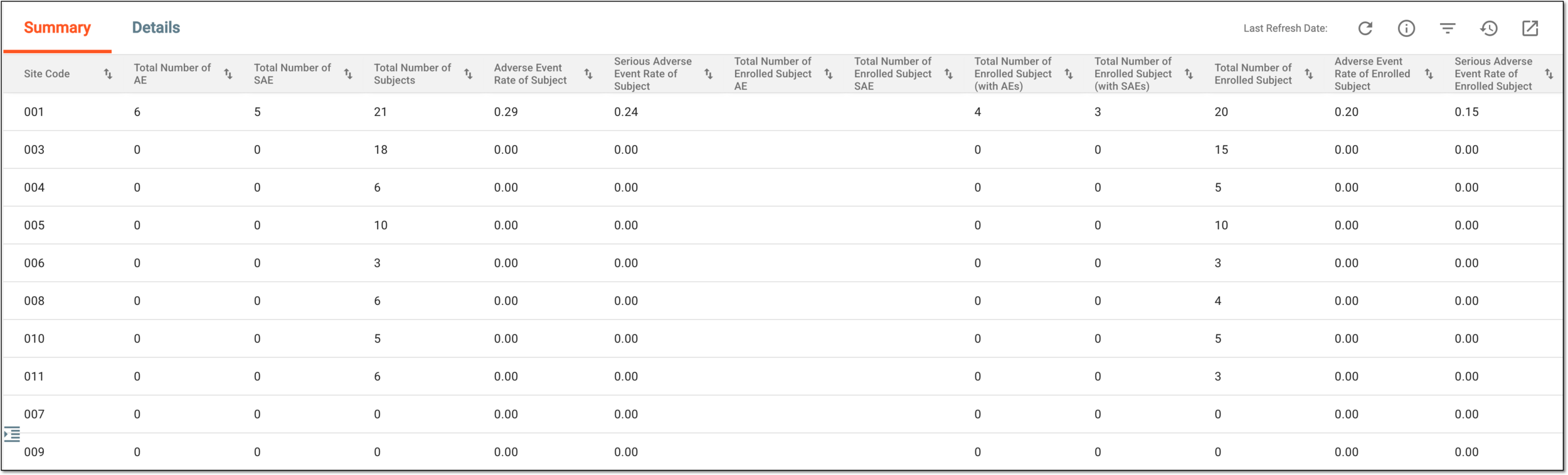 Figure 2. Analyzing summary of subject safety report
Element
Details
Last Refresh Date
Represents the exact date, time, and time zone indicator when the data you see in the table was last pulled from CTMS.
Refresh
Select
 to pull the most recent data from CTMS if no data is available in the report or the last refresh date of the data is more than one hour ago.
Field Description
Select
 to open the Summary - Field Description dialog and look up the details of each of the table columns.
Site Code
Represents the code of the site where the AEs are recorded for the subjects.
Total Number of AE
Represents the total number of AE occurrences recorded at the site.
Total Number of SAE
Represents the total number of SAE occurrences recorded at the site.
Total Number of Subject
Represents the total number of subjects for whom the AEs were recorded at the site.
Adverse Event Rate of Subject
Represents the mean number of AEs recorded per subject at the site.
The days are calculated using the following formula:
Total Number of AE / Total Number of Subject
Serious Adverse Event Rate of Subject
Represents the mean number of SAEs recorded per subject at the site.
The days are calculated using the following formula:
Total Number of SAE / Total Number of Subject
Total Number of Enrolled Subject AE
Represents the total number of AE occurrences recorded in EDC for the enrolled subjects of the study.
Total Number of Enrolled Subject SAE
Represents the total number of SAE occurrences recorded in EDC for the enrolled subjects of the study.
Total Number of Enrolled Subject (with AEs)
Represents the total number of subjects enrolled in the study who have the AE occurrences recorded for them in EDC.
Total Number of Enrolled Subject (with SAEs)
Represents the total number of subjects enrolled in the study who have the SAE occurrences recorded for them in EDC.
Total Number of Enrolled Subject
Represents the total number of subjects currently enrolled in a study at the site.
Adverse Event Rate of Enrolled Subject
Represents the mean number of AEs recorded per enrolled subject at the site.
The days are calculated using the following formula:
Total Number of Enrolled Subject AE / Total Number of Enrolled Subject
Serious Adverse Event Rate of Enrolled Subject
Represents the mean number of SAEs recorded per enrolled subject at the site.
The days are calculated using the following formula:
Total Number of Enrolled Subject SAE / Total Number of Enrolled Subject
-
Select the Details tab to analyze the more detailed statistics on subject safety as explained in the following table.
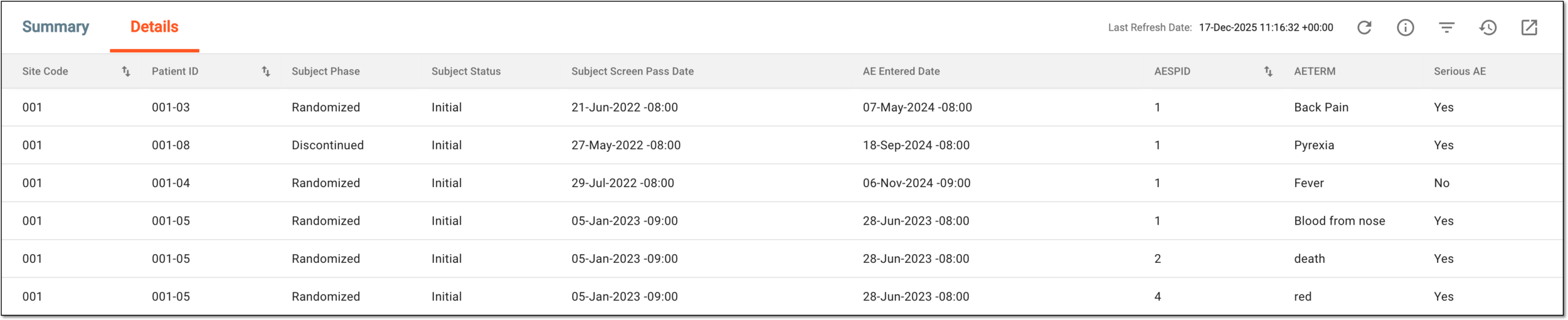 Figure 3. Analyzing details of subject safety data
Element
Details
Last Refresh Date
Represents the exact date, time, and time zone indicator when the data you see in the table was last pulled from CTMS.
Refresh
Select
to pull the most recent data from CTMS if no data is available in the report or the last refresh date of the data is more than one hour ago.Field Description
Select
to open the Details - Field Description dialog and look up the details of each of the table columns.Site Code
Represents the code of the site where the AE is recorded for the subject.
[Unique ID Label]
Represents the unique identifier of the subject for whom the AE is recorded.
The column name depends on the unique ID label configuration of your study in IWRS.If there are additional IDs configured for your study, you see as many such columns as there are IDs.Subject Phase
Represents the subject phase at which the AE is recorded, for example, Enrolled, Randomized, Completed, and so on.
Subject Status
Represents the current status of the subject in the EDC system, such as:
-
Initial: the subject is active in a study and the data collection for them is awaited or in progress.
-
Softlocked: the subject's visits and forms are currently softlocked—data entry is unavailable.
-
Unlocked: the subject is unlocked for data entry and review after being softlocked.
-
Signed: the subject's visits (and forms) are already signed by the user in charge.
-
Inactive: the subject is temporarily inactivated in the EDC system to prevent any actions with their data.
Subject Screen Pass Date
Represents the date when the subject has passed their screening activities to assess the eligibility for participation.
AE Entered Date
Represents the date when the subject's AE is recorded in the EDC system.
AESPID
Represents a unique identifier used to categorize and track AE records in clinical trials.
AETERM
Represents the term entered by the user when recording the AE occurrence, for instance, Headache, Back Pain, and so on.
Serious AE
Represents if the AE is classified as an SAE according to the industry requirements.
-
You have reviewed the subject safety report. You can also export the report as an XLSX file and work with it offline on your computer.
Any untoward medical occurrence in a clinical investigation subject administered a pharmaceutical product that does not necessarily have a causal relationship with this treatment. An adverse event (AE) can therefore be any unintended sign (including an abnormal laboratory finding), symptom, or disease temporally associated with the use of a medicinal (investigational) product, whether or not related to the medicinal (investigational) product.
An adverse event that results in death, is life-threatening, requires subject hospitalization or prolongation of existing hospitalization, results in persistent or significant disability/incapacity, or is a congenital anomaly/birth defect.
An eClinical application that is mainly used to manage and control the personnel, communication, budget, progress, expenses, documents, and declaration involved in the entire clinical trial. It provides study and site management, study quality control, study progress tracking, project management, risk management, reports, and a visualized dashboard.
Get to know all the possibilities of the app with the comprehensive CTMS User Guide.
An eClinical application that represents unified and configurable subject randomization and trial supply management tool for subject grouping, drug inventories, shipments, and dispensations, as well as other vital processes during a clinical trial.
Get to know all the possibilities of the app with the comprehensive IWRS User Guide.
A specific phase that a subject has to complete in the course of a clinical trial to move further to the next phase. For instance, Screening, Enrolled, Randomized, and others.
 |
In eClinical, subject phases are designed individually for each study via the SD application, although they are referenced in others, like IWRS or EDC.