View manual query effectiveness report
The manual query effectiveness refers to the assessment of data collected on CRFs by tracking the number of manual queries and their age. By monitoring this KRI statistic on the total number of manual queries opened at each study site, sponsors, and clinical research organizations can identify potential data quality issues early on, and take corrective actions to improve data quality.
The statistics presented in the Manual Query Effectiveness report are pulled from the CTMS application based on the number of KRIs created with the Data Management Query Effective category and have the risk indicator related to the query tracking. These statistics include the data on the total number of manual queries in a form, the total age of open or answered manual queries, and so on.
-
In the EDC application header, select the REPORTS tab.
-
In the left pane of the page that opens, expand the KRI-Central Monitoring tab to see the list of available reports.
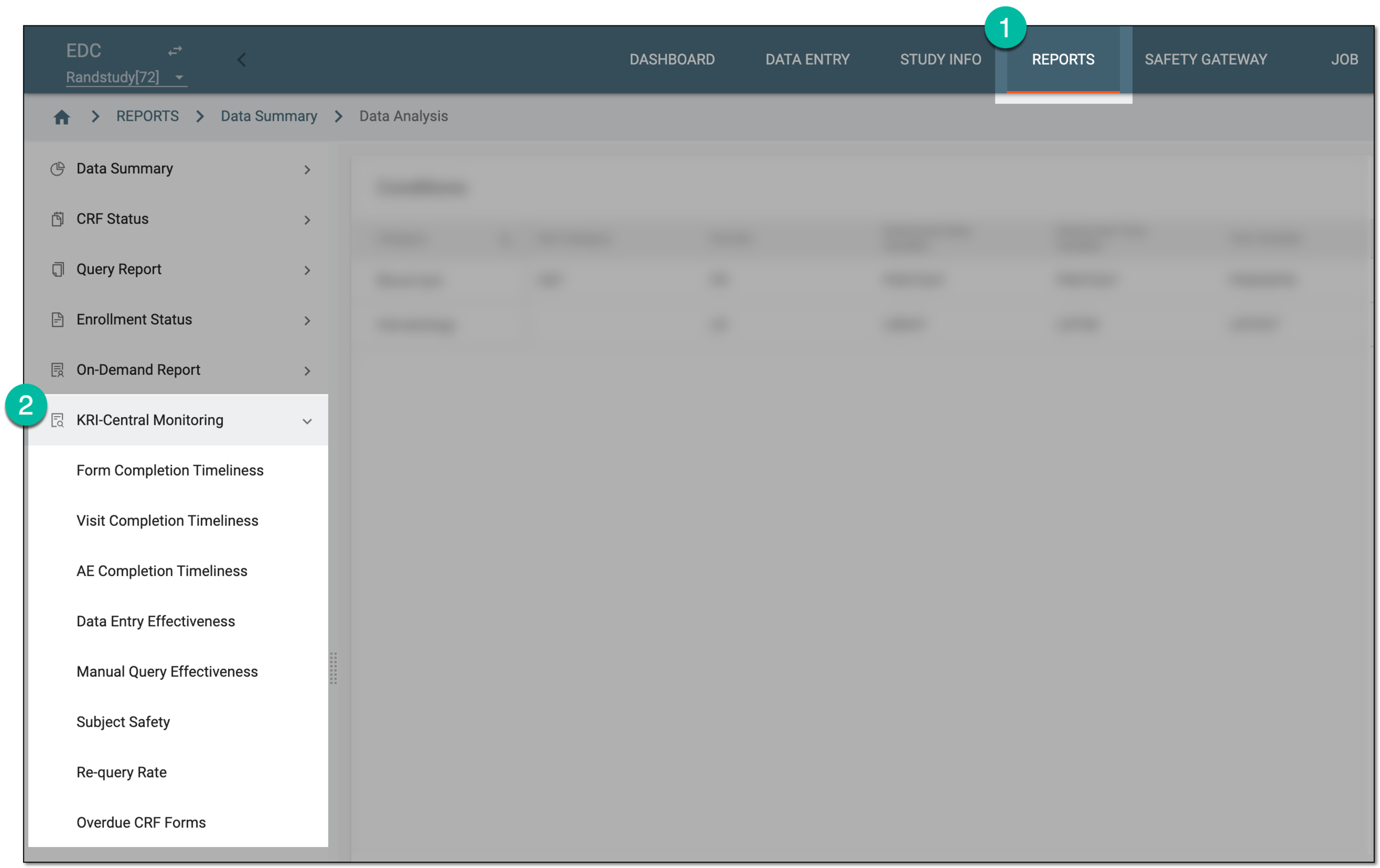 Figure 1. Accessing KRI reports
-
From the list that appears, select Manual Query Effectiveness.
-
In the Summary tab that opens, view the summary statistics on manual query effectiveness as explained in the following table.
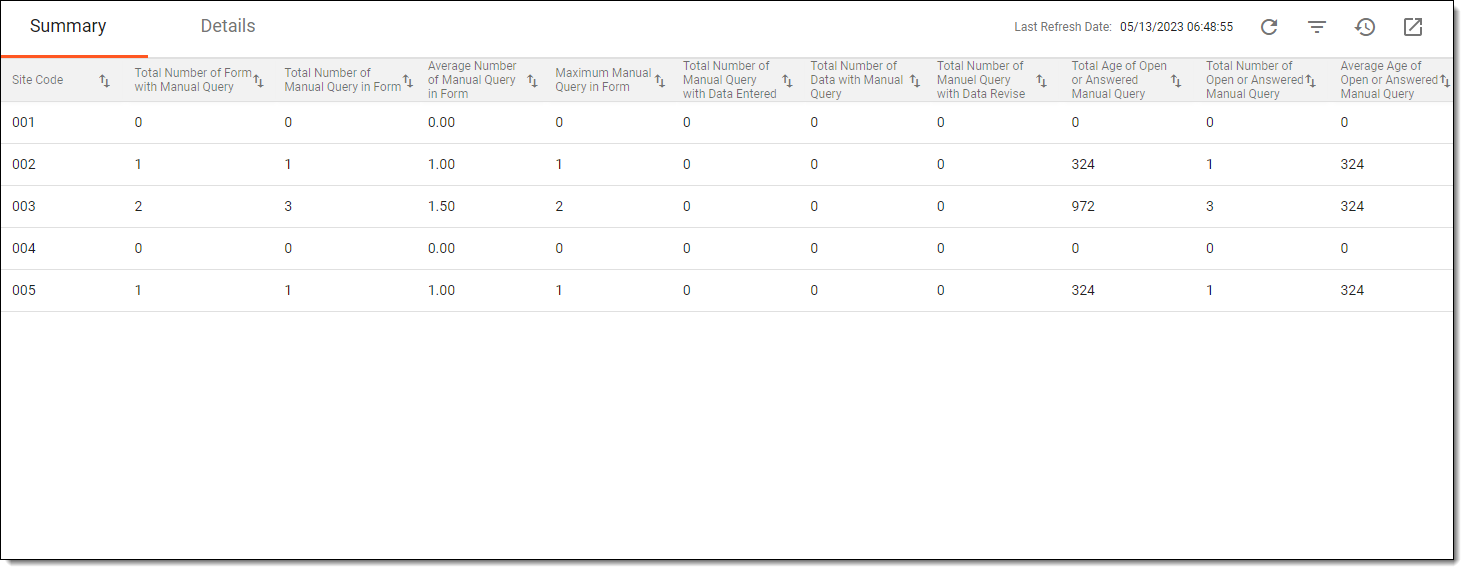 Figure 2. Viewing summary of manual query effectiveness
Important
There may be no data available in the report or if the data is not the latest, then from the workspace toolbar, select Refresh
 to to pull the most recent data from CTMS.
Column
Details
Site Code
Represents the unique identifier of the site at which the CRFs with the manual query are completed.
Total Number of Form with Manual Query
Represents the total number of CRFs with manual queries at a certain site.
Total Number of Manual Query in Form
Represents the total number of all manual queries opened in various CRFs at a certain site.
Average Number of Manual Query in Form
Represents the mean of manual queries opened per CRF at a certain site.
The days are calculated using the following formula:
Total Number of Manual Query in Form / Total Number of Form with Manual Query
Maximum Manual Query in Form
Represents the highest number of manual queries opened for a single CRF.
Total Number of Manual Query with Data Entered
Represents the total number of manual queries for which the data was completed after they were opened.
Total Number of Data with Manual Query
Represents the total number of form items (data elements) for which the manual queries were opened.
Total Number of Manual Query with Data Revise
Represents the total number of manual queries for which the data in question was amended after they were opened.
Total Age of Open or Answered Manual Query
Represents the number of days all the manual queries in the CRFs of the site remained open—even if answered—without closure.
Total Number of Open or Answered Manual Query
Represents the number of manual queries that are currently open—even if answered but not closed—at the site.
Average Age of Open or Answered Manual Query
Represents the mean of days the manual query in the CRF of the site remains open—even if answered—without closure.
The days are calculated using the following formula:
Total Age of Open or Answered Manual Query / Total Number of Open or Answered Manual Query
-
Then switch to the Details tab to view the detailed statistics on manual query effectiveness as explained in the following table.
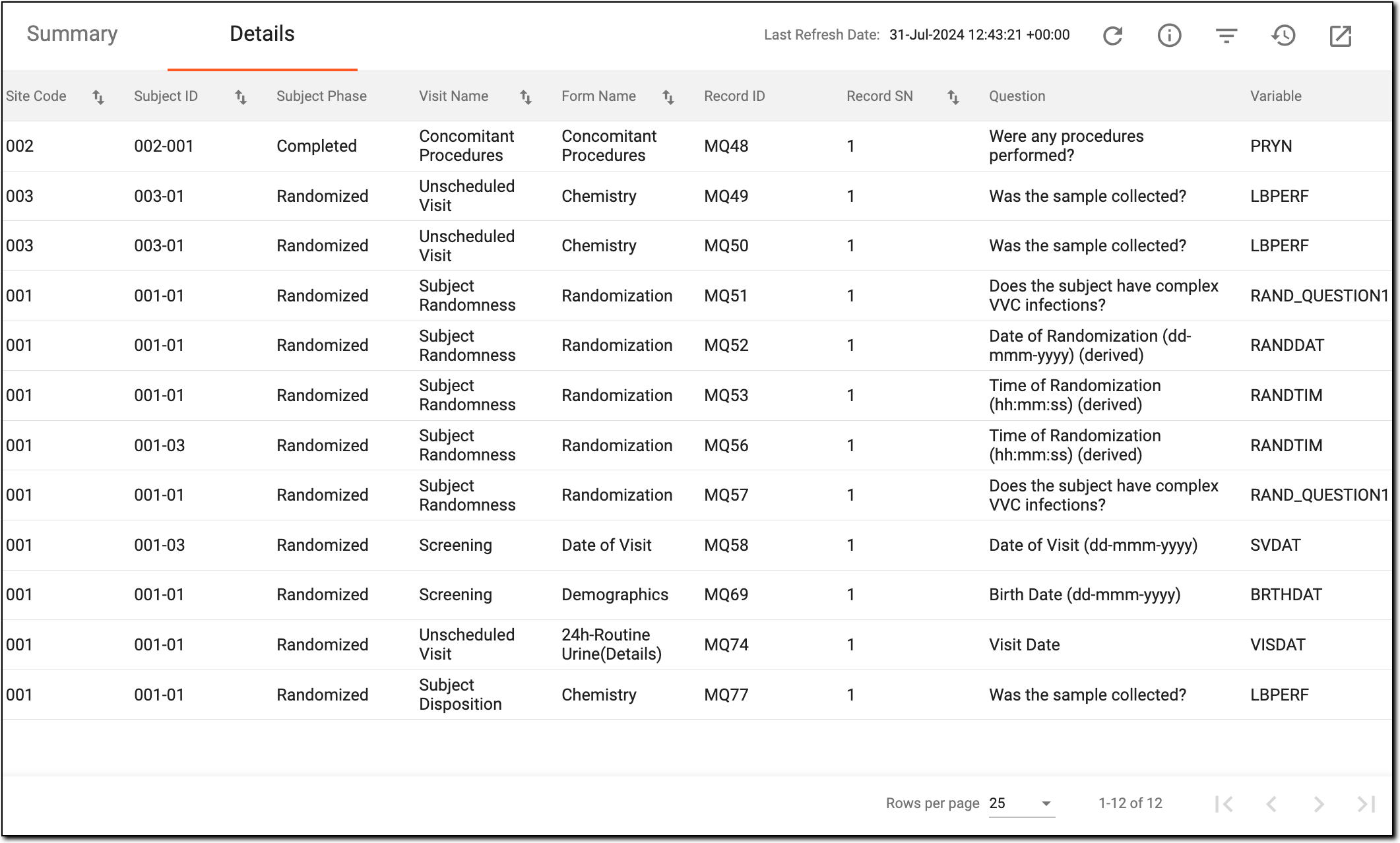 Figure 3. Viewing details of manual query effectiveness
Column
Details
Site Code
Represents the unique identifier of the site at which the CRF with the manual query is completed.
[Unique ID Label]
Represents the unique identifier of the subject to whom the CRF with the manual query belongs.
The column name depends on the unique ID label configuration of your study in IWRS.If there are additional IDs configured for your study, you see as many such columns as there are IDs.Subject Phase
Represents the subject phase at which the manual query is opened in the CRF, for example, Enrolled, Randomized, Completed, and so on.
Visit Name
Represents the name of the visit at which the CRF with the manual query is completed.
Form Name
Represents the name of the CRF in which the manual query was opened.
Record ID
Represents the unique identifier of the record within the CRF, for which the manual query was opened.
Record SN
Represents the sequential number of the record within the CRF, for which the manual query was opened.
Question
Represents the question within the CRF record, for the data of which the manual query was opened.
Variable
Represents the data item (variable) within the CRF record, for which the manual query was opened.
Query Topic
Represents the text entered by the user upon opening the manual query.
Queried By
Represents the name of the user who opened the manual query.
Creation Role
Represents the role of the user who opened the manual query, such as CRA, CRC, PI, or else.
Creation Date
Represents the date and time when the manual query was opened.
Query Age
Represents the number of days the manual query remained open—even if answered—without closure.
Query Status
Represents the current status of the manual query—Open, Answered, or Closed.
Query Close Date
Represents the date and time when the manual query was closed.
Manual Query with Data Revise
Represents if the manual query caused the data item in question to be amended (Yes) or not (No).
Manual Query with Data Entered
Represents if the manual query caused the data item in question to be completed (Yes) or not (No).
You have reviewed the manual query effectiveness report. You can also export the report as an XLSX file and work with it offline on your computer.
A specialized document in a clinical trial designed to collect the subject data.
See also eCRF.
An eClinical application that is mainly used to manage and control the personnel, communication, budget, progress, expenses, documents, and declaration involved in the entire clinical trial. It provides study and site management, study quality control, study progress tracking, project management, risk management, reports, and a visualized dashboard.
Get to know all the possibilities of the app with the comprehensive CTMS User Guide.
An eClinical application that represents unified and configurable subject randomization and trial supply management tool for subject grouping, drug inventories, shipments, and dispensations, as well as other vital processes during a clinical trial.
Get to know all the possibilities of the app with the comprehensive IWRS User Guide.
A specific phase that a subject has to complete in the course of a clinical trial to move further to the next phase. For instance, Screening, Enrolled, Randomized, and others.
 |
In eClinical, subject phases are designed individually for each study via the SD application, although they are referenced in others, like IWRS or EDC.
An individual piece of data collected within a domain. It represents a specific attribute or characteristic that can vary among subjects in a study. Each variable is defined by its format (such as categorical, continuous, and so on) and plays a crucial role in data analysis, allowing researchers to assess relationships and outcomes in the study.
For instance, within the "Demographics" domain, variables might include "Age," "Gender," and "Ethnicity."
A person responsible for overseeing and monitoring a clinical trial to ensure it is conducted in compliance with regulatory standards and protocols. The CRA’s scope of work might include protocol review, site selection and initiation, monitoring, data entry control, and more.
In the eClinical system, the Clinical Research Associate (CRA) user role is assigned to a person who works with the sites, and in EDC, mainly has to make sure that the entered data is truthful to the source document. CRA checks the source document in a process called source data verification and ensures that everything entered by the clinical research coordinators is valid to avoid any discrepancies caused by human errors.
A person responsible for the successful planning, execution, and management of clinical trials. The CRC’s scope of work might include study preparation, site setup, patient recruitment, regulatory compliance control, data collection, and more.
In the eClinical system, the Clinical Research Coordinator (CRC) user role is granted to a person who works on a site with subjects and is responsible for entering data to EDC, ensuring the data is entered correctly according to all requirements, and answering queries from data managers on any questionable data pieces.
A person responsible for overseeing and conducting the research study at a specific investigational site or multiple sites, depending on the study's design. The role of a PI is multifaceted and involves various responsibilities, such as study oversight, protocol adherence, participant recruitment and informed consent implementation, regulatory compliance, and so on.
In the eClinical system, the Principal Investigator (PI) role that is assigned to a person who oversees the data entering and signs off subjects—gives authorized confirmation that all the entered data is valid and follows the industry standards. The responsibilities of PI can vary depending on study requirements.