Review deleted VTs
With the Review Deleted VTs feature, you can examine any verbatim terms (VTs) that have been removed from the coding list, whether through manual deletion or automated processes. This review helps you understand the context and rationale for deletion, helping maintain a clear audit trail and ensuring accurate record-keeping in the coding flow.
-
In the Medical Coding application header, select the CODING tab.
 Figure 1. Accessing coding functionality
-
On the VT List page that opens, in the workspace toolbar, select Delete VTs
 .
.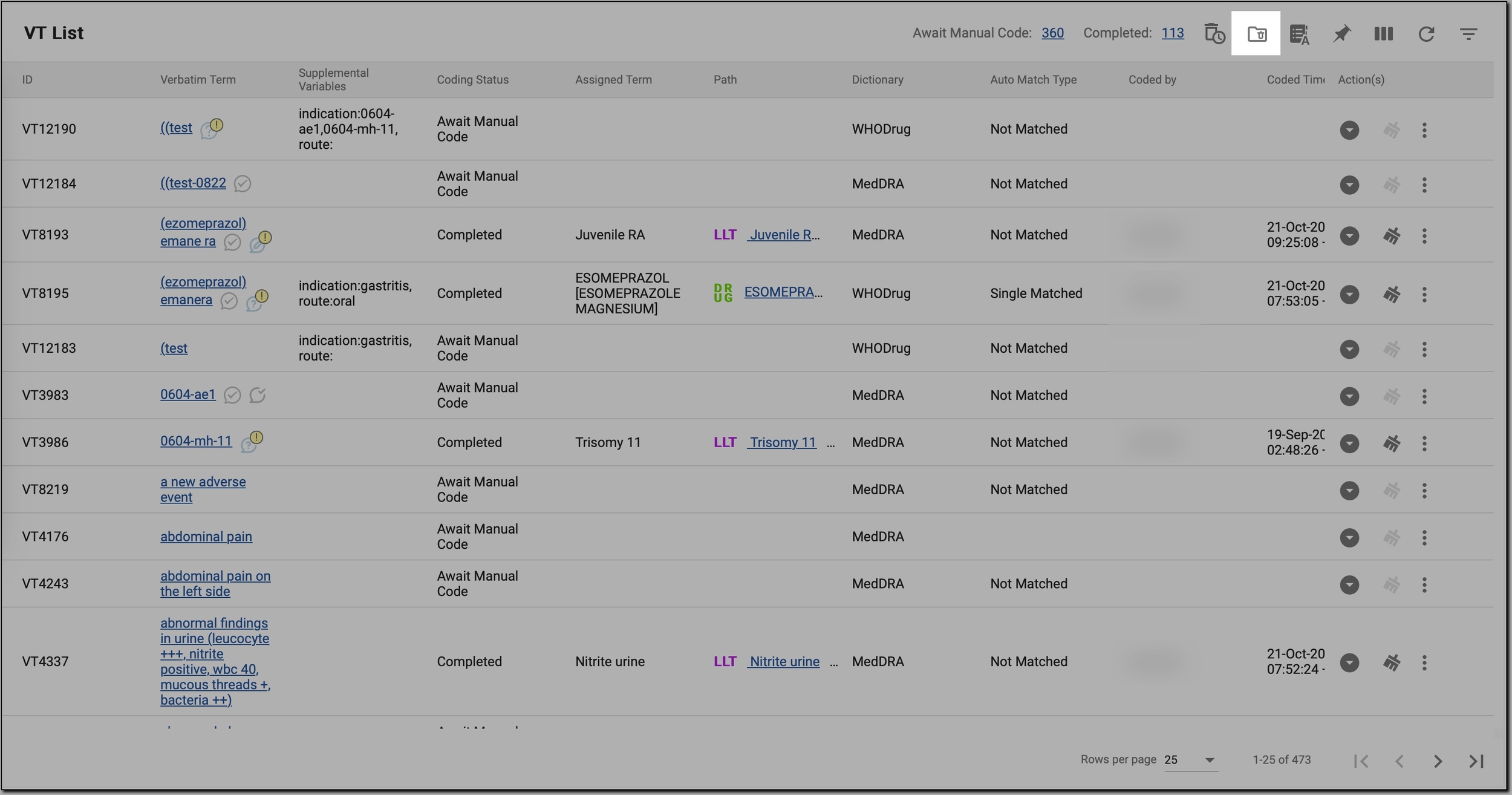 Figure 2. Accessing deleted VTs
-
On the VT List page that opens, in the table, review a list of deleted VTs, as explained in the following table.
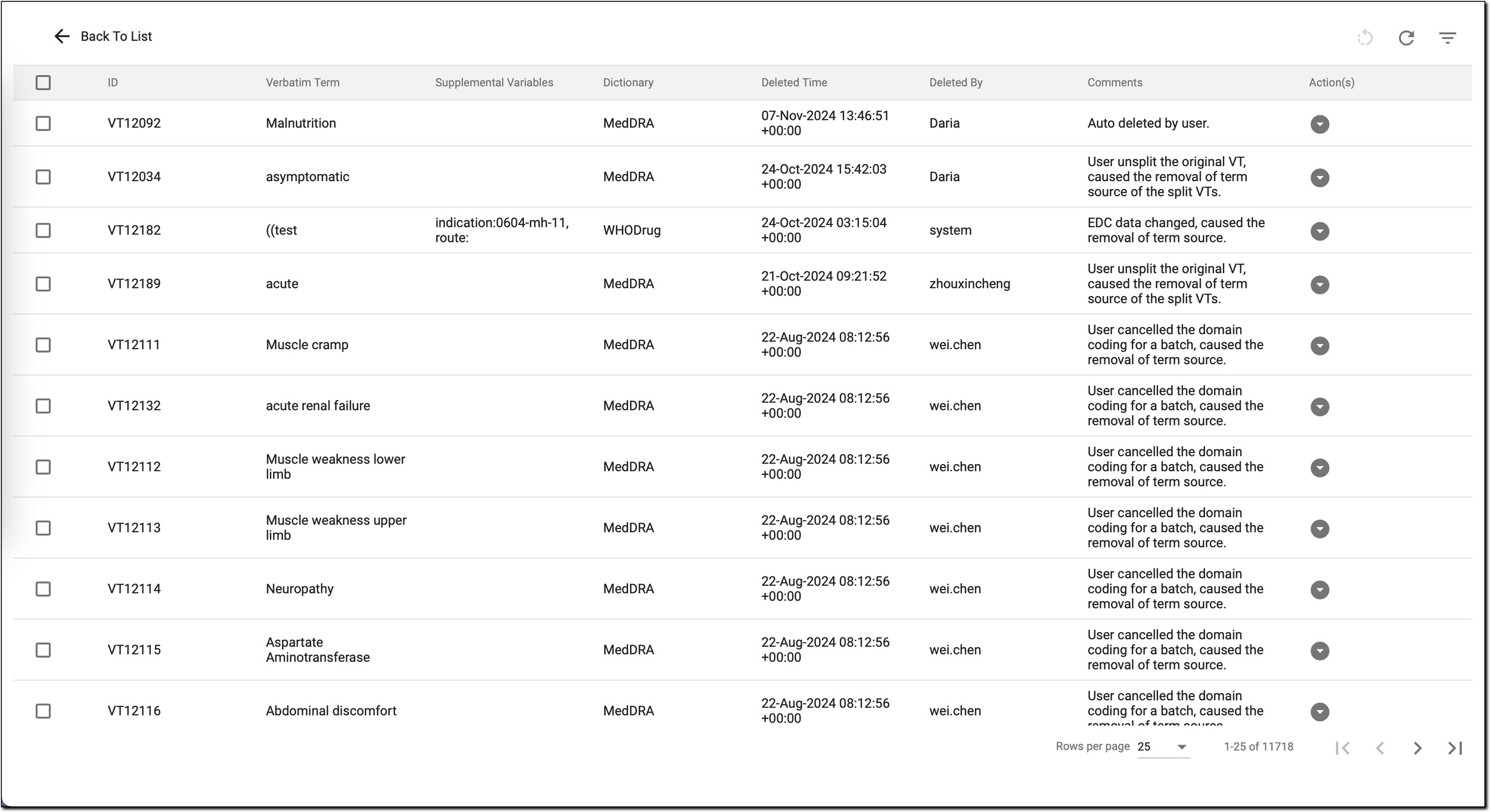 Figure 3. Reviewing deleted VTs
Column
Details
ID
A unique identifier for each VT entry. This ID allows easy reference to specific terms within the list.
Verbatim Term
The actual text or phrase as it appears in the source data. This is the original term provided, which must have been mapped to a standardized term in the coding dictionaries.
Supplemental Variables
Additional contextual information related to each verbatim term. These variables may include specific details from the source data, such as indication or route, which help provide context when coding the term.
Dictionary
Specifies which dictionary was used to assign the standardized term. Possible dictionaries include:
-
WHODrug: used for drug names and related terms.
-
MedDRA: used for medical conditions, adverse effects, and other clinical terms.
Deleted Time
The date and time when the VT was deleted. This timestamp is useful for tracking deletion activity.
Deleted by
The username of the person who deleted the verbatim term. This helps track who completed the deletion for each entry.
Comments
Additional notes or explanations about the deletion. Comments can provide context for why the VT was deleted, such as specific criteria it met (for example, no source term or closed batch) or any relevant remarks from the person performing the deletion. This is useful for tracking decisions and maintaining a clear record of deletion activities for reference or auditing purposes.
-
-
If you need more information about the deleted verbatim term, in the Actions column, select
 . Then, in the expanded table, switch
between the tabs and review additional details about the selected VT as explained in the following table.
. Then, in the expanded table, switch
between the tabs and review additional details about the selected VT as explained in the following table. Figure 4. Reviewing additional VT details
Column
Details
Term Source
Provides essential information about the origin and context of the deleted verbatim terms (VTs) to help track their source.
Term Source
Identifies the origin of the verbatim term, such as the eClinical EDC system or another source. This helps track where the term was initially recorded.
Term
Displays the raw, unprocessed verbatim term as it was extracted from the source data.
During extraction, the CODING system always converts terms to lowercase in order to remove duplicates. Therefore, this column helps you understand what the term originally looked like before any processing or modification.Batch Number
Refers to the coding batch in which the term was included.
Original Term
Shows the exact wording of the term as it was initially recorded in the source system before any splitting. It serves as a reference to the unaltered version of the term prior to the application of any split rules.
Level
Reflects the specific hierarchical layer within the coding structure—specified at the study setup phase in the Coding Admin module—that defines the depth of the term in the coding hierarchy.
In dictionaries like MedDRA or WHODrug, terms are organized in levels, with each level corresponding to a different level in the hierarchy:
-
MedDRA example: levels may range from Preferred Term (PT) to higher levels such as System Organ Class (SOC).
-
WHODrug example: levels include Drug Name (base level), Ingredient (a higher level), or Substance Name (the most granular classification).
So, basically, the Level value indicates the layer of the term being coded.
Variable
Represents the variable name from the source data file or from the EDC system that contains the verbatim term, such as AETERM, CMTRT, MHTERM, and others.
Line
Refers to the line number in the source file where the term was found. This detail assists in locating the term in its original dataset for verification or review.
Form
Indicates the form in which the term was recorded, such as a specific case report form (CRF). This helps you understand the data’s context within the study structure.
Visit
Specifies the visit name in the study at which the term was collected. This can help in understanding temporal aspects of the study data.
Subject
Refers to the participant identifier, linking the term to the specific subject in the study from whom the data was collected.
Site
Identifies the study site where the data was collected. This information can help in tracking study data across different locations.
Study Name
Indicates the name of the study in which the data was collected, helping to contextualize the term within a specific study framework.
Action(s)
This column helps you take actions on the term, such as querying the original source data for additional information or validation.
Assigned Term History
Tracks the history of term assignments, helping you review how the terms were mapped and coded over time, providing a detailed trail of the coding process.
Dictionary
Specifies which dictionary—MedDRA or WHODrug—was used to assign the standardized term.
Term
Displays the standardized term from the coding dictionary that has been assigned to the verbatim term.
Path
Shows the hierarchical path in the coding dictionary—MedDRA or WHODrug—where the assigned term is located.
Auto Coded
Indicates whether the term was automatically coded by the system. If Yes, the system has suggested the term based on previous mappings. If No, manual coding was required.
Register Synonym
Indicates if the term has a synonym in the register, helping to track similar or alternate terms in the coding process.
Coded by
Displays the username of the person who assigned the standardized term to the verbatim term, providing accountability for the coding process.
Coded Time
Shows the date and time when the term was assigned, which is useful for tracking when coding was completed.
Audit
Provides a record of user actions and roles related to the coding process, helping to ensure traceability and accountability in the system.
Audit
Identifies the specific action or event that triggered an audit entry, such as a user deleting the VT, the system autocoding the VT, the system clearing the VT, or any other significant changes made to the term's status or assignment.
Business Type
Specifies the type of business action that was performed, such as Restore, Delete, or Auto Code, indicating the specific operation applied to the VT in the context of the coding process.
User
Displays the username of the person who performed the audit action, allowing for traceability and accountability.
Role
Indicates the role of the user (for example, Coder, Reviewer) at the time of the audit event, clarifying their responsibility in the process.
Time
Shows the exact date and time when the audit event occurred, allowing for precise tracking of when actions were taken.
-
Once you have reviewed the deleted VTs, you can now:
-
Restore any mistakenly deleted VTs.
-
Proceed with further actions, such as manually coding or reassigning terms based on your review.
-
Finalize the coding process, ensuring all terms are correctly assigned and cleared, according to the established standards.