Study management
The STUDY MANAGEMENT tab is designed to provide an overview of all studies that can be a part of the coding process. This tab displays a list of studies (created in the ADMIN application), offering a snapshot of their current status and configurations.
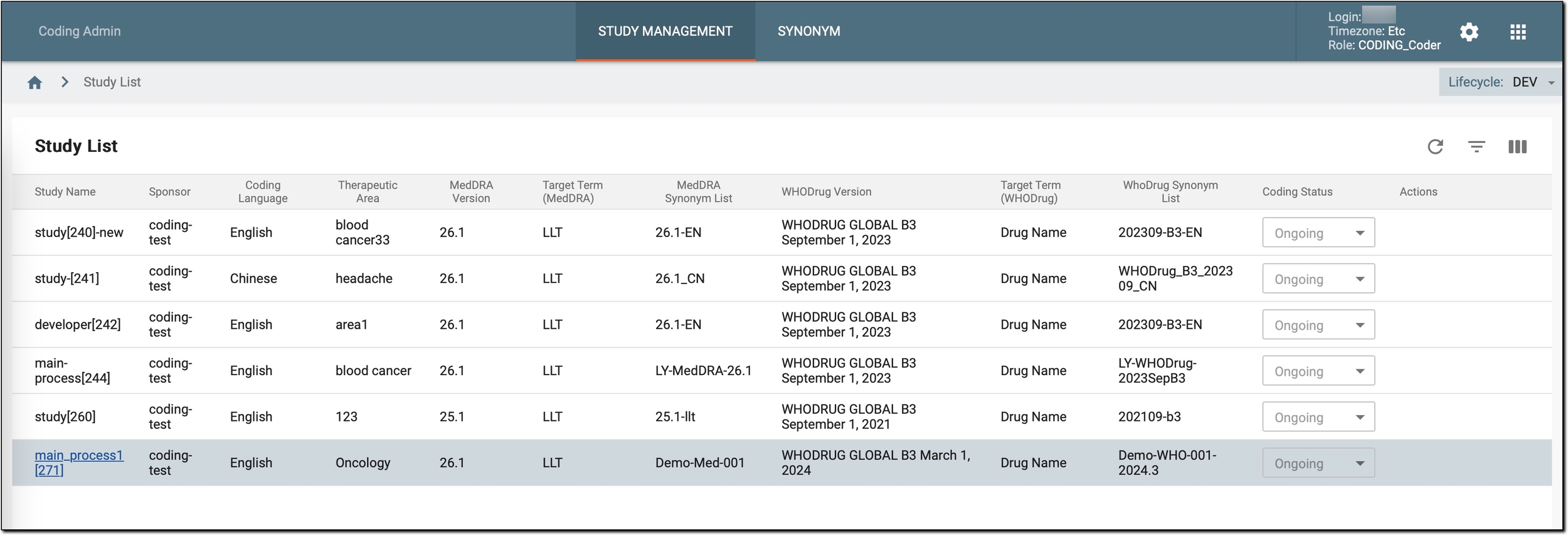
In this list, each study is represented by its unique identifier (name) and other relevant details. These details include the sponsor, which is the organization conducting the study, the coding language used for medical terms, and the therapeutic area of the study. Additionally, it displays the assigned MedDRA and WHODrug dictionary versions, the target terms for both MedDRA and WHODrug, the WHODrug synonym list, and the current coding status.
Tip
The name of the study is hyperlinked if you have the appropriate role (permission) to code this study. By selecting the hyperlink, you are redirected to the Medical Coding module where the actual coding can be performed.
The primary purpose of this tab, beyond displaying some basic study details, is to allow administrators to change the coding status of a study. By updating the status to, for example, Ongoing, administrators can indicate that the study is currently in the coding phase. This status update helps inform other users that the coding process is actively underway for that particular study, thereby enhancing coordination and clarity within the coding team.
In addition, users can request to upgrade the study to a new MedDRA/WHODrug dictionary version after a new dictionary is released, view the upgrade history, and update some basic study configurations, such as the synonym lists, language, therapeutic areas, and more.