Update study configurations
Updating study configurations is important for maintaining accuracy and efficiency in the coding process. Adjusting key parameters, such as coding language, terminology versions, or therapeutic areas, ensures that the coding team works with the most current and relevant guidelines and classifications. This flexibility allows for better alignment with study objectives and regulatory standards, ultimately enhancing the quality and consistency of coded data.
Important
The option is unavailable unless you have the CODING_Admin role.
To change the role, in the CODING toolbar, expand the lifecycle list, then select the appropriate environment, and choose the CODING_Admin role.

-
In the Coding Admin application header, select the STUDY MANAGEMENT tab.
 Figure 2. Accessing the STUDY MANAGEMENT tab
-
In the Study List table that appears, next to the study for which you want to update configurations, select Edit
 .
. Figure 3. Initiating study configurations update
Important
The option is inactive for studies in the Upgrading status.
-
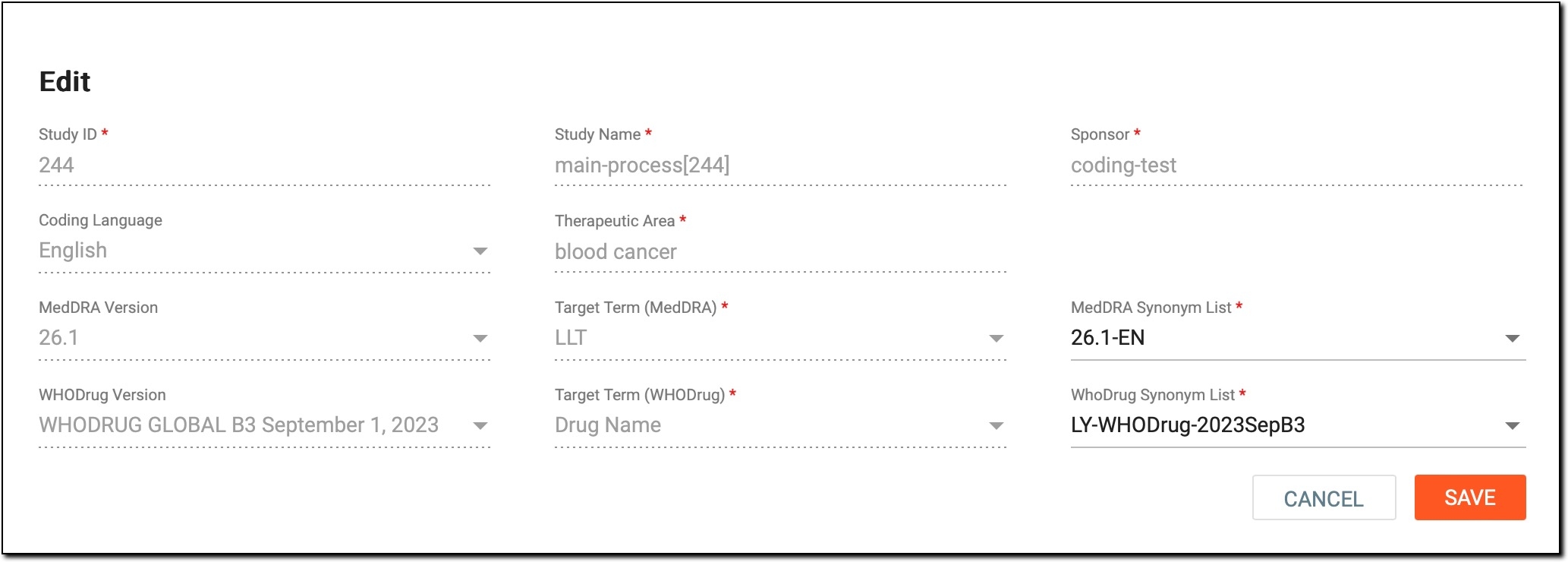
In the Edit dialog that opens, update the fields as explained in the following table.
Element
Editable in (study status)
Description
Study ID
N/A
A read-only field that represents a unique identifier assigned to a study for which verbatim terms (VTs) are standardized. It is used for reference and tracking purposes.
Coding Language
Not Started
Expand the list and select another language that must be used for coding VTs within the study.
MedDRA Version
Not Started
Expand the list and select another version of the MedDRA dictionary that must be used for coding VTs.
WHODrug Version
Not Started
Expand the list and select another version of the WHODrug dictionary that must be used for coding VTs.
Study Name
N/A
A read-only field that represents the name of the study for which VTs are standardized.
Therapeutic Area
Not Started
Expand the list and select another therapeutic area (TA) to which the study pertains.
Target Term (MedDRA)
Not Started
Expand the list and select another MedDRA term targeted for coding in the study. The target term refers to the term level expected to be coded.
For example, if "LLT" is selected as the target term, the coder needs to map an AE verbatim term to an "LLT." If "PT" is selected, the coder maps an AE verbatim term to a "PT."
Target Term (WHODrug)
Not Started
Expand the list and select another WHODrug term targeted for coding in the study.
Sponsor
N/A
A read-only field representing the name of the organization funding and conducting the study.
MedDRA Synonym List
Not Started, Ongoing
Expand the list and select another list of synonyms associated with MedDRA terms that must be used during the coding process.
WHODrug Synonym List
Not Started, Ongoing
Expand the list and select another list of synonyms associated with WHODrug terms that must be used during the coding process.
SAVE
All
Select
 to proceed with updating study configurations.
CANCEL
All
Select
 to cancel the update of study configurations and dismiss the changes made.Figure 4. Updaing study configurations
Once saved, the study configurations become updated.