Code VTs manually
Coding VTs manually is a crucial step in the coding process, especially when automatic coding has been executed, but some verbatim terms (VTs) remain unmatched, ensuring all terms are properly addressed.
With manual coding, you can:
-
In the Medical Coding application header, select the CODING tab.
 Figure 1. Accessing coding functionality
-
On the VT List page that opens, find the VT that must be coded and, in the Verbatim Term column, select the hyperlink representing that VT.
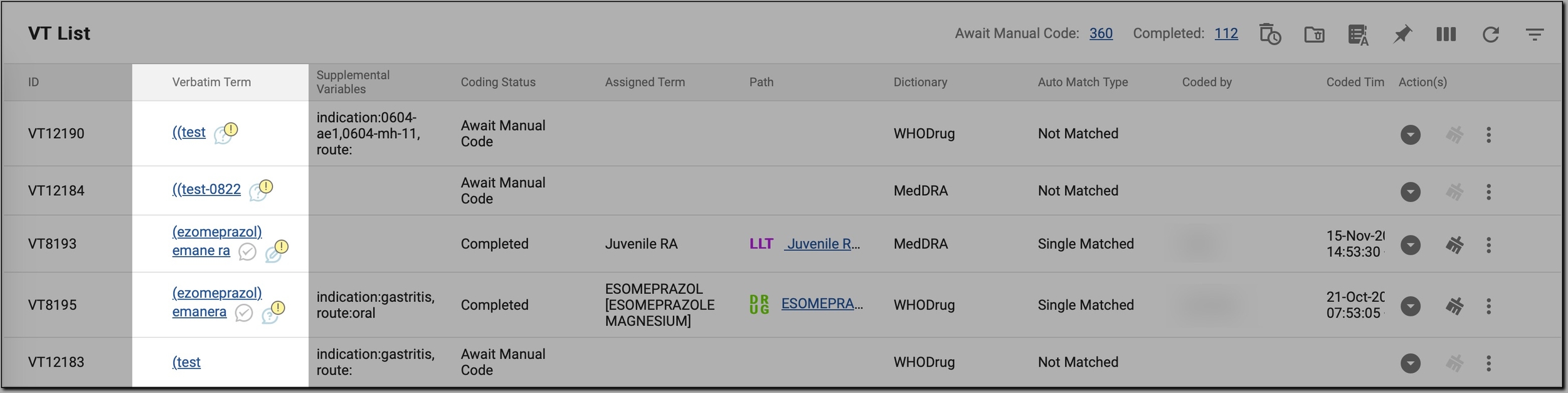 Figure 2. Selecting VT to code
Tip
For your convenience, filter the table to display only terms awaiting manual coding by selecting the number next to Await Manual Code in the workspace toolbar.
-
On the Result page that opens, code the WHODrug or MedDRA term as follows.
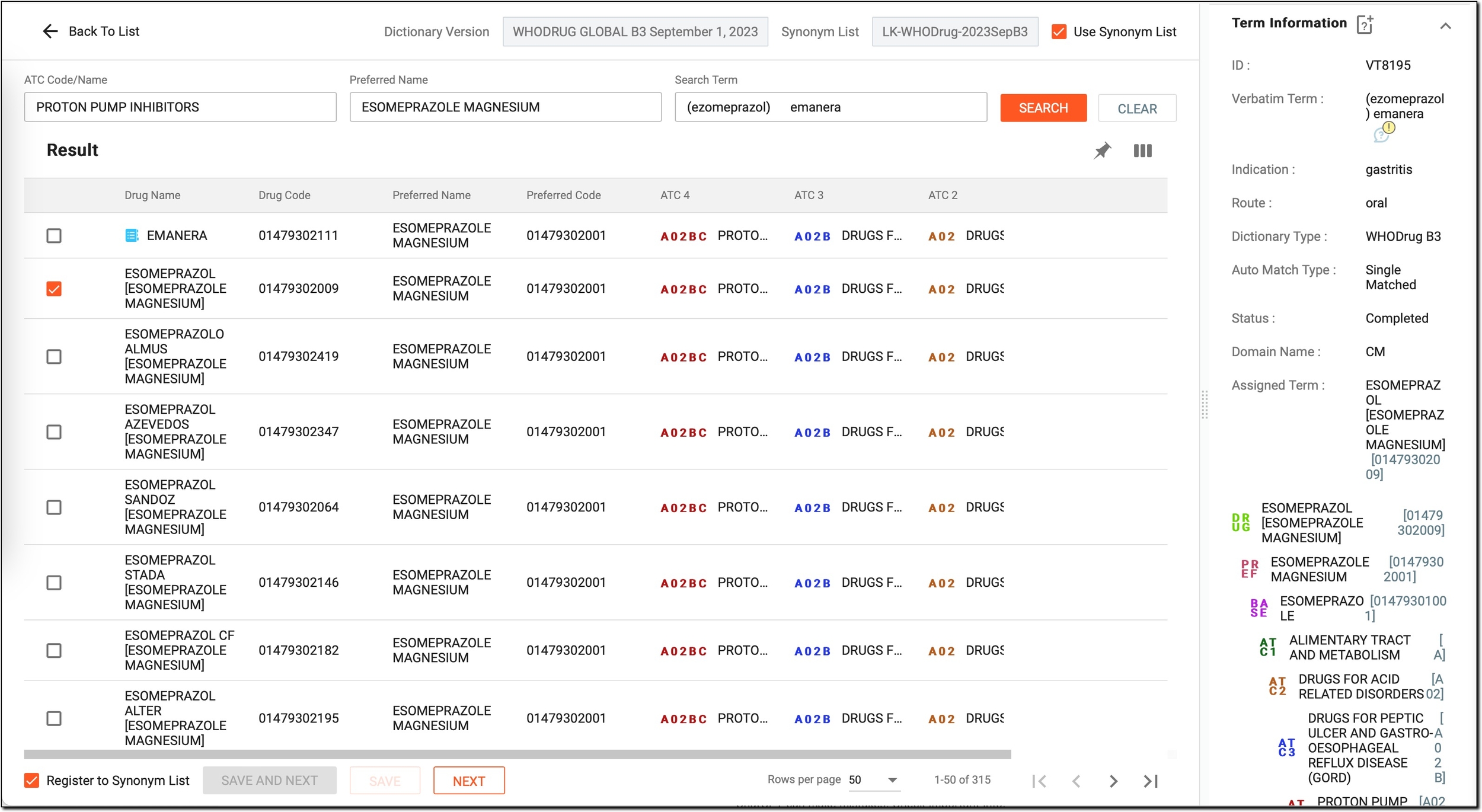 Figure 3. Coding WHODrug VT
Element
Details
Dictionary Version
A read-only field that displays the version of the coding dictionary being used. In this case, it is WHODrug.
Synonym List
Shows the active synonym list applied during coding.
Use Synonym List
Select this checkbox to enable matching using the active synonym list. Or, clear it if you want to exclude synonyms from the matching process.
ATC Code/Name
Serves as a search criterion for identifying the corresponding term in the Anatomical Therapeutic Chemical (ATC) classification system, which categorizes drugs based on their therapeutic use and chemical characteristics.
If needed, you can manually enter or refine the value to search for a different or more relevant ATC term that better matches the verbatim term being coded.
This field is prefilled only when a verbatim term has an assigned ATC code, providing a quick reference to the appropriate classification.Preferred Name
Serves as a search criterion for finding the preferred term in the coding system based on the verbatim term. It is automatically populated with the term most commonly used or accepted in the coding system.
If needed, you can modify the preferred term to search for a different or more appropriate term that better matches the coding requirements for the verbatim term. This allows for greater flexibility in selecting the most accurate or relevant term when necessary.
Search Term
This field is prefilled with the verbatim term you are coding, but you can edit it if you want to perform a more specific search. Enter keywords related to the term to refine the results.
SEARCH
Select
 or simply press ENTER on your keyboard to initiate a search based on the terms you have entered in
the Search Term, ATC Code/Name, and Preferred Term fields. The system looks for potential matches in the coding dictionaries based on your input.
or simply press ENTER on your keyboard to initiate a search based on the terms you have entered in
the Search Term, ATC Code/Name, and Preferred Term fields. The system looks for potential matches in the coding dictionaries based on your input.CLEAR
Select
 to reset and clear any entered data. This will help you to start a new search with fresh terms if needed.
Checkboxes
Select the checkboxes next to the terms you want to choose for coding.
Drug Name
Displays the name of the drug as listed in the coding dictionaries.
Drug Code
Shows the unique code assigned to the drug by the coding dictionary.
Preferred Name
Displays the preferred name of the drug as determined by the dictionary. This should match the intended use of the drug term in the coding process.
Preferred Code
Displays the preferred code associated with the Preferred Name.
ATC 4
Shows the most specific level of the ATC classification for the drug. It represents the drug's detailed therapeutic use or chemical structure.
ATC 3
Represents the broader therapeutic class of the drug, one level above ATC 4. It classifies the drug into a general therapeutic group.
ATC 2
Represents an even higher-level classification, grouping the drug into broader categories, such as the anatomical group or major therapeutic action.
This level helps provide a general sense of the drug’s therapeutic use.
ATC 1
Displays the highest level of the ATC classification. It categorizes the drug into a very broad anatomical or pharmacological group, such as all drugs affecting a particular organ system.
Register to Synonym List
Select this checkbox if you want to add the selected term to the synonym list. This option will include the term for future reference or potential use in synonym-based searches.
SAVE AND NEXT
Select
 to save your current selection and move to the next verbatim term that requires coding. This helps you continue coding without
interruption.
to save your current selection and move to the next verbatim term that requires coding. This helps you continue coding without
interruption.SAVE
Select
 to save the selected term and any changes made to the coding of the current verbatim term. This action stores all your updates,
but it does not move you to the next verbatim term that requires coding. You remain on the current term, helping you review or make further adjustments if necessary.
to save the selected term and any changes made to the coding of the current verbatim term. This action stores all your updates,
but it does not move you to the next verbatim term that requires coding. You remain on the current term, helping you review or make further adjustments if necessary.NEXT
Select
 to move to the next verbatim term without saving the current changes. Use this option if you want to review or make further
adjustments before finalizing the selection.
to move to the next verbatim term without saving the current changes. Use this option if you want to review or make further
adjustments before finalizing the selection.In addition, to help you guide your decision when coding the term, review the details in the Term Information pane on the right as explained in the following table.
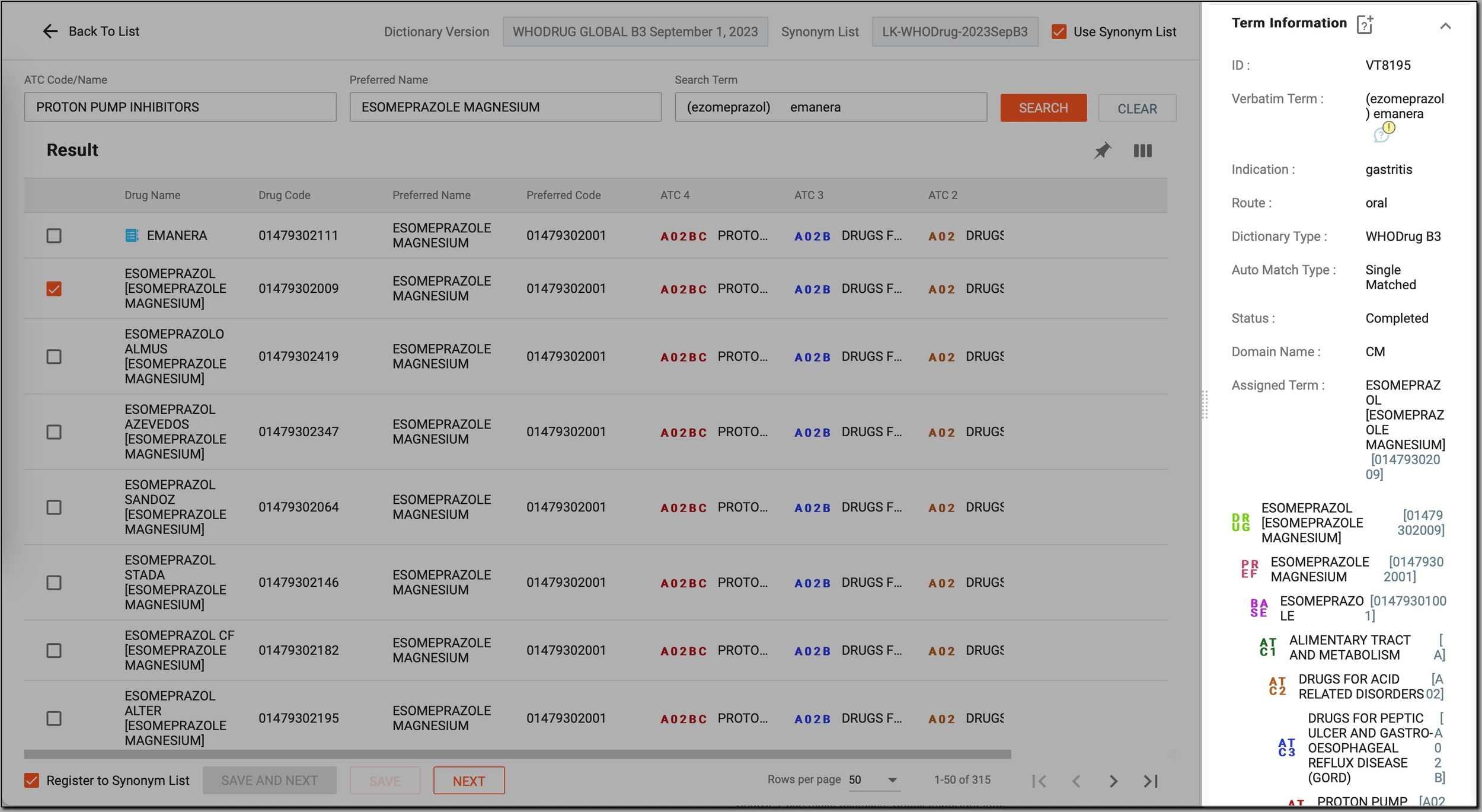 Figure 4. Reviewing additional information about the WHODrug term being coded
Element
Details
New Query for Coding
Select
 to initiate a new query for coding. This is helpful in cases where additional clarification or verification is needed for a coding decision.
ID
A read-only unique identifier for the verbatim term.
Verbatim Term
The raw, unrpocessed verbatim term extracted from the source data that needs to be coded.
Indication
The intended use or reason for the drug or treatment.
Route
The method of drug administration, for instance, oral, injection, or else.
Dictionary Type
The type of dictionary used for coding, MedDRA or WHODrug.
Auto Match Type
Indicates the result of an automatic matching process, if available. Possible types include:
-
Not Matched: no match is found in the dictionary, and the term requires manual coding.
-
Single Matched: one unique match is found in the dictionary, which can be used directly.
-
Multi Matched: multiple potential matches are found, and you should choose the correct one manually.
Status
Indicates the current progress of the VT coding. Possible statuses include:
-
Await Manual Code: the standardized dictionary term has not yet been assigned to a verbatim term and requires manual coding.
-
Completed: the standardized dictionary term has been successfully assigned to a verbatim term and coding is complete.
Domain Name
The specific medical domain to which the term is related, for instance, AE for adverse events, CM for concomitant medication, DM for demographic data, and so on.
Assigned Term
Displays the dictionary term that has been assigned to the verbatim term, as well as the hierarchical path through the coding levels.
This hierarchical path shows the progression of the term from its most general classification to more specific ones. It may include one of the following levels:
For example, if you are coding a drug, the Assigned Term might show the following path:
-
DRUG: Aspirin
-
PREF: Acetylsalicylic Acid
-
BASE: Analgesic
-
ACT1: Non-steroidal Anti-inflammatory Drug (NSAID)
-
ACT2: Oral
-
ACT3: Pain Relief
-
ACT4: Headache Treatment
New Query for Source Term
Select
 to initiate a new query for a source term if further clarification or correction is needed.
This option is particularly useful for terms that cannot be coded due to ambiguity or multiple interpretations and is available only for VTs synchronized from the EDC system to the CODING application.Hide/Show terms from closed batch
Select it to view or hide source terms from batches that are already closed.
Imagine you are reviewing verbatim terms for coding in a batch that is still open. After processing, a batch gets closed, meaning no further changes or coding updates can be made to the terms in that batch. However, you might need to reference or check the terms in a closed batch for accuracy, consistency, or historical context.

Select it to expand or collapse additional source term details.
Term Source
Identifies the origin of the verbatim term, such as the eClinical EDC system or another source. This helps track where the term was initially recorded.
Batch Number
Refers to the coding batch in which the term was included.
Original Term
Shows the exact wording of the term as it was initially recorded in the source system before any splitting. It serves as a reference to the unaltered version of the term prior to the application of any split rules.
Level
Reflects the specific hierarchical layer within the coding structure—specified at the study setup phase in the Coding Admin module—that defines the depth of the term in the coding hierarchy.
In dictionaries like MedDRA or WHODrug, terms are organized in levels, with each level corresponding to a different level in the hierarchy:
-
MedDRA example: levels may range from Preferred Term (PT) to higher levels such as System Organ Class (SOC)..
-
WHODrug example: levels include Drug Name (base level), Ingredient (a higher level), or Substance Name (the most granular classification).
So, basically, the Level value indicates the layer of the term being coded.
Variable
Represents the variable name from the source data file or from the EDC system that contains the verbatim term, such as AETERM, CMTRT, MHTERM, and others.
Line
Refers to the line number in the source file where the term is found. This detail assists in locating the term in its original dataset for verification or review.
Form
Indicates the form in which the term is recorded, such as a specific case report form (CRF). This helps you understand the data’s context within the study structure.
Visit
Specifies the visit name in the study at which the term is collected. This can help in understanding temporal aspects of the study data.
Subject
Refers to the participant identifier, linking the term to the specific subject in the study from whom the data is collected.
Site
Identifies the study site where the data is collected. This information can help in tracking study data across different locations.
Study Name
Indicates the name of the study in which the data is collected, helping to contextualize the term within a specific study framework.
Closed Manual Query
Next to the term source name, select
 to open the audit trail pane and view all previous queries made for the source term
associated with the selected VT. This helps you review the history of queries and see how the source term was handled in the past, ensuring you have full visibility of previous actions.
to open the audit trail pane and view all previous queries made for the source term
associated with the selected VT. This helps you review the history of queries and see how the source term was handled in the past, ensuring you have full visibility of previous actions.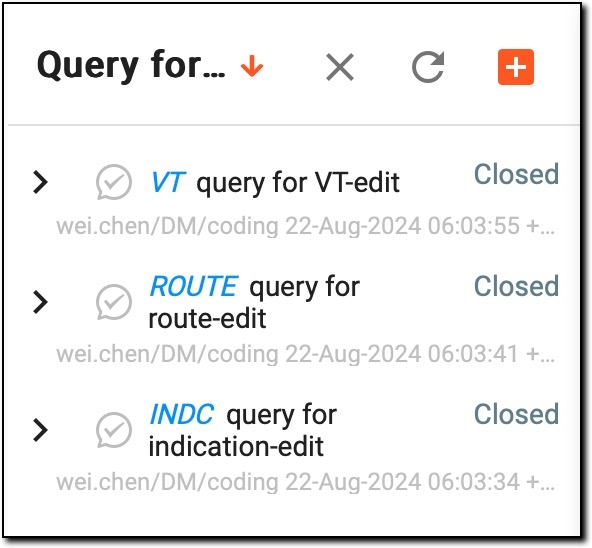 Figure 5. Reviewing previous queries for source term
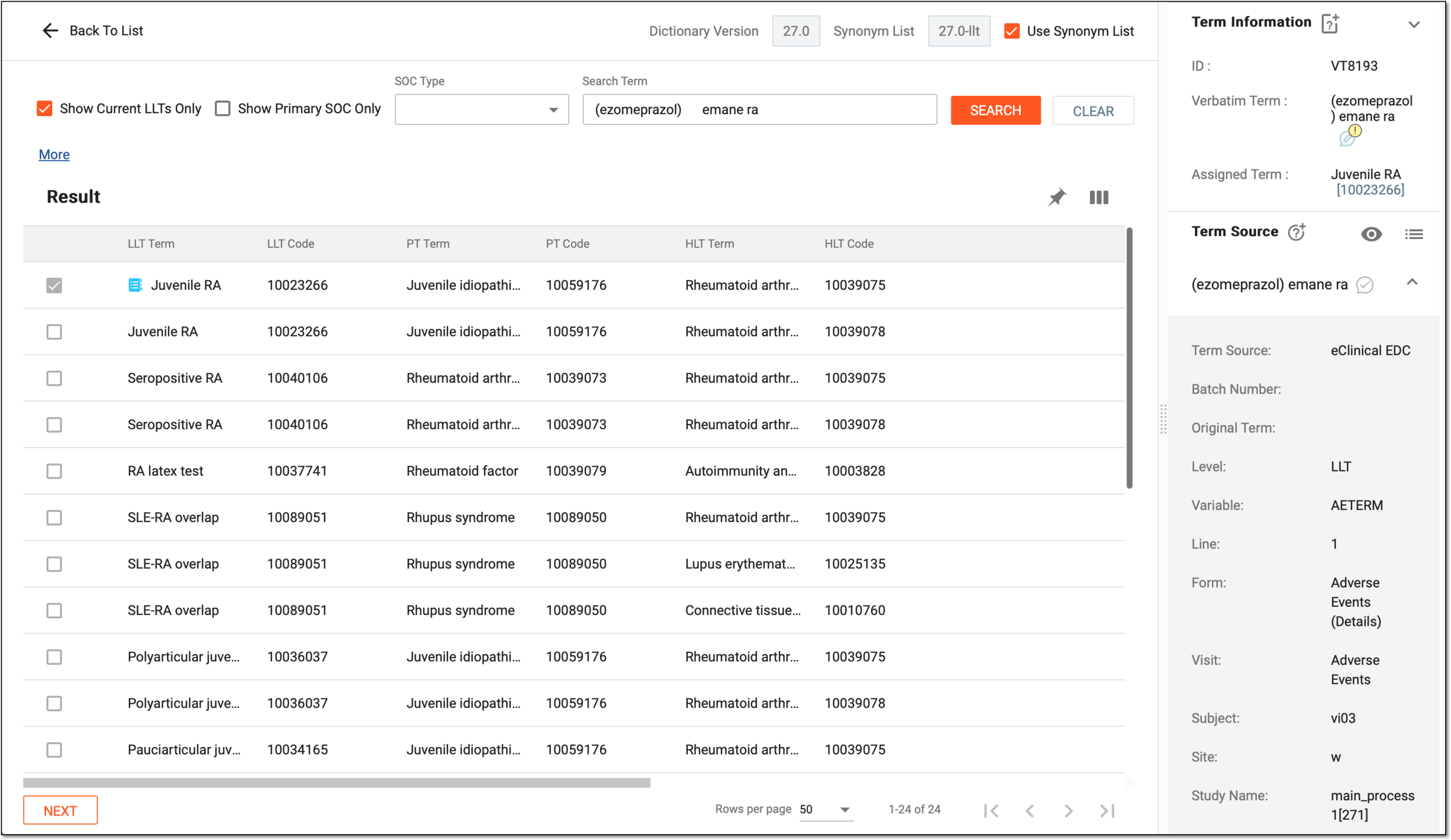 Figure 6. Coding MedDRA VT
Element
Details
Dictionary Version
A read-only field that displays the version of the coding dictionary being used. In this case, it is WHODrug.
Synonym List
Shows the active synonym list applied during coding.
Use Synonym List
Select this checkbox to enable matching using the active synonym list. Or clear it if you want to exclude synonyms from the matching process.
Show Current LLTs only
Select this checkbox to display only the current Lowest Level Terms (LLTs)—those that are still valid and not retired in the latest version of the MedDRA dictionary.
This checkbox is disabled in the selected state and cannot be changed if the Forced Select Current LLTs checkbox is selected on the study level.Show Primary SOC only
Select this checkbox to display only the Primary System Organ Class (SOC) assigned to each term.
This checkbox is disabled in the selected state and cannot be changed if the Forced Select Primary SOC checkbox is selected on the study level.SOC Type
Expand the menu and select the type of System Organ Class (SOC) associated with a term.
Search Term
Enter the term you want to find in the coding dictionary.
HLGT
Represents a broader grouping of High-Level Terms (HLTs) within the coding hierarchy. HLGTs provide an intermediate level of categorization between HLTs and System Organ Classes (SOCs), facilitating better organization and analysis of related terms.
HLT
Groups together related Preferred Terms (PTs) within the coding dictionary. HLTs provide a higher-level categorization to make it easier to analyze and interpret coding data.
PT
Displays a standardized term in the coding dictionary that represents a unique medical concept. PTs are used to ensure consistency and clarity when analyzing data from various sources.
SEARCH
Select
or simply press ENTER on your keyboard to initiate a search based on the term you have entered in the
Search Term field. The system looks for potential matches in the coding dictionary based on your input.CLEAR
Select
to reset and clear any entered data. This will help you to start a new search with fresh terms if needed.Checkboxes
Select the checkboxes next to the terms you want to choose for coding.
LLT Term
Displays the Lowest Level Term (LLT) from the coding dictionary that has been matched or selected for coding.
LLT Code
Shows the unique identifier or code for the selected LLT, which is used for database tracking and reporting.
PT Term
Displays the Preferred Term (PT) associated with the selected LLT. The PT represents a standardized description of the concept in the coding hierarchy.
PT Code
Shows the unique identifier or code for the PT. This code helps in consistent referencing across systems and datasets.
HLT Term
Displays the High-Level Term (HLT) associated with the selected LLT and PT. The HLT provides a higher-level grouping of terms within the coding hierarchy.
HLT Code
Shows the unique identifier or code for the HLT, providing additional classification details.
NEXT
Select
to move to the next verbatim term to be coded. -
Once you have completed the manual coding for the verbatim term, the newly assigned term appears in the Assigned Term field, and the status changes from Awaiting Manual Code to Completed, indicating that the term has been successfully coded.
The Coding Time and Coded By fields are also be populated, providing a record of when the coding was performed and by which user. This ensures that all terms are properly documented and that the coding process is tracked.
Once the coding is done, the VT is fully processed and you can now proceed with any remaining tasks or coding activities.