Search for ICSRs
In PV, you can use simple search or advanced filters to find the needed ICSRs in the list. While the objective of both simple and advanced search is to locate the cases of your interest quicker, however, the important purpose of the advance search is to perform the ICSR duplicate check and prevent the entry of replicated cases.
-
In the PV application header, select the ICSR tab.
 Figure 1. Accessing ICSR list
-
On the ICSR List page that opens, use the search options as follows.
On the workspace toolbar, in the Search Case Number text box, start typing the identification number of the case or part of it. The results satisfying the entered request appear automatically in the table.
Tip
The fuzzy search is supported, meaning you can search for an approximate result if you have made a mistake while typing the case number.
 Figure 2. Applying simple search to find ICSR
-
From the workspace toolbar, select Search
 .
.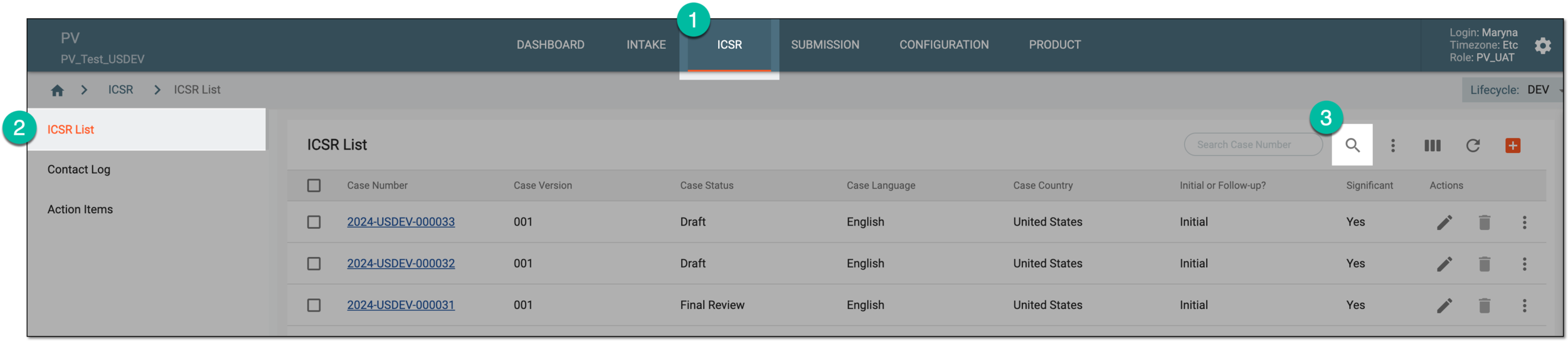 Figure 3. Accessing advanced search
-
On the Advance Search page that opens, use the available filters to find the ICSR of your interest as explained in the following table.
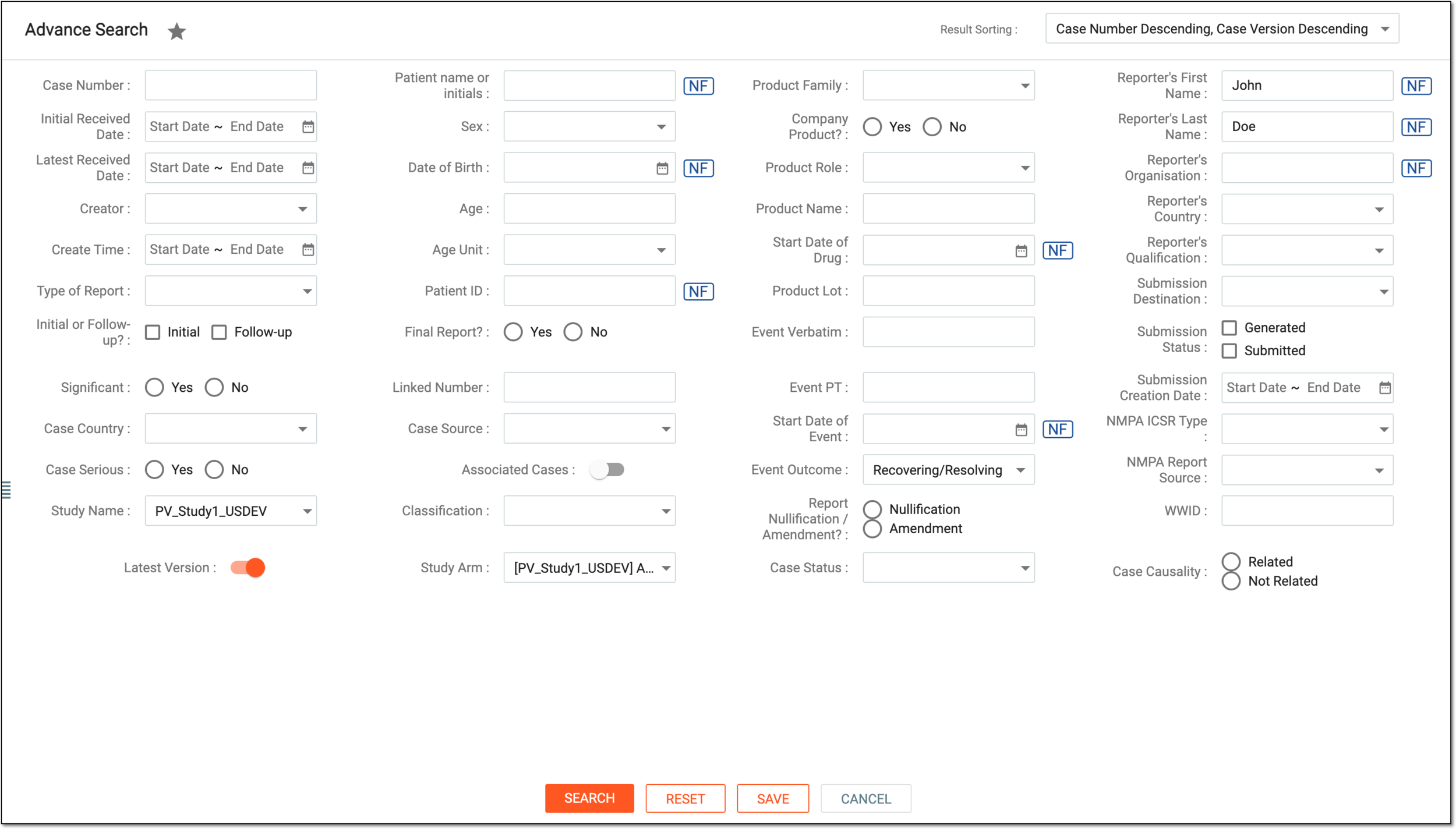 Figure 4. Applying advanced search filters
Tip
For some of the fields, Null flavor
 is available. This option is used to
describe the reason for missing data. By selecting it, you activate the options No Information, Masked, Unknown, and so on. You can find the details for the available null flavor
options and their codes in Appendix A. Null flavor specification.
is available. This option is used to
describe the reason for missing data. By selecting it, you activate the options No Information, Masked, Unknown, and so on. You can find the details for the available null flavor
options and their codes in Appendix A. Null flavor specification.Element
Details
Result Sorting
Select how you prefer seeing the search results in the ICSR list:
-
Case Number Descending, Case Version Descending: sort all the cases and their versions from newest to oldest. If applied, you see the latest created case of its latest version at the top of the list. This is also the default sorting option in the system.
-
Case Number Ascending, Case Version Ascending: sort all the cases and their versions from oldest to newest. If applied, you see the oldest created case of its oldest version at the top of the list.
-
Case Number Ascending, Case Version Descending: sort the cases from oldest to newest but display the newest case version. If applied, you see the newest version of the oldest created case at the top of the list.
-
Third Part of WWID Ascending, Case Version Ascending: sort by the worldwide unique case ID from oldest to newest and the oldest case version. If applied, you see the earliest created version of each case sorted ascendingly according to their WWID numbers.
-
Third Part of WWID Ascending, Case Version Descending: sort by the worldwide unique case ID from oldest to newest and the latest case version. If applied, you see the latest created version of each case sorted ascendingly according to their WWID numbers.
To apply the sorting, ensure to turn off the Latest Version toggle so as not to interfere with the set version
                                              condition.
Case Number
Enter the case number for the ICSR you need to find.
The system can give you multiple results for a single case number since the numbers are identical for the initial and follow-up ICSR.
Initial Received Date
Select the dates to specify the period within which the initial ICSR of your interest has been received in PV.
Latest Received Date
Select the dates to specify the period within which the latest version of the ICSR of your interest has been received in PV.
Creator
Select the name of the user to look for cases created by them.
Create Time
Select the dates to specify the period within which the ICSR of your interest is created in PV.
Type of Report
Select the type of the ICSR that you need to find.
Initial or Follow-up?
Select the respective checkbox to specify whether you are looking for an initial (the case is reported for the first time) or follow-up (the data in the report is an additional or updated version of the previously reported case).
Significant
Select the respective option, as follows:
-
Yes: the report of your interest is generated for a significant event.
-
No: the report of your interest is generated for an event that is not significant.
The definition of clinical significance varies per sponsor, but mostly it requires new information or changes in the previous reports concerning one of the four validity criteria—identifiable reporter, identifiable patient, adverse event, or suspect medicinal product. Other
                                              information that may impact the overall clinical significance of the case is any change in causality assessment, study information, concomitant medications, medical history, and so on.
Case Country
Select the country, in which the case for the ICSR of your interest has occurred.
Case Serious
Select the respective option, as follows:
-
Yes: the report of your interest is generated for a serious adverse event (SAE).
-
No: the report of your interest is generated for an adverse event (AE) that is not serious.
Study Name
Select the study for which the ICSR of your interest has been created.
Latest Version
Use this filter together with Case No. as follows:
-
Turn the toggle on to search only for the latest version of the ICSR with the specified case number.
If turned on, it may interfere with some of the result sorting conditions. -
Turn the toggle off to search for all the available versions of the ICSR with the specified case number.
Patient name or initials
Enter the name or initials of the patient for whom the AE/SAE has occurred and the ICRS of your interest has been created.
Sex
Select the sex of the patient for whom the AE/SAE has occurred, and the ICRS of your interest has been created.
Date of Birth
Select the date of birth for the patient for whom the AE/SAE has occurred, and the ICRS of your interest has been created.
Age
Enter the number to represent the age of the patient for whom the AE/SAE has occurred, and the ICRS of your interest has been created. You can also specify the unit for this value in the following field.
Age Unit
Select the unit to support the age value, such as years, months, weeks, or days.
Patient ID
Enter the identification number of the patient for whom the AE/SAE has occurred, and the ICRS of your interest has been created.
Final Report?
Select the respective option, as follows:
-
Yes: the report of your interest is final for the patient, and no follow-up data is possible.
-
No: the report of your interest is not final, and more follow-up data can be expected.
Linked Number
Enter the case number or another identification number of another report linked to the ICSR of your interest.
Case Source
Select the sources of how the ICSR is created in the system—from EDC import, E2B R3 import, created manually, or else.
Associated Cases
Use this filter together with Case No. as follows:
-
Turn the toggle on to include the cases associated with the specified case number in the search results.
-
Turn the toggle off to exclude the cases associated with the specified case number from the search results.
Classification
Select the checkboxes next to the case types that can be the following: Adverse Event, Product Problem (e.g., defects/malfunctions), Expedited/SUSAR, Non-Expedited/SAE, Unanticipated, or Anticipated.
If multiple items are selected, the search results include cases with all the classifications combined, not one of them.For instance, if Adverse Event and Anticipated are selected, the search results will show all the anticipated AE cases.
Study Arm
Select the treatment arms of the study for which the ICSR is generated. This helps you narrow the search for specific treatment combinations as opposed to searching by the product name.
For instance, Arm A uses Drug 1, Arm B uses Drug 2, and Arm C uses Drugs 1 and 2.
If searched by Drug 1, you see both cases generated for the subjects of Arm A and Arm C. But using this filter, you can narrow the search to the cases exclusive to the study arm of your interest.
If multiple items are selected, the search results include cases with all the arms combined, not one of them.Product Family
Select one or multiple product families existing in the PV system for the medicinal product from which the ICSR is generated.
Company Product?
Select the respective option, as follows:
-
Yes: the report of your interest is generated for the company product registered in the PV system.
-
No: the report of your interest is generated for a concomitant medication or another drug that is not treated as a company product in the PV system.
Product Role
Select the relation of the medicinal product to the event recorded with the ICSR of your interest—Suspect, Concomitant, Interacting, or Drug Not Administered.
Product Name
Enter the name of the product that caused the AE/SAE for which the ICRS of your interest has been created.
Start Date of Drug
Select the date when the drug that caused the ICSR-related AE/SAE has first been taken.
Product Lot
Enter the lot number to which the drug that caused the ICSR-related AE/SAE belongs.
Event Verbatim
Enter the term used in the original reported case to describe the ICSR-related AE/SAE.
Event Country
Select the country in which the ICSR-related AE/SAE occurred.
Start Date of Event
Select the date when the ICSR-related reaction or AE/SAE has started.
Event Outcome
Select the outcome of the ICSR-related AE/SAE.
Report Nullification / Amendment?
Select the respective option, as follows:
-
Nullification: if the ICSR of your interest is classified as a case nullification in the PV system.
-
Amendment: if the ICSR of your interest is an addition (amendment) for another existing case in the PV system.
Case Status
Select the checkboxes next to the case workflow status of the ICSR of your interest.
Reporter's First Name
Enter the name of the ICSR data reporter.
Reporter's Organization
Enter the name of the organization to which the ICSR data reporter belongs.
Reporter's Country
Select the country of the ICSR data reporter's residence.
Reporter's State or Province
Enter the state or province of the ICSR data reporter's residence.
Reporter's City
Enter the city of the ICSR data reporter's residence.
Submission Destination
Select the organizations to which the ICSR of your interest is submitted.
Submission Status
Select the checkbox next to the current submission status of the ICSR of your interest.
Submission Creation Date
Select the start and end dates to outline the period during which the submission package is created for the ICSR of your interest.
NMPA ICSR Type
Select the type of the ICSR of your interest according to NMPA.
NMPA Report Source
Select the source of the report according to NMPA.
WWID
Enter the case world-wide identification number to search for a specific case.
SEARCH
Select
 to execute searching according to the applied filters.
RESET
Select
 to reset all the applied filters and start over.
SAVE
Select
 to save and use the saved filter set when needed.
CANCEL
Select
 to discard all the implemented changes and return to the ICSR List page.
 -
-
Upon applying the search, the system displays the results satisfying the specified parameters.
Tip
The search results are based on the study access permission granted via ADMIN.