View item-level SDV result records of general/global SDV
Source Data Verification (SDV) involves the review and comparison of data recorded in the source documents such as laboratory results, medical history, adverse event records, and so on against the data captured on the case report forms (CRFs).
Once you have selected the SDV type for your study and configured either global, general, or target SDV settings, the planning stage may be considered complete. You can now start to verify the CRF data against the source documentation and then track the outcomes under the SDV Result tab.
In this section, you can learn how to access and interpret the form-level result records for Global and General SDV procedures. An item-level report represents SDV results for individual form fields and their variables as opposed to the form-level one that shows the SDV result per form only.
-
In the EDC application header, select the STUDY INFO tab.
-
In the left pane of the page that opens, expand SDV and select the SDV Result tab.
-
On the page that opens, select the Item tab to analyze the item-level SDV result records as explained in the following table.
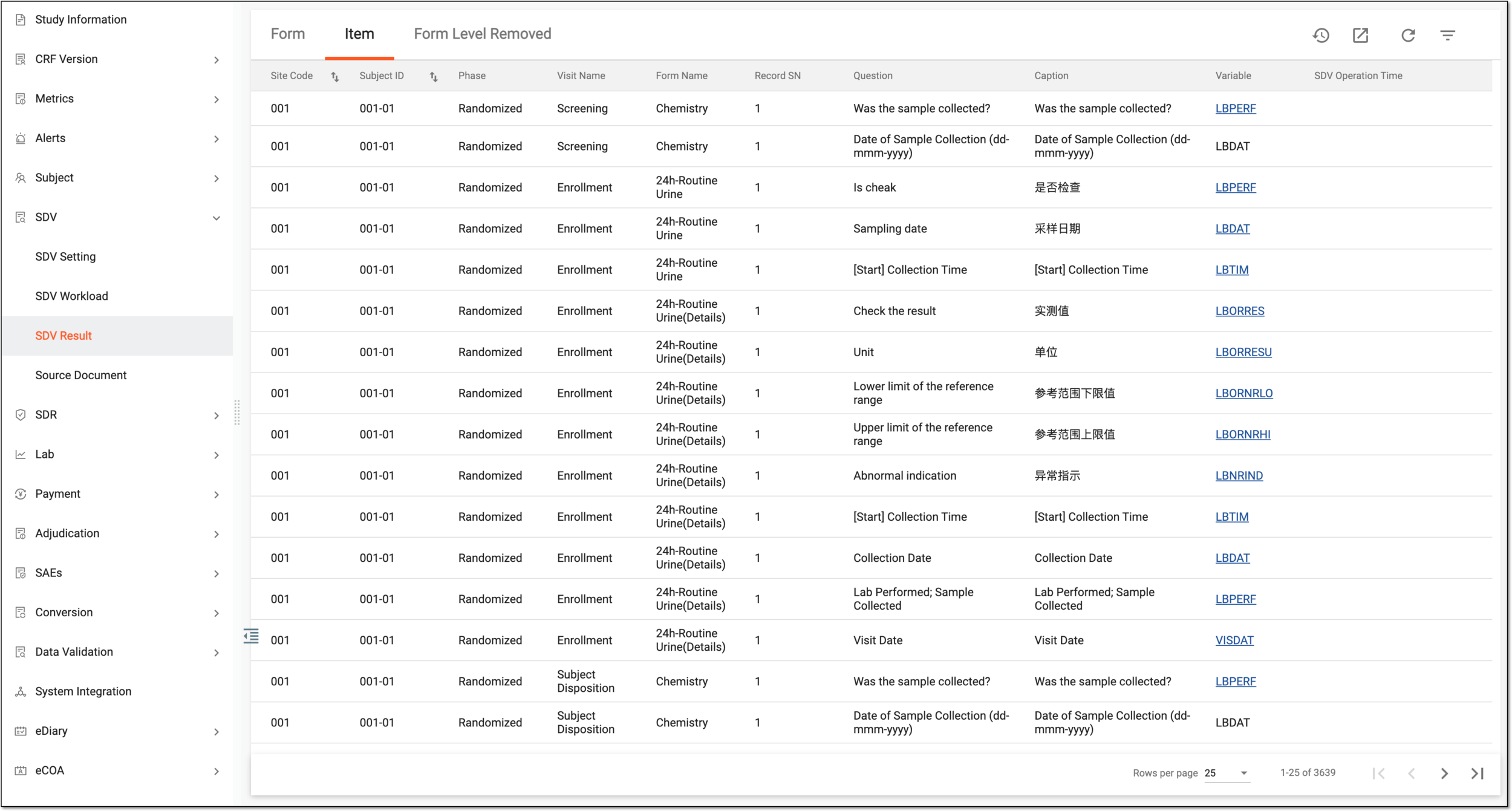 Figure 1. Analyzing item-level SDV result records
Column
Details
Site Code
Represents the code of the site at which the SDV for CRF data must occur.
Subject ID
Represents the unique identifier of the subject for whom the SDV for CRF data must occur.
Phase
Represents the subject phase during which the SDV for CRF data must occur.
Visit Name
Represents the name of the visit at which the CRF for which the SDV must occur is completed.
Form Name
Represents the name of the CRF for which the SDV must occur.
Select the hyperlink in the Form Name column to go to the corresponding CRF where you can conduct the SDV approval.Record SN
Represents the serial number of a record within the CRF for which SDV must occur. This is only applicable for log forms that have multiple records, for instance, the Adverse Events form.
Question
Represents the question text of the CRF field for which the SDV must occur, for instance, "AE date."
Caption
Represents the caption text of the CRF field for which the SDV must occur, for instance, "Specify the date of AE occurrence."
Variable
Represents the variable of the CRF field for which the SDV must occur, for instance, "AEDATE".
SDV Operation Time
Represents the time when the user performed and confirmed SDV for the CRF.
SDV Operator
Represents the name of the user who performed and confirmed SDV for the CRF.
Workload (min)
Represents the time estimate defined for the CRF SDV completion.
SDV Status
Represents the SDV status:
-
Yes: this status represents that the SDV procedure is already performed.
-
No: this status represents that the SDV procedure is not yet performed.
SDV Availability
Represents if the CRF is already available for SDV to be performed or not.
The form is unavailable for the SDV process if one or all of the following is true:
-
The CRF is softlocked.
-
The CRF or any of its items have the Initial status.
-
The CRF or any of its items are disabled.
-
The CRF is complete but there are more review settings configured for your study that must occur before SDV.
Use filtering to sort out all forms currently available for SDV.Form Completion Time
Represents the timestamp of when the CRF is completed with data.
SDV Availability Time
Represents the timestamp when the CRF first became available for SDV to be performed.
Active
Represents if the SDV is currently active in the system or already completed.
-
You have reviewed the SDV results per item.
A specialized document in a clinical trial designed to collect the subject data.
See also eCRF.
A specific phase that a subject has to complete in the course of a clinical trial to move further to the next phase. For instance, Screening, Enrolled, Randomized, and others.
 |
In eClinical, subject phases are designed individually for each study via the SD application, although they are referenced in others, like IWRS or EDC.