Select SDV setting type for study
Source Data Verification (SDV) involves the review and comparison of data recorded in the source documents such as laboratory results, medical history, adverse event records, and so on against the data captured on the case report forms (CRFs).
Before the SDV process is started, based on the study specifics, the sponsor decides what type of plan is developed for a study and outlines how much of the CRF data must undergo verification.
In EDC, you can differentiate between three types of settings according to which the SDV plans are configured:
-
Global SDV: using this type, you can establish a general percentage of all study data that must undergo SDV. The system randomly selects the CRFs intended for verification out of the total number to satisfy your established percentage.
-
General SDV: using this type, you can specify the forms and the percentage of data that need to undergo SDV by adding the SDV setting records by form, visit, and subject.
-
Target SDV: using this type, you can configure a more sophisticated SDV plan by adding various tiers, inclusion and exclusion criteria, and so on.
-
In the EDC application header, select the STUDY INFO tab.
-
In the left pane of the page that opens, expand SDV and select the SDV Setting tab.
-
On the page that opens, from the workspace toolbar, select SDV Setting
 .
.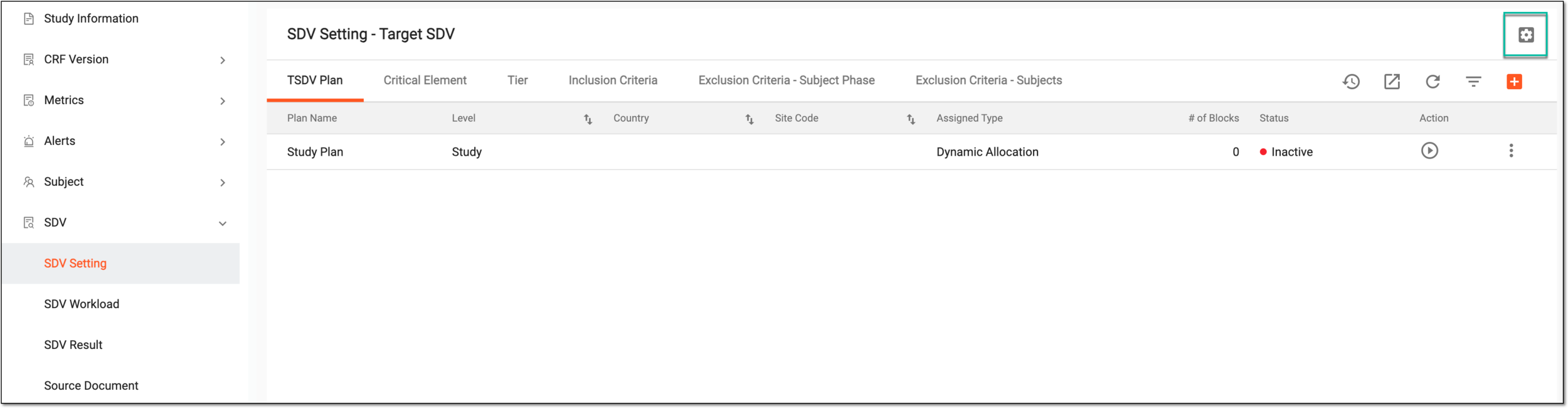 Figure 1. Accessing SDV setting types
-
In the SDV Setting dialog that opens, select the type you want to establish for your study—Global SDV, General SDV, or Target SDV. Then select
 .
.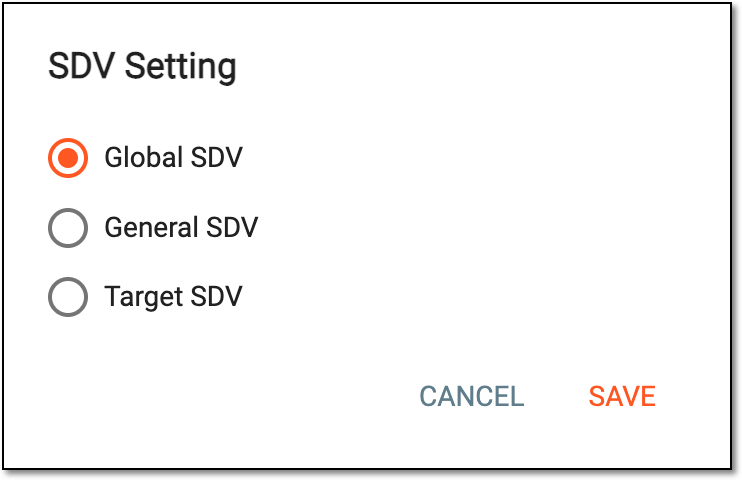 Figure 2. Selecting SDV type
-
In the confirmation dialog that appears, select
 to proceed with your action.
 Figure 3. Confirming to set SDV type
Once confirmed, the selected SDV type is established for your study. You can now configure your SDV plans as needed: