Analyze randomization result, distribution, and block summary
Randomization is a process during which subjects receive their random numbers and are assigned to different arms based on the configured randomization scheme.
Each time randomization occurs, its result is tracked and stored by the IWRS system. This section concentrates on how to view the randomization result and its details specifically for cohorts for which the permuted block randomization method is selected upon configuration.
For the randomization process, you can analyze the outcome in three categories:
-
Result: the tab contains the details of all subjects' allocation to treatment arms, the stratification factors taken into account, blocks, and randomization numbers assigned.
-
Distribution: the tab contains the summary of subject allocation between the treatment arms.
-
Block: the tab contains the summary of the subject allocation per block for the randomization scheme; provides options for manual reservation of blocks for replacement subjects.
-
In the IWRS application header, select the TREATMENT DESIGN tab.
-
On the page that opens, in the left pane, select the Period subtab.
-
In the Period List table that appears, locate the period of your interest. Then in the Period Name column, select the value to open the period configurator.
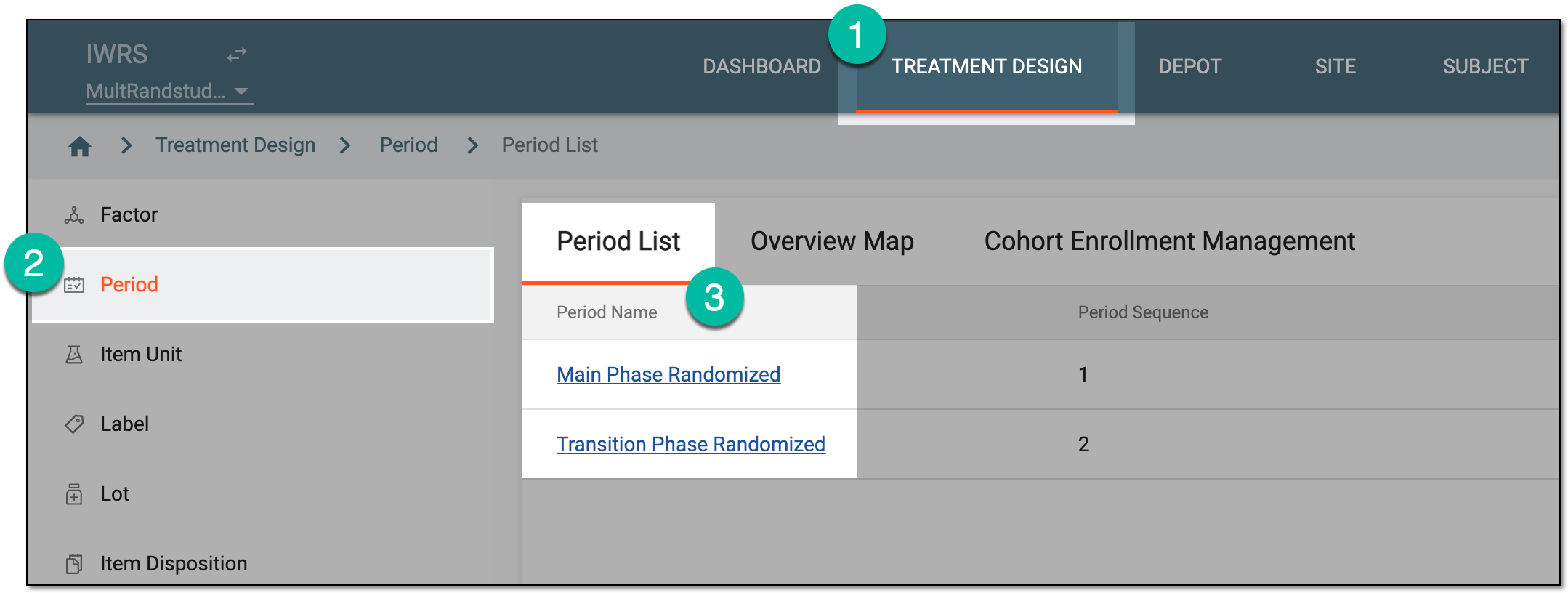 Figure 1. Selecting period
-
In the period configurator, drill down the explorer tree and select Result
 .
.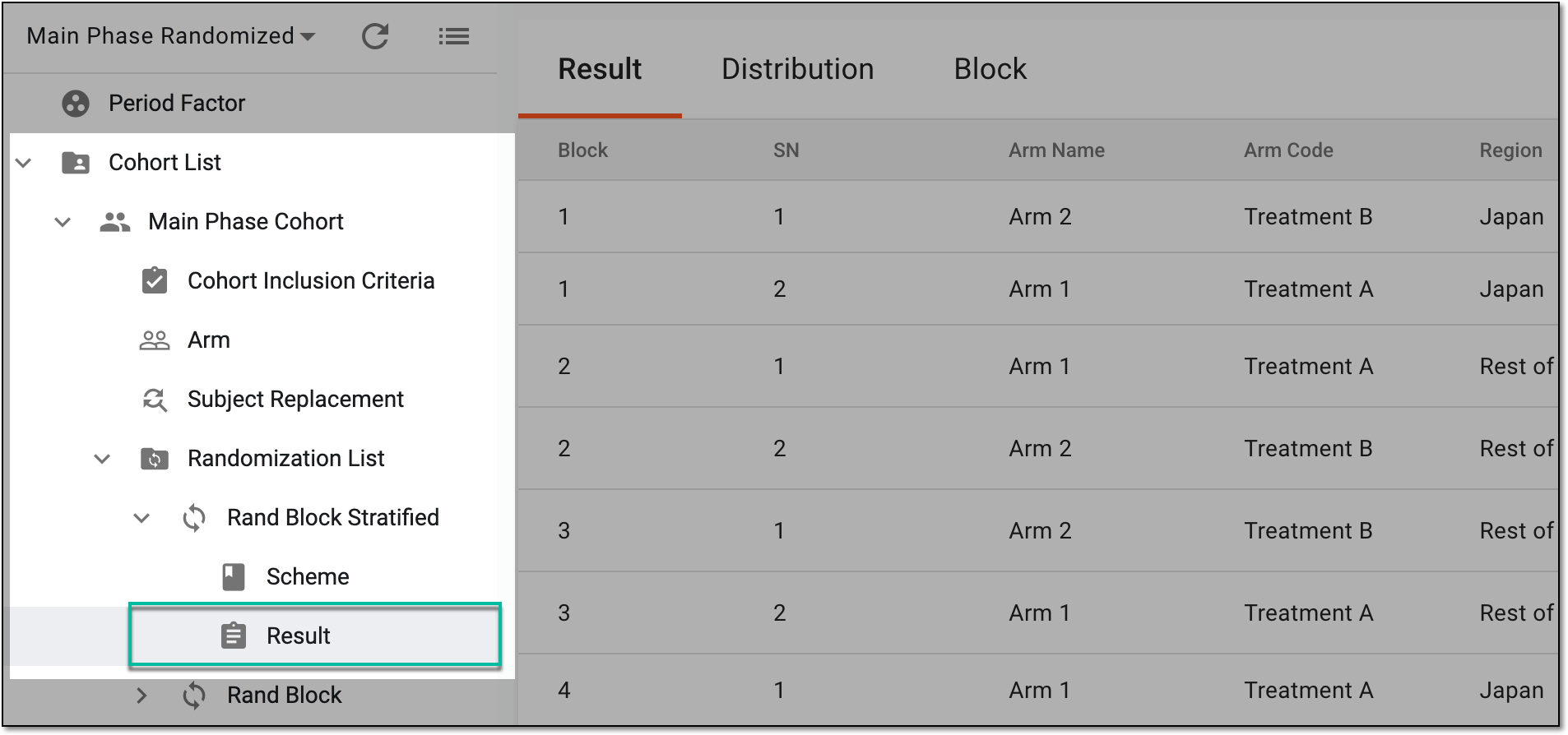 Figure 2. Accessing randomization result
-
On the page that opens, you can access the randomization result, subject distribution, and block allocation details as follows.
Under the Result tab that opens, in the table, you can analyze the randomization result details as explained in the following table.
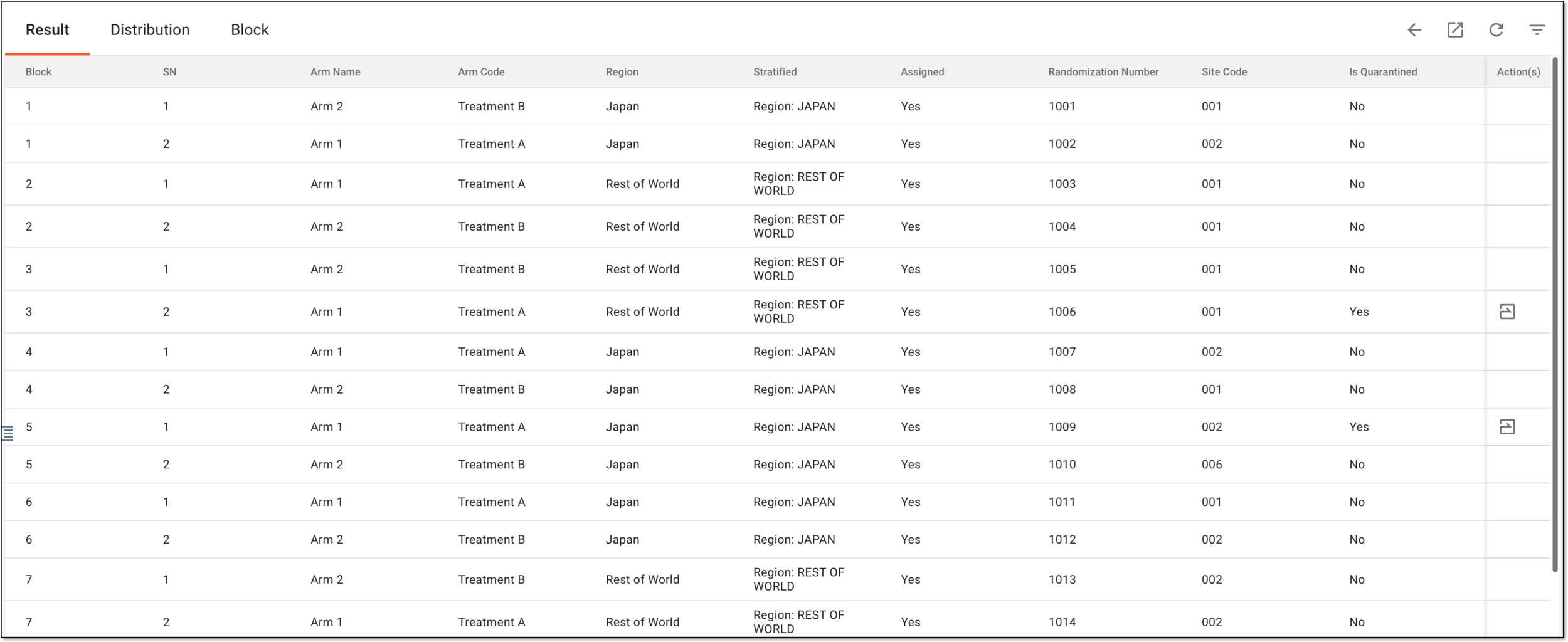 Figure 3. Analyzing randomization result details
Column
Details
Block
Represents the identifier for the specific block to which the subjects are allocated as a result of randomization. The block size is set upon randomization scheme configuration and based on this size, the same identifier is relevant for a certain number of subjects.
For instance, if the block size is set to four, then for every four subjects a new block is generated, thus, there are four subjects with the same block identifier in the randomization result list.
The lock symbol next to the block value indicates that the randomization
numbers of this block are reserved for the replacement subject. The replacement subject is a new subject that qualifies all the criteria to be enrolled and randomized into the same arm as the subject discontinued from the study who needs to be replaced to keep the arm balance intact.
next to the block value indicates that the randomization
numbers of this block are reserved for the replacement subject. The replacement subject is a new subject that qualifies all the criteria to be enrolled and randomized into the same arm as the subject discontinued from the study who needs to be replaced to keep the arm balance intact.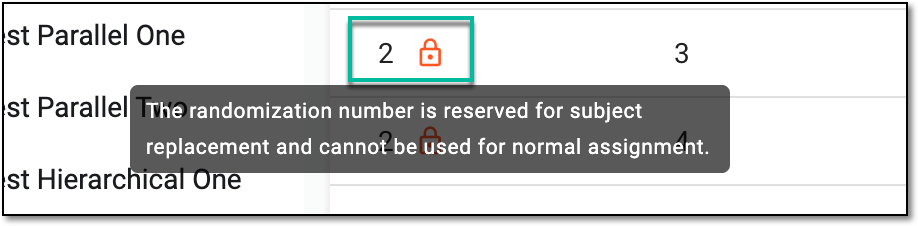 Figure 4. Identifying randomization number locked for replacement
SN
Represents the subject's sequential number in a study.
Arm Name
Represents the name of the arm to which the subject is assigned as a result of randomization.
Arm Code
Represents the unique identifier of the arm to which the subject is assigned as a result of randomization.
[Stratified factor name]
Represents an individual stratified factor based on which the subject is assigned to the specific arm as a result of randomization.
For instance, it can be Region, Sex, Age, and so on.
There can be as many such columns as there are stratified factors involved in randomization. Bringing out the individual factor column makes it easier to filter
                                        the table by a specific factor or to do statistical analysis.
Stratified
Represents the stratified factor or a group of factors separated with a semicolon based on which the subject is assigned to the specific arm as a result of randomization.
This value combines the values of all the [Stratified Factor Name] columns.Assigned
Represents whether the subject has the treatment assigned (Yes) or not (No).
Randomization Number
Represents the random number the subject receives as a result of randomization.
Site Code
Represents the code of the site to which the subject is assigned.
Forced Randomized
Represents whether the subject has been randomized as a result of forced randomization (in case it has occurred).
This column is only available if forced randomization is enabled for your
                                        study.
Is Quarantined
Represents if the subject is currently quarantined (Yes) or not (No).
Select the Distribution tab and analyze how the randomized subjects are allocated to treatment arms as explained in the following table.
 Figure 5. Analyzing subject distribution between arms
Column
Details
Arm Name
Represents the name of the treatment arm to which subjects are allocated as a result of randomization.
Arm Code
Represents the identification code of the treatment arm to which subjects are allocated as a result of randomization.
Expected Ratio
Represents the ratio according to which subjects are allocated to the arm.
For instance, if all arms have a ratio of 1, then the subjects are distributed equally, and if the ratio is 1 for Arm A and 2 for Arm B, then Arm B has twice the size of Arm A allocation.
Actual Assigned Rand ID
Represents the quantity of randomization numbers associated with the arm. These numbers are to be assigned to the subjects upon their allocation to the arm.
Status
Represents if the arm is activated or inactivated. Only active arms are available for subject allocation.
Select the Block tab and analyze the block summary for the randomization scheme as explained in the following table.
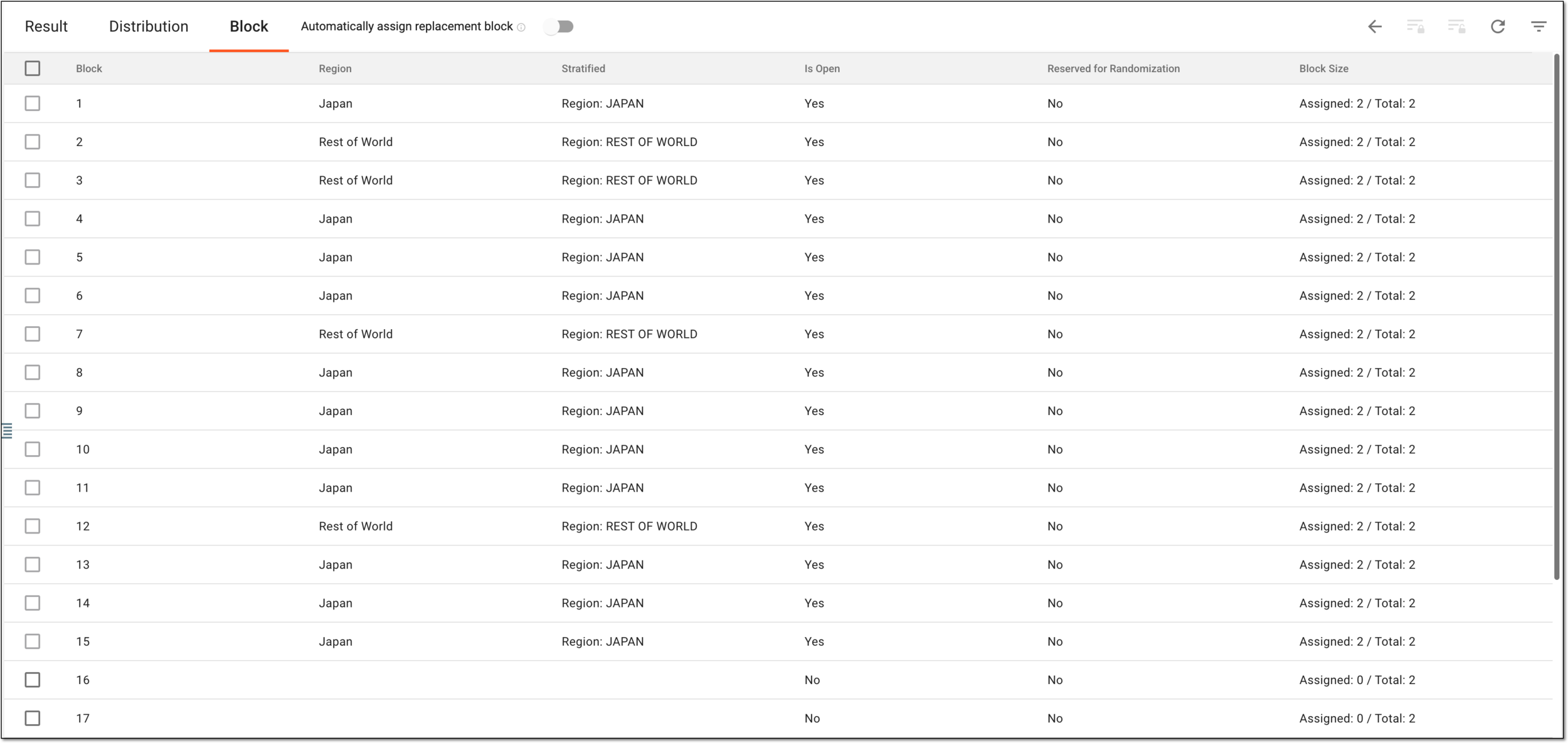 Figure 6. Analyzing block summary for randomization scheme
Element
Details
Automatically assign replacement block
Set as follows:
-
Turn on the toggle for the system to automatically assign a new block for the replacement reservation if there is no suitable randomization number in the reserved blocks during the subject replacement.
-
Turn off the toggle for the system to use regular randomization if the subject is eligible for replacement, but there is no suitable fandomization number in the reserved blocks.
Multiselect
Select on of the following:
-
The checkbox next to the block with the Reserved for Randomization status No to be able to reserve the randomization number for replacement.
-
The checkbox next to the block with the Reserved for Randomization status Yes to be able to cancel the reservation of the randomization number.
The checkbox is inactive and cannot be selected for the blocks that already have the subjects allocated as a result of randomization.Block
Represents the identifier for the specific block to which the subjects are allocated as a result of randomization.
[Stratified factor name]
Represents an individual stratified factor based on which the subject is assigned to the specific block as a result of randomization.
For instance, it can be Region, Sex, Age, and so on.
There can be as many such columns as there are stratified factors involved in randomization. Bringing out the individual factor column makes it easier to filter
                                        the table by a specific factor or to do statistical analysis.
Stratified
Represents the stratified factor or a group of factors separated with a semicolon based on which the subject is assigned to the specific block as a result of randomization.
This value combines the values of all the [Stratified Factor Name] columns.Is Open
Represents whether the block is open for the randomization of subjects (Yes) or not (No). If the value is No, it means that no randomization numbers have yet been assigned to the subjects.
Reserved for Randomization
Represents if the randomization number is reserved for replacement (Yes) or not (No).
Block Size
Represents the ratio of the randomization numbers already assigned to subjects to the total number of randomization numbers, divided by a slash.
Reserve for Replacement
From the workspace toolbar, select
 to reserve the selected block and make all the randomization numbers within be only available for the replacement subjects.
Cancel Reservation
From the workspace toolbar, select
 to discard the reservation of the selected block for a replacement subject.
If at least one randomization number from the block is already assigned to the replacement subject, you cannot cancel the reservation. -
Once you have studied the result of the randomization, distribution statistics, and block summary, you can also export these details to use them offline according to your business needs.