Check site details
Within CTMS, you can view detailed information about the site where the clinical trial is being conducted. This information includes, for example, the site address, geographic region, phone, fax, who is the principal investigator (PI) at that site, the information about the site personnel, and so on.
-
In the CTMS application header, select the ENTITY MANAGEMENT tab.
-
On the page that opens, in the left pane, leave the Site tab selected.
-
On the Site List page, depending on the view mode applied to your sites, do one of the following:
-
If sites are presented as tiles, on the Site List page that opens, select the tile representing the site whose details you want to view.
-
If sites are presented as a list, on the Site List page that opens, in the Site Name column, select the hyperlink representing the name of the site whose details you want to view.
-
-
On the Details page that opens, view the site details as explained in the following table.
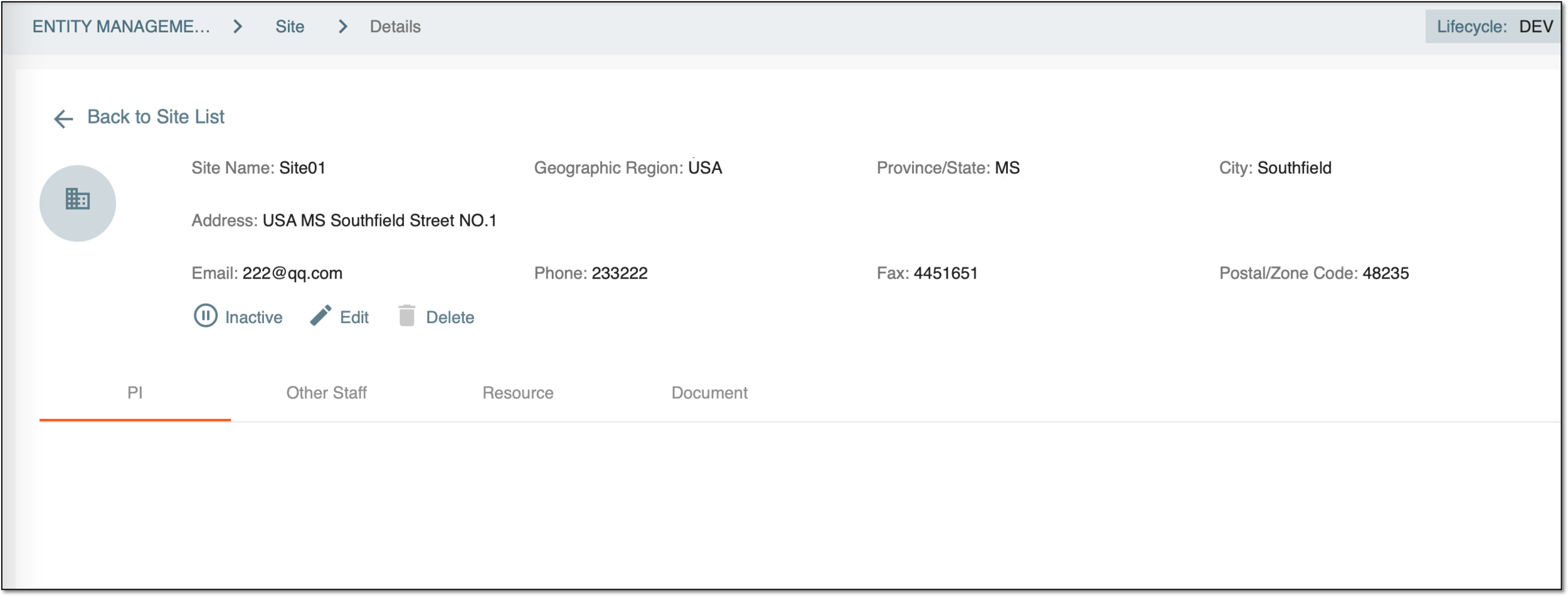 Figure 1. Checking site details
Element
Details
Site Name
Represents the name of the site where the clinical trial is conducted.
Geographic Region
Represents the geographic area where the site is located.
Province/State
Represents the name of the province or state in which the site is located.
City
Represents the city in which the site is located.
Address
Represents the address of the site.
Phone
Represents the phone number of the site.
Fax
Represents the fax number of the site.
Postal/Zone Code
Represents the postal code (zone) of the site.
Activate/Inactivate
-
Select
 to activate the site
to make it available for being added to a study.
to activate the site
to make it available for being added to a study. -
Select
 to inactivate the
site to make it temporarily unavailable for being added to studies.
to inactivate the
site to make it temporarily unavailable for being added to studies.The main difference between inactivating and deleting a site is that an inactivated site can be reactivated while deleting a site is permanent. Keep in mind that if a site is deleted from the system and then needs to be added back, it will be added as a brand new site.
Edit
Select
 to update the site information, such as the site
address or related document attachments (such as qualification certificates and other documents).
to update the site information, such as the site
address or related document attachments (such as qualification certificates and other documents).Delete
Select
 to delete the site if it is no longer
participating in trials and is no longer needed as part of the Clinical Trial Management System.
to delete the site if it is no longer
participating in trials and is no longer needed as part of the Clinical Trial Management System.PI
Select this tab to obtain information about who is the owner and lead researcher at this site (that is, who is the person responsible for preparing, conducting, and administering a clinical trial at this site.
Other Staff
Select this tab to view the other staff members at this site.
Resource
Select this tab to view the resources available at this site.
For example, examination rooms for conducting physicals and discussions with study subjects; office equipment, such as a computer with high-speed internet access, fax machine, and telephone for patient scheduling and study correspondence; a locked storage area for study materials and study medication; and so on.
Document
Select this tab to view the documents uploaded for this site that can help you conduct a clinical trial at this site.
-