View visit status details report
The Visit Status Details report displays all the visits configured for the study and all the pertinent details, such as name and status (happened or not), subject participating in the visit, data captured, reviewed, and signed throughout the visit, queries, if any, waiting for resolution, and so on.
-
In the EDC application header, select the REPORTS tab.
-
On the page that opens, in the left pane, select the CRF Status subtab to expand the list of available reports and select Visit Status Details.
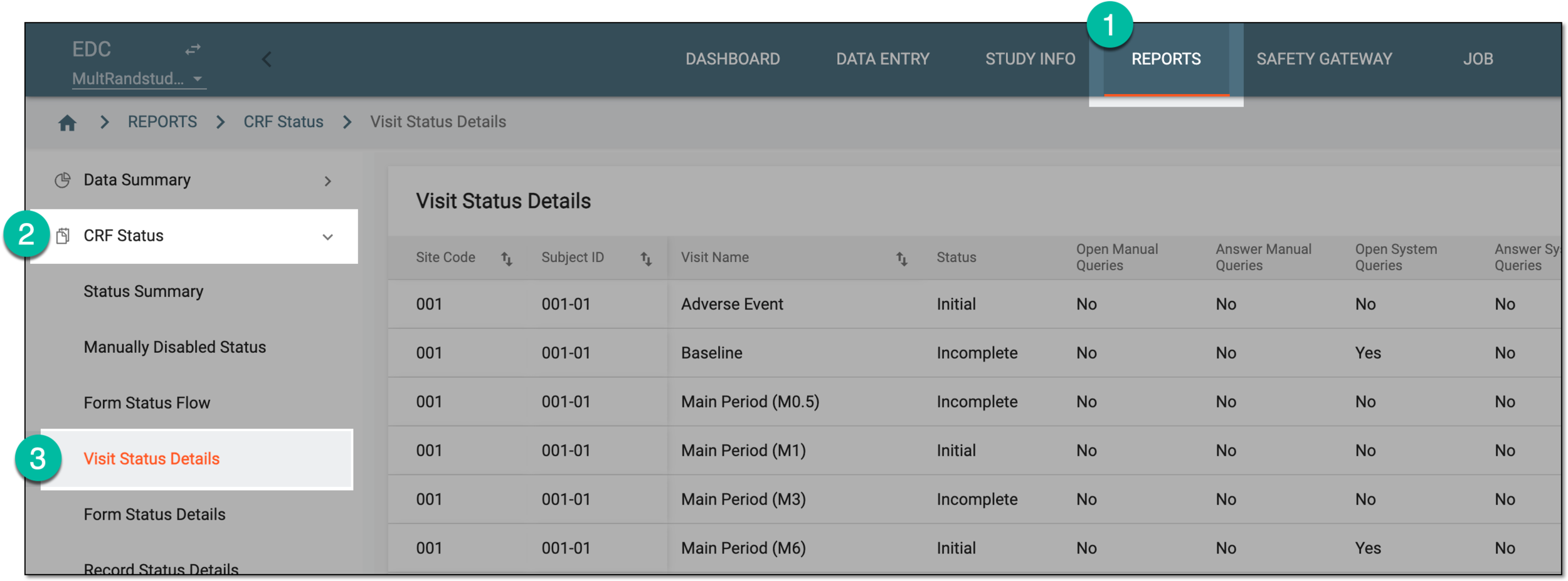 Figure 1. Accessing visit status details report
-
In the Visit Status Details table that opens, analyze the data as explained in the following table.
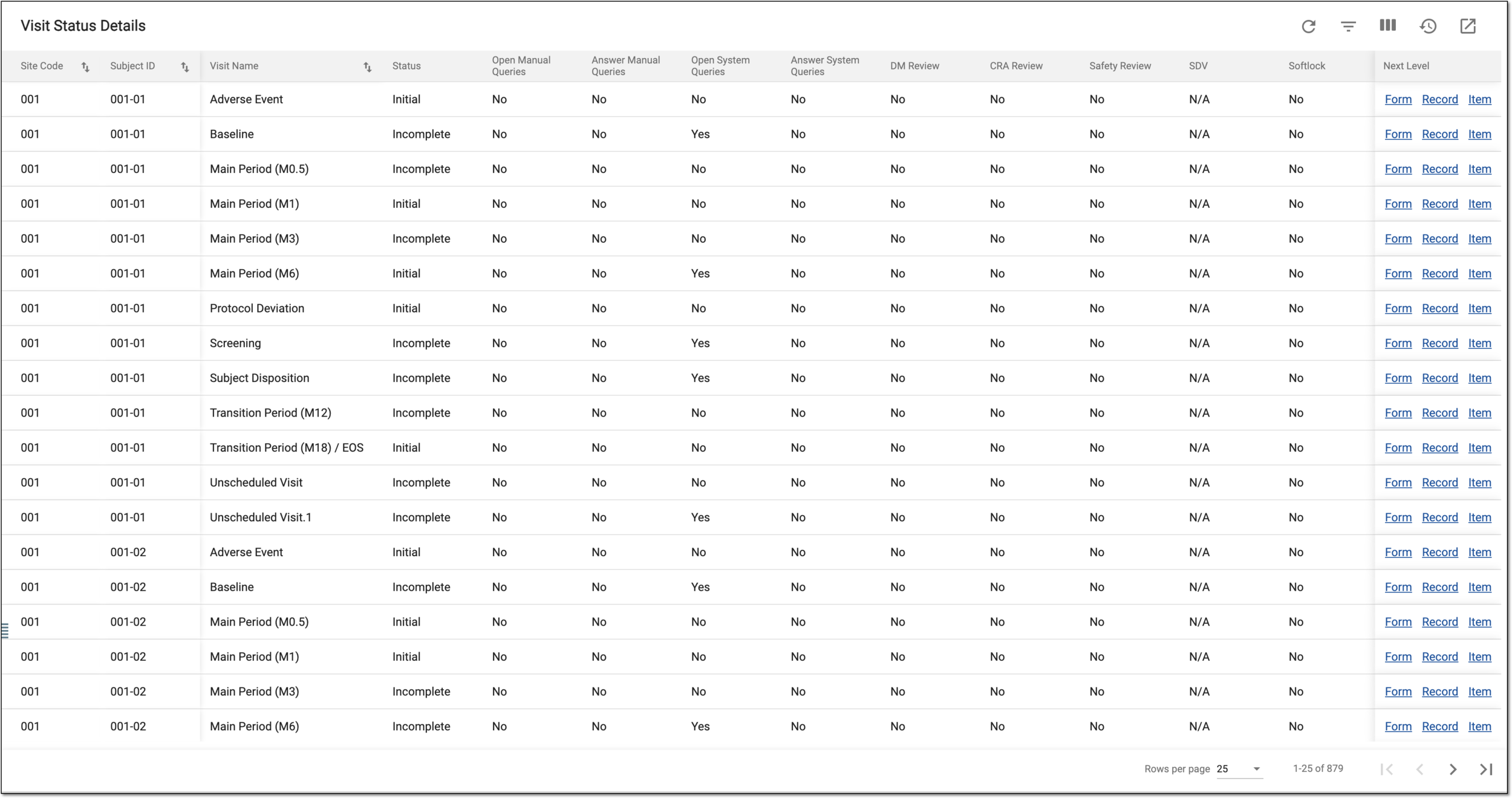 Figure 2. Analyzing visit status details report
Important
The available statuses depend on the review and approval stages configured for your study via EDC and SD.
Column
Details
Site Code
Represents the code of the site where the data collection occurs.
[Unique ID Label]
Represents the unique identifier of the subject for whom the data collection occurs.
The column name depends on the unique ID label configuration of your study in IWRS.Visit Name
Represents the name of the subject visit at which the data collection occurs.
Status
Represents the current state of the visit in terms of its occurrence and data collection:
-
Initial: the data collection is not initiated for CRFs associated with this visit.
-
Incomplete: the data collection is initiated for CRFs associated with this visit but has not been completed yet.
-
Complete: the data collection is completed for all CRFs associated with this visit.
Status Flow
Represents one of the following:
-
Yes: there are open manual queries awaiting resolution for the visit, its CRFs, records, or items.
-
No: there are no open manual queries awaiting resolution for the visit, its CRFs, records, or items.
Answer Manual Queries
Represents one of the following:
-
Yes: there are answered (resolved) manual queries for the visit, its CRFs, records, or items.
-
No: there are no answered (resolved) manual queries for the visit, its CRFs, records, or items.
Open System Queries
Represents one of the following:
-
Yes: there are open system queries awaiting resolution for the visit, its CRFs, records, or items.
-
No: there are no open system queries awaiting resolution for the visit, its CRFs, records, or items.
Answer System Queries
Represents one of the following:
-
Yes: there are answered (resolved) system queries for the visit, its CRFs, records, or items.
-
No: there are no answered (resolved) system queries for the visit, its CRFs, records, or items.
DM Review
Represents one of the following:
-
Yes: the data review for all CRFs associated with this visit is done by the data manager (DM), which gives the DM Review status for the visit as a whole.
-
No: the data review for the CRFs associated with this visit is not completed by the DM.
-
N/A: the DM review does not apply to this visit and its CRFs.
CRA Review
Represents one of the following:
-
Yes: the data review for all CRFs associated with this visit is done by the clinical research associate (CRA), which gives the CRA Review status for the visit as a whole.
-
No: the data review for the CRFs associated with this visit is not completed by the CRA.
-
N/A: the CRA review does not apply to this visit and its CRFs.
Safety Review
Represents one of the following:
-
Yes: the data review for all CRFs associated with this visit is done by the safety team, which gives the Safety Review status for the visit as a whole.
-
No: the data review for the CRFs associated with this visit is not completed by the safety team.
-
N/A: the safety review does not apply to this visit and its CRFs.
SDV
Represents one of the following:
-
Yes: the source data verification (SDV) is completed for all CRFs associated with this visit that are intended for such verification, which gives the SDV status for the visit as a whole.
-
No: the SDV is not completed for all the CRFs associated with this visit and intended for such verification.
-
N/A: the SDV does not apply to this visit and its CRFs.
Softlock
Represents one of the following:
-
Yes: all the CRFs and the visit itself are soft-locked after the needed review stages are completed.
-
No: the visit is not soft-locked.
-
N/A: the soft-lock functionality does not apply to this visit and its CRFs.
Sign
Represents one of the following:
-
Yes: all the CRFs and the visit itself are signed by the principal investigator (PI).
-
No: the visit is not signed by the PI.
-
N/A: the PI signature functionality does not apply to this visit and its CRFs.
Hardlock
Represents one of the following:
-
Yes: all the CRFs and the visit itself are hard-locked after the needed review stages and PI signature are completed.
-
No: the visit is not hard-locked.
-
N/A: the hard-lock functionality does not apply to this visit and its CRFs.
Next Level
Select the corresponding hyperlink to go to other reports as follows:
-
Form: go to the form status details report and view in-depts data on this visit's CRFs and their progress.
-
Record: go to the record status details report and view in-depts data on the CRF records completion pertinent to this visit.
-
Item: go to the item status details report and CRF items (fields) completion pertinent to this visit.
-
Once the report details are studied, you can leave the page or perform other suggested manipulations.