Study list
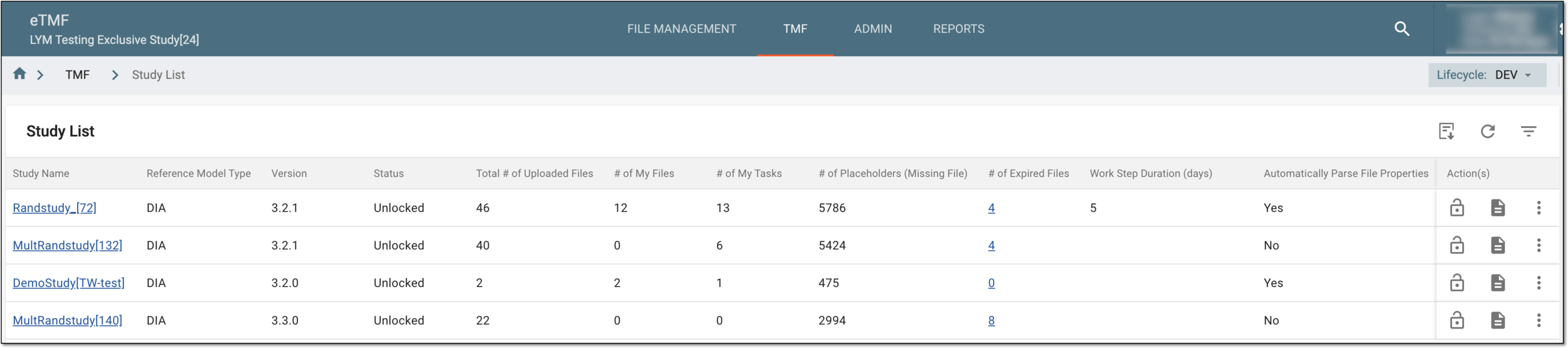
The Study List page displays a list of studies that are currently available to you in the eTMF system.
Important
The system automatically adds new studies to the Study List table after they are created in CTMS. You need to configure your study TMF base to complete the study initialization in the eTMF system.
The elements of Study List are explained in the following table.
|
Element |
Details |
|---|---|
|
Study Name |
Represents the name of a study. Also, the name is an active link to the study details. Select it to access the following pages: |
|
Reference Model Type |
Represents the reference model that has been used to create the study:
|
|
Version |
Represents the version number of the reference model. |
|
Status |
Represents whether the TMF base is locked or unlocked. |
|
Total # Uploaded Files |
Represents the number of master files that exist in the system. |
|
# of My Files |
Represents the number of master files that belong to you. |
|
# of My Tasks |
Represents the number of tasks you have in the scope of the current study, such as study query resolution. |
|
# of Placeholders (Missing Files) |
Represents the number of the placeholder documents for the study.
|
|
# of Expired Files |
Represents the number of obsolete files in the study. Select the linked number to be redirected to the Expired Files page, where you can analyze and manage the files. |
|
Work Step Duration (days) |
Represents the number of days required for completion of the study activity. |
|
Automatically Parse File Properties |
Defines whether the file properties must be populated in the system during file upload to eTMF with two values:
|
From this page, you can perform the following actions: