View unblinded randomization report
The Unblind Randomization report of the IWRS application helps you track the randomization numbers across all the cohorts and periods of the study. It also helps you verify whether or not a certain number has already been assigned to a certain subject at a site.
Important
To view this report, you must have the Unblind Randomization permission granted to your user role via the ADMIN application.
-
In the IWRS application header, select the REPORT tab.
-
On the page that opens, in the left pane, select Randomization Report > Unblind Randomization.
-
In the Unblind Randomization table that opens, view the randomization numbers for all the cohorts and periods in a study and check whether a certain number has already been assigned to a certain subject at a site.
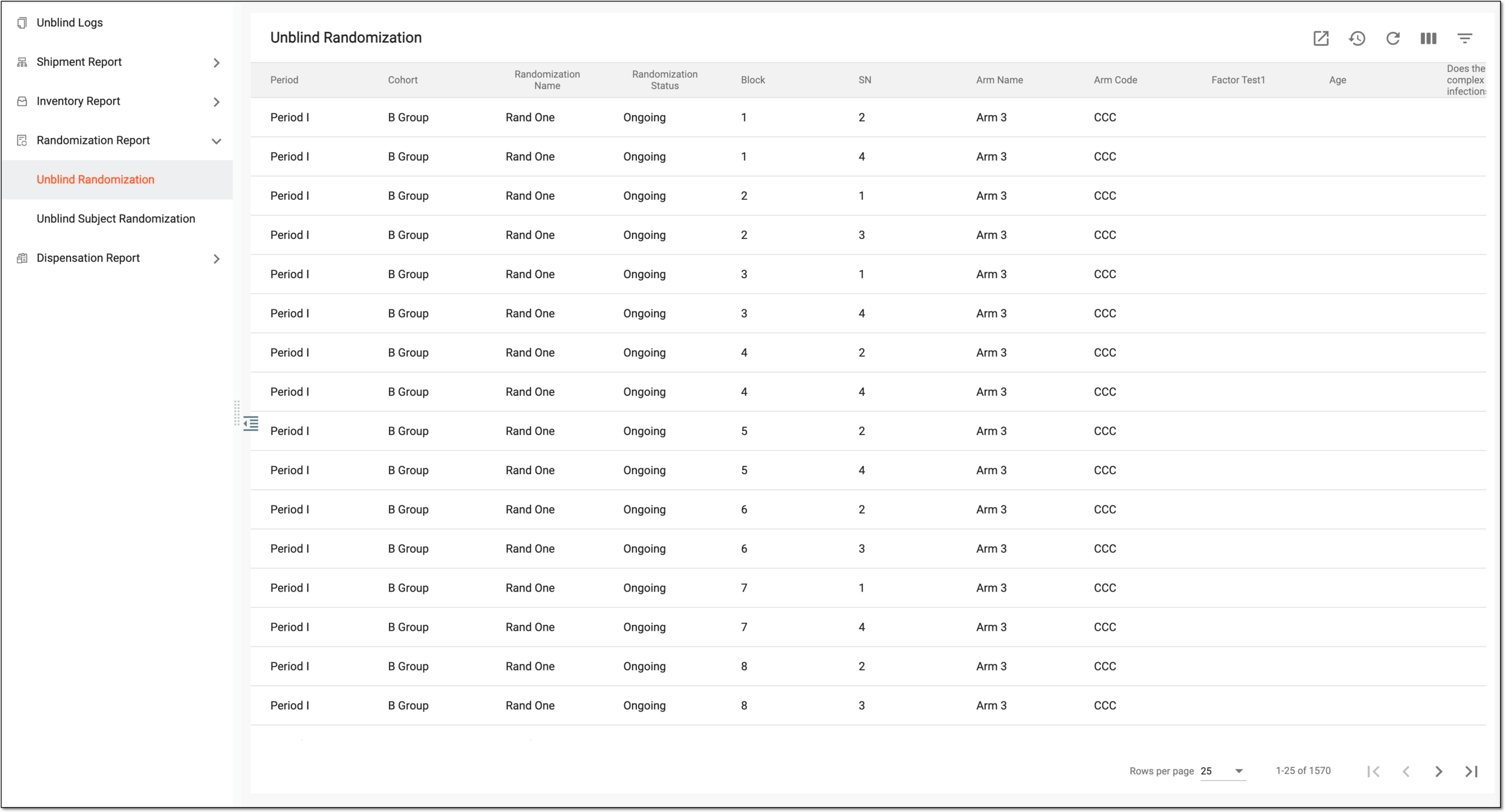 Figure 1. Viewing randomization numbers of study
Tip
From the workspace toolbar, select Visible Columns
 to choose the columns you want to show or hide
from the report before viewing it.
to choose the columns you want to show or hide
from the report before viewing it.Column
Details
Period
Represents the name of the period in which the randomization scheme is generated.
A period is a study phase in which subjects are allocated to different cohorts and randomized.
Cohort
Represents the name of the cohort in which the randomization scheme is generated.
A cohort is a group of subjects who receive the same treatment.
Randomization Name
Represents the name of the randomization scheme itself.
Randomization Status
Represents the status of the randomization scheme:
-
Draft: a default status of the scheme which is not yet used in a trial and is still being configured.
-
Ongoing: the scheme is used for the randomization of subjects in an ongoing trial.
-
Completed: the randomized trial is over.
-
Terminated: the randomization scheme has been terminated.
-
Suspended: the randomization scheme has been suspended.
-
Closed: the randomization scheme has been closed.
Block
Represents the number of subjects for randomization in a block (an element in a randomization method).
SN
Represents the subject's sequential number in a study.
Arm Name
Represents the name of the arm to which the subject is assigned as a result of randomization.
Arm Code
Represents the identification code of the arm to which the subject is assigned as a result of randomization.
[Subject-specific Factor]
Represent the columns named following the configured factors of the subject-specific treatment factor range, that are set to be displayed in reports. There can be as many such columns as configured factors.
The names of such factors can be customized upon configuration. However, if the same factor is used as a randomization factor for a subject (period factor), its original name is displayed in the table instead of a custom alias.
For instance, if the subject's age and sex are configured as subject-specific factors in IWRS, two columns named "Age" and "Sex" are available in the table.
Stratified
Represents the name of the stratified factor on the basis of which the subject is assigned to the specific arm as a result of randomization.
Assigned
Represents whether or not the subject has a randomization number assigned.
Randomization Number
Represents the randomization number itself.
Site Code
Represents the site code of the subject to whom the randomization number is assigned.
Forced Randomized
Represents whether the subject has received a randomization number as a result of forced randomization (Yes/No).
Forced randomization occurs when the site does not have enough drugs to dispense for subjects in a certain arm.
This column is only available if forced randomization is enabled for your study.Created By
Represents the name of the user who has generated the randomization scheme.
Created Date
Represents the date and time when the randomization scheme has been created.
-
You have viewed the unblinded randomization report. You can also export the report data to work with it offline.