Execute dispatch file extraction manually
The integration enables the automation of data transfers between IWRS and various vendor data providers. Currently, the shipment data exchange is supported via integration. To establish the shipment data providers for your study, you add the respective vendors to the list of integrations and configure their integration settings.
One such integration type is dispatch integration. Once configured, the system starts the daily file extraction from the vendor's server to update the shipment details in IWRS. However, there is an option to execute file extraction manually if you know that on the vendor's side, there is new information that you want to pull to IWRS immediately and not wait for the system-scheduled run.
-
In the IWRS application header, select the INTEGRATION tab.
-
From the left pane, select the Integration Setting subtab.
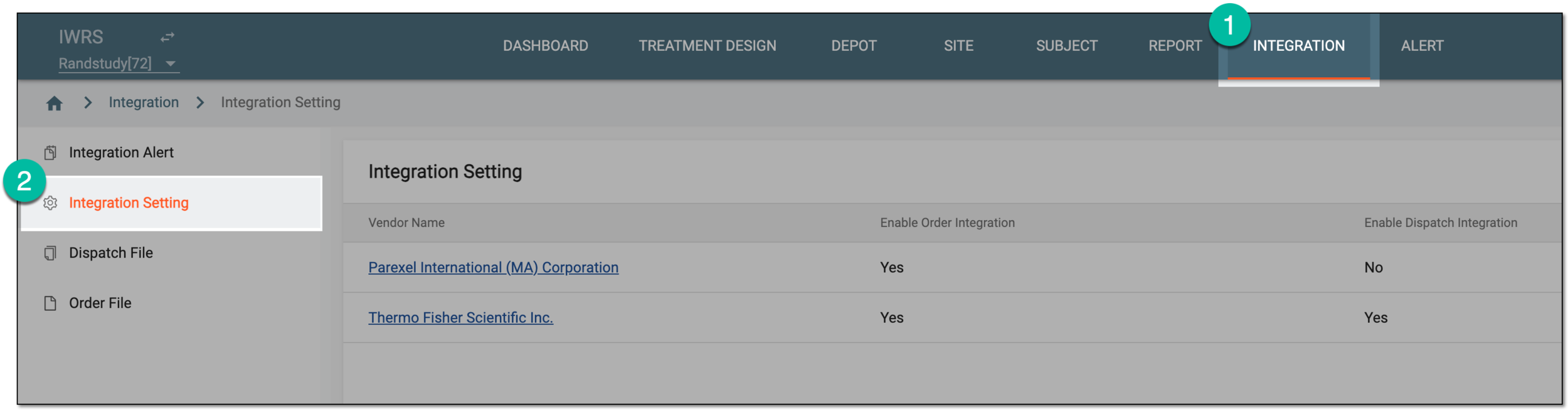 Figure 1. Accessing integration setting
-
In the Integration Setting table that appears, locate the vendor for whom you want to execute file extraction. Then from the Vendor Name column, select the hyperlink.
 Figure 2. Selecting vendor to access integration settings
-
On the page that opens, select the Dispatch Integration Setting tab.
-
In the Dispatch Integration Setting table that opens, locate the setting according to which you want to manually extract files. Then from the Actions column next to it, select More
 > Manually Execute
  .
. Figure 3. Executing dispatch file extraction
Once done, the dispatch file is extracted from the vendor's server and the shipment details are updated for the respective depots in IWRS. You can now proceed to manage your updated shipments.