Prepare documentation configuration for financial management module
When handling financial management in CTMS and site payments in EDC, you can initiate and complete payment requests to reflect money transactions between the sponsor and vendors. Each payment request can be supported with the respective file—invoice, voucher, and so on—to reflect the transaction details for further reporting, financial audit, and other regulatory and study tracking purposes. These files can be manually uploaded upon request creation, attached later on, or autogenerated by the system based on certain business and regulatory requirements.
In CTMS, you can prepare the documentation configuration to outline a unified structure, naming conventions, and compliance with requirements for all the files generated by the system to support financial management.
-
Access the study management page in one of the following ways:
-
In the CTMS application header, select the DASHBOARD tab and then select the study dashboard of your interest.
 Figure 1. Accessing study management from dashboard
-
In the CTMS application header, select the STUDY MANAGEMENT tab. Then from the Study Data List table, select the study name of your interest.
 Figure 2. Accessing study management from study data list
-
-
On the study page that opens, in the left pane, select Documentation Config.
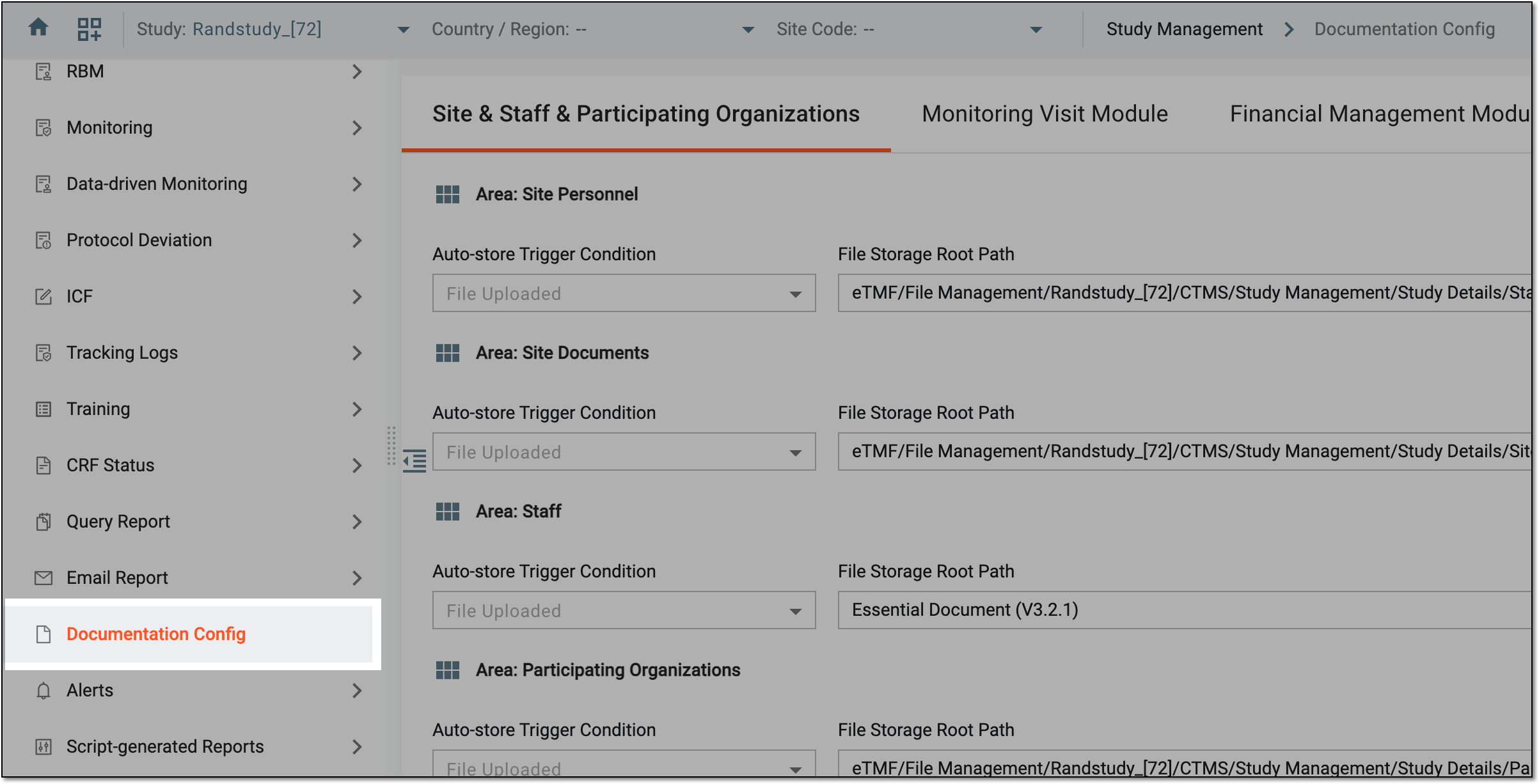 Figure 3. Accessing documentation configurations
-
On the page that opens, select the Financial Management Module tab and in the Area: Payment Request - Site Payment block, manage the autogeneration of the files for payment requests as follows.
-
Enable or disable the autogeneration of the invoice files as follows:
-
Select Auto-Generate Invoice PDF as Yes to enable the system to automatically create invoice files for payment requests as per custom configuration.
-
Select Auto-Generate Invoice PDF as No to disable the automatic creation of invoice files for payment requests.
 Figure 4. Enabling invoice PDF autogeneration for payment requests
-
-
Once Auto-Generate Invoice PDF is enabled, configure the file autogeneration details as explained in the following table.
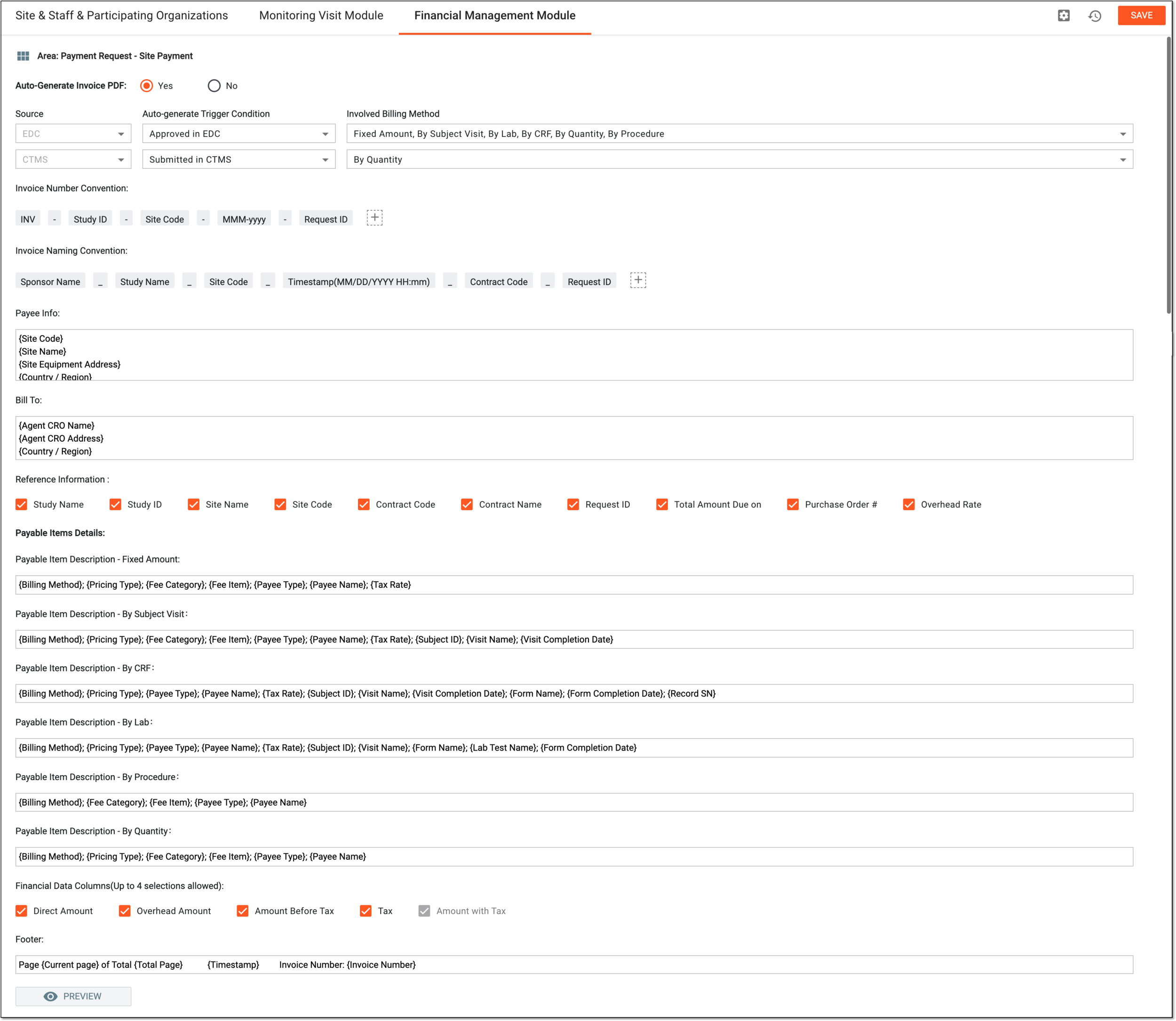 Figure 5. Configuring invoice file autogeneration details
Element
Details
Source
Represents the origin of the payment request as follows:
-
EDC: the payment request has been created in EDC.
-
CTMS: the payment request has been created in CTMS.
Auto-generate Trigger Condition
Select the payment request event that acts as a condition that, once completed, triggers the system to autogenerate the invoice file— Approved in EDC, Submitted in CTMS, Approved in CTMS, or Enter Pay Node.
For instance, if you select Approved in EDC, once the payment request is approved in EDC, the system automatically generates the invoice file, and it appears as an attachment in the respective request details page. However, if you select Enter Pay Node, then only once the payment request has reached the paying stage of its workflow in CTMS, the system autogenerates the invoice file.
In case the trigger condition is met in EDC and the invoice is generated, however, the payment request is then rejected in CTMS, and its audit is reinitiated in EDC, the system generates the new version of the invoice once the condition is met again in
                                              EDC. All the generated versions are kept attached to the payment request for traceability.
Involved Billing Method
Select which billing method used in the payment request should trigger the invoice file autogeneration when meeting the chosen condition—Fixed Amount, By Subject Visit, By Lab, By CRF, By Quantity, By Procedure, or By Invoice.
Invoice Number Convention
Define the default identification number convention for all the invoices as follows:
-
Add more elements or separators to your naming convention by selecting Add
 .
. -
Move any elements around by dragging them.
-
Remove the elements by hovering over them and selecting
 .
.
Invoice Naming Convention
Define the default naming convention for all the invoice files as follows:
-
Add more elements or separators to your naming convention by selecting Add
. -
Move any elements around by dragging them.
-
Remove the elements by hovering over them and selecting
.
Payee Info
Enter the details of the payment recipient (payee) to be included in the invoice file. These can be site identification details, such as code, name, address, and so on. Start typing { and from the menu that appears, select the available variables that will be populated with respective site details pulled from the respective contract when the file is generated.
Bill To
Enter the details of the clinical research organization to be included in the invoice file. These can be general details, such as name, address, and so on. Start typing { and from the menu that appears, select the available variables that will be populated with respective CRO details pulled from the respective contract when the file is generated.
Reference Information
Select the checkboxes next to the data items that you want to be included in the invoice PDF file. Those cleared will not be included in the resulting file.
Payable Items Details
Payable Item Description - Fixed Amount
Enter the description for the payable item of the Fixed Amount billing method that you want to be included in the generated invoice file. Start typing { and from the menu that appears, select the available variables that will be populated with respective payable item details present in the payment request.
Payable Item Description - By Subject Visit
Enter the description for the payable item of the By Subject Visit billing method that you want to be included in the generated invoice file. Start typing { and from the menu that appears, select the available variables that will be populated with respective payable item details present in the payment request.
Payable Item Description - By CRF
Enter the description for the payable item of the By CRF billing method that you want to be included in the generated invoice file. Start typing { and from the menu that appears, select the available variables that will be populated with respective payable item details present in the payment request.
Payable Item Description - By Lab
Enter the description for the payable item of the By Lab billing method that you want to be included in the generated invoice file. Start typing { and from the menu that appears, select the available variables that will be populated with respective payable item details present in the payment request.
Payable Item Description - By Procedure
Enter the description for the payable item of the By Procedure billing method that you want to be included in the generated invoice file. Start typing { and from the menu that appears, select the available variables that will be populated with respective payable item details present in the payment request.
Payable Item Description - By Quantity
Enter the description for the payable item of the By Quantity billing method that you want to be included in the generated invoice file. Start typing { and from the menu that appears, select the available variables that will be populated with respective payable item details present in the payment request.
Financial Data Columns(Up to 4 selections allowed)
Select the checkboxes next to the amounts that you want to be included in the resulting invoice file in the format of the table.
Due to the PDF file format limitations, you can only select four values. The Amount with Tax value is preselected and cannot be cleared, thus, you can select only three out of the following Direct Amount, Overhead Amount, Amount Before Tax, and Tax.Footer
Enter the details that have to be displayed in the footer of the resulting PDF invoice file, such as page number, invoice number, and so on. Start typing { and from the menu that appears, select the available variables that will be populated with respective predefined data.
PREVIEW
Select
 to open the PDF invoice file template in the new browser page and preview the configurations to check if they are satisfactory.
 -
-
Enable or disable the autostoring of all files—autogenerated or manually uploaded to payment requests—as follows:
-
Select Auto-store in eTMF as Yes to enable the system to automatically store the payment request files in the designated eTMF directory as per custom configuration.
-
Select Auto-store in eTMF as No to disable the automatic storing of payment request files in eTMF.
-
-
Once Auto-store in eTMF is enabled, configure the file autostoring details as explained in the following table.
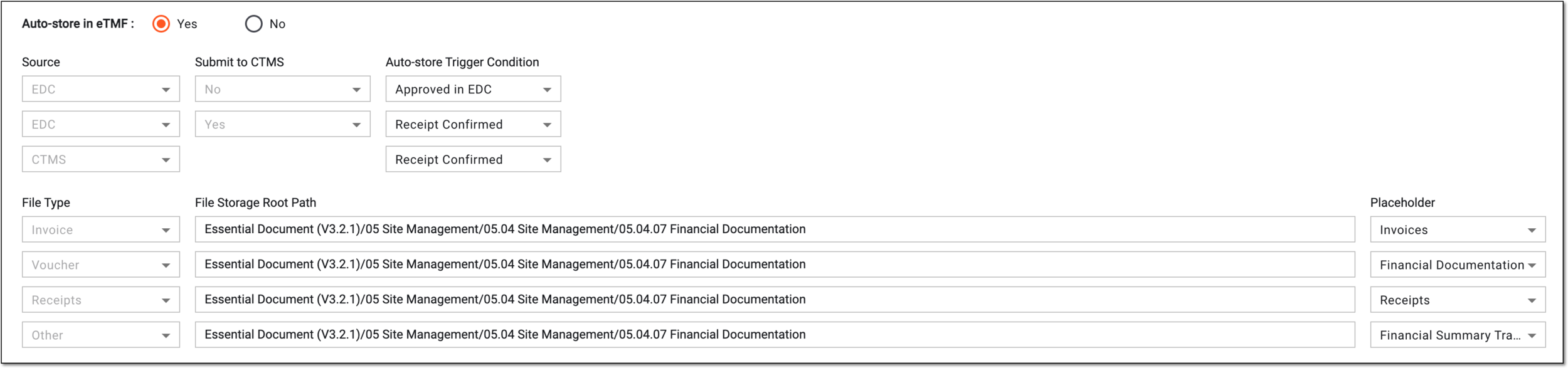 Figure 6. Enabling and configuring autostoring of payment request files
Element
Details
Source
Represents the origin of the payment request creation—EDC or CTMS.
Submit to CTMS
Indicates whether the payment request is submitted to CTMS for further approval after being audited in EDC (Yes) or the review and approval process is completed in EDC only (No).
This indicator is only available for the EDC source of payment requests.Auto-store Trigger Condition
Select the payment request event that acts as a condition that, once completed, triggers the system to autostore the generated file to eTMF.
File Type
Represents the category of the payment request file—Invoice, Voucher, Receipts, and Other. The file type is selected when manually uploading files to the payment request.
File Storage Root Path
Select the field and in the tree that appears, drill down to the intended essential document directory in eTMF to autostore files of a certain type.
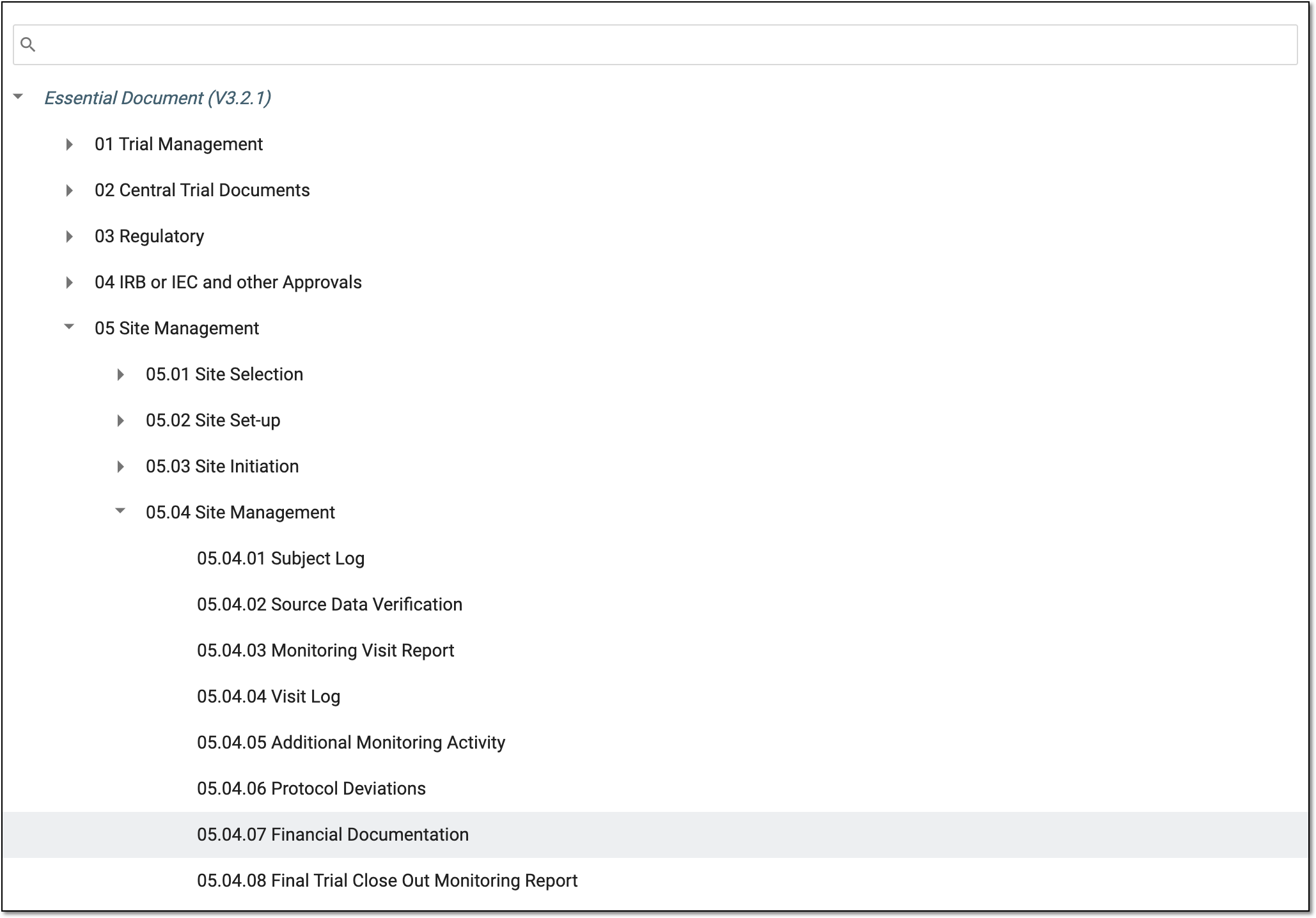 Figure 7. Selecting financial file storage directory
Placeholder
Select the placeholder that is to be associated with your file once it is autostorred to eTMF.
-
Once enabled and the set conditions are met, the system starts generating the files for payment requests in EDC and CTMS and autostore them in eTMF according to the configured settings.